Twitter age verification: How to bypass X’s age restriction in 2026


![Proton VPN logo for comparison table [IN USE]](https://media.vpnpro.com/Proton-VPN.svg)
X (formerly Twitter) requires age verification in line with regional safety laws. Affected countries include the UK, some parts of the EU, and Australia. These regulations exist to prevent minors from accessing sensitive content. This includes content marked as NSFW, posts related to graphic violence, self-harm, and other topics. If you try to access such topics without verifying your age, you’ll be prompted with a “due to local laws, we are temporarily restricting access to this content until X estimates your age” error message.
The minimum age to create and use an X account is 13, but you need to be at least 18 to access sensitive media. If you created an account before you were 13, you can regain access by removing some data. Adults who want to see such content must verify their age and prove that they are not minors. To do so, you will need to provide a selfie, which Twitter’s AI tool will use to estimate your age based on facial analysis. The other method to get access to all of Twitter’s content is by providing a government-issued ID (such as a passport or driver’s license).
If you are uncomfortable uploading personal information like a government ID or a selfie, using a VPN is currently the most effective way to bypass age verification on X (Twitter). It routes your internet traffic through servers in other countries where age verification to access X’s sensitive content is not required, so that you can use the app without any restrictions. Continue reading and learn how to access restricted content on X as an adult without age verification.
🏷️ LIMITED OFFER: Proton VPN deal! Get up to 70% OFF Proton VPN 🏷️
How to bypass Twitter (X) age verification with a VPN
Yes, you can bypass Twitter’s age verification by using a VPN. It allows you to connect to a server in another country and change your virtual location. When you open X, it won’t prompt you to verify your age because you will appear as if you are in a country where it is not required. Here’s how to do that.
- Get a reliable VPN with servers outside the UK, Australia, and the EU. I recommend Proton VPN, as it successfully bypasses Twitter's ID checks by providing fast and secure servers worldwide.
- Download the VPN app on your device.
- Connect to a server in a country where Twitter’s age verification is not required, such as Switzerland or the US.
- Go to Settings & Privacy > Your account > Account information and set your country to match your VPN (e.g., Norway, United States).
- Go to “Content you see” and enable “Display media that may contain sensitive content”.
- Reload Twitter and use the app fully without verifying your age.
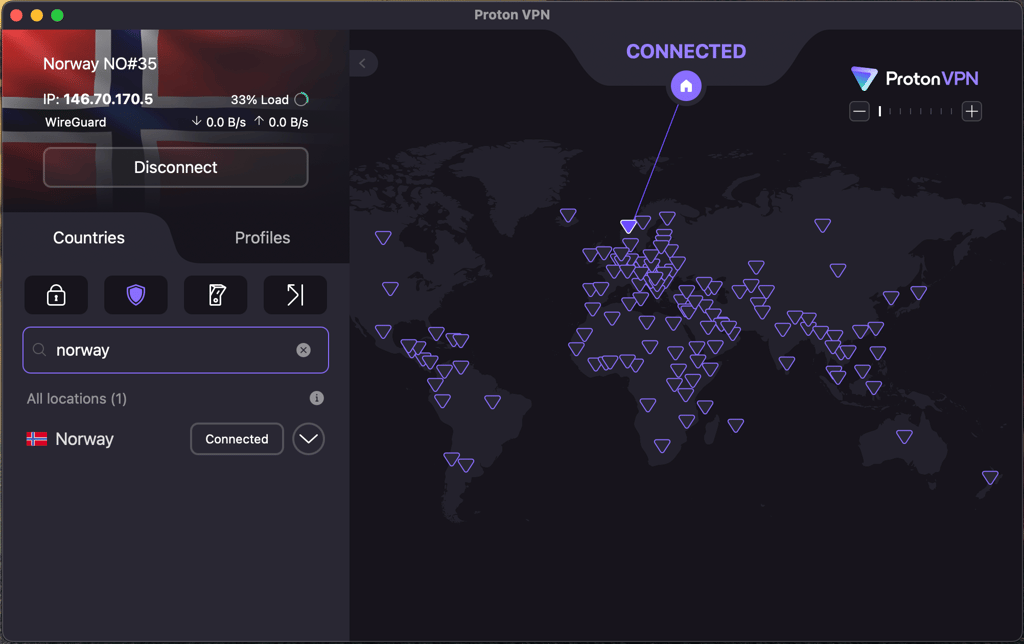
Which countries do not require age verification on Twitter? If you live in the UK, Australia, the EU, or Ireland, you can use servers in the US, Canada, Switzerland, or Norway to bypass X mandatory age checks. For the best experience, I recommend using Norway, as during my tests, it provided the fastest and most stable speeds, which allows using X without any issues.
Why is my Twitter age restricted?
Since mid-2025, Twitter is required to verify its users’ ages to access certain types of content in compliance with the UK’s Online Safety Act, the Irish Online Safety Code, Australia’s Online Safety Amendment, and the European Union Digital Service Act. These laws are protecting children from seeing harmful and adult-oriented content. X, like many social media and other platforms, hosts content that includes adult themes, violence, or sensitive and distressing material, triggering the need for age gating.

In response to the legal requirements, X had to adjust their policy on age verification to ensure that minors cannot access harmful content. To do so, the new Twitter policy checks for the following details:
- Your account’s birthdate. Twitter checks users’ birthdates as the first step in distinguishing users who are of legal age. However, since minors can fake their birthdate, it is usually not enough to verify users’ age without further checks.
- Account creation date. Since you can only create an account while being at least 13 years old, Twitter might identify you as an adult if your account was created a long time ago. For example, if you created an account at least 10 years ago, you should now be at least 23 years old.
- Verified X accounts. You can verify your account with a grey checkmark if you’re an official or a part of a government body, or a gold checkmark if you’re a business. Having a verified account indicates that you’re at least 18 years old.
- X Premium accounts. Since X Premium accounts require ID verification, Twitter might have already verified your age by checking this information. Due to this, you might not be asked for any further age verification.
How to verify age on X (Twitter)?
To verify your age on X, you’ll need to provide a government-issued ID, such as a driver’s license or passport, or submit a selfie, which will be forwarded to X’s partners for facial analysis. Below, you can find the steps on how to complete X’s age verification:
- Open X on your phone or website and log in to your account.
- Click on your profile and select Settings and privacy > Your account > Account information.
- Check and update your birth date if your birth date is missing or incorrect.
- If you are still restricted, follow the age verification prompt. It can pop up if you try to search for age-sensitive content, such as OnlyFans.
- Upload a government-issued ID and take a selfie if required.
- Wait for a review. It can take from several hours to a couple of days. You will be notified when it is completed.
- Use X without age restrictions!
How to verify age on X without Premium
Currently, there are no widely available methods to verify your age on X (formerly Twitter) without subscribing to X Premium. X estimates users’ age based on various data and previous user input. X Premium users can manually verify their age using ID verification, but this feature is not yet available for free users.
To estimate your age, X uses various data points, including your account’s creation date and any previous information about your age. To access all content without restrictions, you must be at least 18 years old. If X identifies you as being younger, you might encounter age restrictions on specific content. X Premium users can verify their age manually by providing a government-issued ID. While X previously stated that free users will also be able to verify their age manually, the feature is not yet available, according to the information on X’s Help Center.
X indicated that they are working on implementing free age-estimation tools, including the possibility of uploading a government-issued ID or a selfie for AI face analysis. However, as of August 1, 2025, such features have not yet been released. If you’re an adult using free X, I would recommend using a VPN to bypass Twitter’s age restrictions until the age verification tools are available.
Bypass X age verification with Proton VPN
How to bypass X age restriction: detailed steps
Due to privacy concerns, many adults on Twitter seek alternative ways to use Twitter without verifying their age and providing personal information. Currently, changing your virtual location with a VPN is the best way to get around X age restrictions for adults. Here’s how to do that.
Step 1. Get a reliable VPN with servers outside the UK, the EU, and Australia
Choosing a trustworthy Twitter VPN is important to safely bypass age restrictions. After testing many VPNs, I can ensure that Proton VPN, TotalVPN, and IPVanish effectively bypass X's age restrictions without requiring online verification. They all have plenty of highly secure servers worldwide, fast speeds, and easily bypass VPN detection systems.
| VPN provider | Rating | Works with X (Twitter) age bypassing? | Recommended servers | Price | Free trial |
| 1. Proton VPN | 8.6 ⭐️⭐️⭐️⭐️⭐️ | ✅ Yes | The US, Canada, Norway, and Switzerland | $2.99/month | ✅ Yes, free version |
| 2. TotalVPN | 8.2 ⭐️⭐️⭐️⭐️⭐️ | ✅ Yes | The US, Canada, Norway, and Switzerland | $1.59/month | ✅ Yes, 7-day free trial |
| 3. IPVanish | 8.4 ⭐️⭐️⭐️⭐️ | ✅ Yes | The US, Canada, Norway, and Switzerland | $2.19/month | ✅ Yes, 7-day free trial |
Overall, I found Proton VPN to be the best option to change X’s location. Thanks to its global server network, I easily connected to the countries where Twitter’s age verification is not required, such as Canada and Norway. Plus, the VPN maintained fast speeds and exceptional security.
Step 2. Download the VPN on your device
Most VPNs are compatible with various devices. After purchasing the VPN, download it on the device of your choice and follow the on-screen instructions to install it (if needed).
If you’re unsure about committing right away, I recommend trying Proton VPN's free trial, which you can use on one device. This lets you test the speed and ability to bypass Twitter’s age restrictions before subscribing.
Step 3. Connect to a server in a country where Twitter age verification is not required
To bypass X age verification, connect to a server in the US, Canada, New Zealand, Switzerland, or Norway, as these countries have not yet implemented age verification laws. For the best experience, select a server that is closer to your real location, as this can enhance your speeds. For me, Switzerland and Norway worked best, as I did not notice any slowdowns.
Step 4. Change your country in X’s account settings
While keeping the VPN active, open your X account, go to Settings & Privacy > Your account > Account information. Select a country to match your VPN location.
Step 5. Change settings for sensitive information
To be able to see full Twitter content, you will also need to adjust sensitive information settings. To do that, go to Settings > Privacy and safety > Content you see. Then enable “Display media that may contain sensitive information”.
Step 6. Reload Twitter
Reload the app to apply the settings. Open content that may be age-restricted. If everything was done correctly, you should not see the age verification prompt.
Avoid verifying your age with Proton VPN
Is it legal to bypass Twitter's age verification using a VPN?
VPNs are legal in most countries, and using one of them to access content isn’t automatically a violation of the law. The UK’s Online Safety Act, Ireland’s Online Safety Code, Australia’s Online Safety Amendment, and the EU’s Digital Services Act do not prohibit the use of VPNs. While the Online Safety Act forbids platforms from promoting the use of VPNs to bypass age verification, using one does not make it illegal. However, bypassing age checks can violate X’s Terms of Service and may result in an account warning or suspension. In addition, similar laws like the UK’s Online Safety Act target platforms’ compliance, not end users, but it also promotes ethical internet use. So you won’t face prosecution for VPN use, but repeatedly dodging age restrictions could flag your account internally.
At VPNpro, we recommend using VPNs only for safety and privacy reasons. Privacy concerns are a valid reason for avoiding age verification prompts, but use VPNs wisely.
Other methods to get around age verification on X
Using the VPN is the most effective way to get around age verification on X for adults. However, I also gathered more methods that may work as well. Just keep in mind that the success of them may vary depending on the device and account history.
- Manually change your account region to one outside the age verification laws. By doing that, you may temporarily re-enable sensitive content without a VPN. However, I also found information on Reddit that this method is not so successful anymore, as X has your IP address. So, for the best result, you should also use a VPN.
- Use a previously created account that originated outside the UK, Ireland, or the EU countries. If you have a similar account, X may use its metadata to determine which regional policies to enforce.
- Use incognito mode and clear cookies before logging in from a new region. Reduce your digital footprint that may lead you to your true location before using X and changing its region.
- Use a proxy server to change your IP address and appear outside countries with age verification laws. However, proxies are less secure than VPNs and often fail to bypass X’s detection systems.
- Access X through the Tor browser to hide your identity and location. However, Tor is slow, unreliable for media-heavy sites, and doesn’t let you choose a specific country.
Other sites restricted by age verification laws
The UK Online Safety Act and other age verification laws restrict access to apps and websites that host adult or potentially harmful content for children, such as bullying, self-harm, and other harmful content. Enforcement began in mid-2025 and affects many popular social media sites, texting platforms, and other websites.
Therefore, the affected sites are Pornhub, Grindr, OnlyFans, and other adult-content sites. Also, X (Twitter), Reddit, and other social media platforms, due to potentially harmful content for children. Dating apps like Tinder also fall into this category.
To use these sites freely, users in the UK, Ireland, Australia, and some European countries must verify their age using official documents. These checks are now a legal requirement for platforms hosting adult content or material unsafe for minors.
If you don’t comply, you will have restricted access to these platforms. For privacy reasons, some adults opt for VPN services to bypass these restrictions.
Closing tips for bypassing X age restrictions in 2026
To use X without restrictions, you’ll need to verify your age on X by providing a government-issued ID (driver’s license or passport) or a selfie for a facial analysis. However, to analyze this information, Twitter shares it with its partners, which puts your privacy at risk. The only way to avoid X’s age verification for adults is by using a robust VPN provider. Since Twitter uses regional signals to determine if age verification is legally required, you can use a VPN to appear as if you are in a country without age verification laws, which will help you access restricted content.
To bypass X (Twitter) age verification, follow these steps:
- Choose and subscribe to a reliable VPN, such as Proton VPN.
- Download and install the VPN app on your device.
- Connect to a server in the US, Canada, Switzerland, or Norway to bypass age verification laws.
- Reload your X app or website and avoid age restrictions!
If you are still unable to access restricted content, be sure to enable the Display media that may contain sensitive content option. You can find it by going to your account’s settings and choosing Privacy and Safety.

![Surfshark weekly deals logo [IN USE]](https://media.vpnpro.com/surfshark-weekly-deals.svg)
![Proton VPN winner logo [IN USE]](https://media.vpnpro.com/2025/05/protonvpn-winner.png)
You may also like to read:
How to use a VPN to bypass Facebook age verification in AU
FAQ
Can minors use a VPN to bypass age verification?
No, minors should not use a VPN or any other method to bypass age verification systems. These laws are specifically designed to protect young people from accessing content that could be harmful or inappropriate for their age. By bypassing these checks, minors would not only be violating the rules but also putting themselves at risk of exposure to explicit material that can have negative effects. Age verification exists to create a safer online environment, and it’s important for minors to respect these boundaries and avoid tools like VPNs to get around them.
What countries require Twitter age verification in 2025?
The UK, Ireland, Australia, and EU countries such as Germany, the Netherlands, Spain, Italy, Poland, Sweden, Romania, Portugal, and France require age verification in 2025. Due to the UK’s Online Safety Act, Australia’s Online Safety Amendment, and the EU’s Digital Service Act, online services must verify users’ age to allow them access to all content without restrictions. These regulations were introduced to protect minors online.
Why is Twitter asking for my age?
Twitter is asking for your age due to legal requirements concerning the display of sensitive content in various regions. Laws like the UK’s Online Safety Act, Australia’s Online Safety Amendment, and the EU’s Digital Service Act require platforms to implement age verification procedures to protect minors from accessing harmful content online. To ensure that children are not exposed to explicit, illegal, or in other ways harmful content, various platforms will need to verify that users are over 18 to grant them full access to the services.
What happens if your Twitter account is under 18?
If your Twitter account is under 18, you can continue using the platform, but you will not be able to see sensitive content. To be able to use X without limitation, you either have to confirm with a valid ID that you are an adult or use a trustworthy VPN to access X from countries without such restrictions.
How do I turn off age restrictions on Twitter?
To turn off age restrictions on Twitter (now known as X), you need to change the Sensitive Content settings via your account’s Privacy and Safety settings. You can do that by going to Settings and Privacy, navigating to Privacy and Safety, choosing Content You See, and enabling the Display media that may contain sensitive content. If that doesn’t work, you can also bypass age verification by using a reliable VPN provider, like Proton VPN.


- How to bypass Twitter (X) age verification
- Twitter age restriction explained
- How to verify age on X?
- Verifying age without Premium
- How to bypass X age restriction: detailed steps
- VPN legality for age verification bypass
- Other methods to get around age verification on X
- Other sites restricted by age verification laws
- Final tips
- FAQ