
Proton Pass review 2026

Since Proton Pass doesn’t get as much attention as the bigger password managers, I decided to take matters into my own hands. After using it daily for several weeks, I’m ready to share my hands-on experience in this detailed Proton Pass review.


In the sections below, I’ll walk you through my real-world experience with the app, how it’s performed throughout October 2026, and how it stacks up against top competitors so you can decide if it’s the right choice for you.
📢 LIMITED OFFER: Get ProtonPass, now up to 60% OFF!
Proton Pass overview
| ⭐ Rating | 9.1/10 ⭐⭐⭐⭐⭐ |
| 💵 Price | From $1.99/month |
| 🆓 Free version | ✅ Yes, plus a 30-day money-back guarantee on paid plans |
| 🌐 Browser extensions | Chrome, Firefox, Brave, Edge, Safari, Web App |
| 🖥️ Platforms | Windows, macOS, Android, iOS, Linux |
| 🏷️ Best deal | Get ProtonPass, now up to 60% OFF! |
Is Proton Pass safe?
From user reviews and my own testing experience, Proton Pass earns its reputation as a highly secure password manager. It relies on AES-256 encryption, a strict zero-knowledge framework, and full end-to-end encryption to make sure only I can access what’s inside my vault. The platform has also gone through a thorough external audit by Cure53, which verified that its security architecture holds up to industry-leading standards.
Beyond encryption, Proton Pass adds extra layers of protection through tools like Proton Sentinel, Pass Monitor, Secure Sharing, and support for passkeys, each designed to defend against modern cyber threats. In this part of my review, I’ll dive into how these features work together and why I’ve come to trust Proton Pass with protecting my sensitive data.
Test Proton Pass yourself with a 30-day money-back guarantee
Encryption
Proton Pass relies on AES-256 encryption – the same gold-standard protocol trusted by banks and security experts worldwide. This means every password I save is locked behind a cryptographic wall that only I can unlock.
What I appreciate most is that Proton Pass goes beyond simple storage protection. It’s built around end-to-end encryption, so all my information is encrypted directly on my device before it ever touches the internet. Only my master password can decrypt it, keeping even Proton itself locked out of my vault.
These encryption methods are consistent with the high security benchmarks used across Proton’s ecosystem, from Proton Mail to Proton VPN, ensuring that my personal details stay completely private and shielded from any third-party access.
2FA and biometric authentication
Proton Pass takes password security seriously, and two-factor authentication (2FA) is a big part of that. When I enable 2FA, logging in requires not just my master password but also a verification code from an authenticator app like Proton Pass itself, ensuring that even if someone got hold of my password, they couldn’t access my vault without my device. This built-in tool generates TOTP (time-based one-time passwords) codes within Proton Pass itself, so I don’t have to rely on external authenticator apps for secure logins.
On top of that, Proton Pass supports biometric authentication on both Android and iOS, letting me unlock my vault quickly with a fingerprint or Face ID instead of typing my password every time. It’s a convenient feature that doesn’t compromise on safety since the biometric data stays encrypted locally on my device – it’s never sent to Proton’s servers.
Together, 2FA and biometric login give Proton Pass a strong balance between top-grade security and everyday usability, which makes a noticeable difference when using it across different devices.
Privacy-friendly jurisdiction
One thing I really value about Proton Pass is that it’s based in Switzerland – one of the most privacy-focused countries in the world. Switzerland isn’t part of the EU or any intelligence-sharing alliances like the Five, Nine, or Fourteen Eyes, which means complete data protection and independence from foreign surveillance requests.
Proton follows the same privacy principles across all its services, including Proton Mail and Proton VPN, with a strong commitment to transparency and user rights. The company is legally bound by Swiss privacy laws, which require user data to stay private unless ordered by a Swiss court.
Knowing that Proton Pass operates under such strong privacy protections gives me extra peace of mind, especially compared to providers based in jurisdictions with weaker digital rights protections.
Independent security audits
I always take extra comfort in knowing a password manager has been independently audited, and Proton Pass didn’t disappoint. When the service went open source in 2023, it underwent a thorough third-party audit by the well-known German cybersecurity firm Cure53. The review, conducted in May and June of that year, carefully examined Proton Pass’s code and encryption design.
The final Cure53 report found only a few minor issues, all of which Proton promptly addressed, ultimately confirming that the app’s overall security posture was excellent. For me, the transparency of publishing the audit results openly shows that Proton takes user trust seriously and stands behind its privacy claims.
Zero-knowledge architecture
One of the biggest reasons I trust Proton Pass is its strict zero-knowledge architecture. In simple terms, everything I store in my vault is encrypted and decrypted only on my own device, so Proton never sees or has access to my passwords, notes, or encryption keys. This design means that even Proton’s employees couldn’t read my data, even if they wanted to.
Because all encryption happens locally, my information stays completely protected, even if Proton’s servers were ever compromised. Without my master password, the encrypted data is useless to anyone else. It’s a level of privacy that truly puts control in my hands and makes me feel confident about the safety of my most sensitive information.
Proton Pass features
During my time testing Proton Pass, I found that its security and convenience features go far beyond simple password storage. The app is packed with tools designed to strengthen account protection, detect potential threats, and make everyday login and password management much easier. Each feature plays a role in keeping my personal data, credentials, and browsing activity completely safe across all my devices.
Here’s a quick rundown of the core Proton Pass features that stood out to me, along with what each one does:
| Proton Pass feature | What it does |
| Password generator | Creates strong, unique passwords (customizable from 1-10 words or 4-64 random characters) to enhance account security. |
| Autofill | Automatically and securely fills in my saved credentials, payment info, and personal details while browsing. |
| Passkeys | Enables passwordless logins on supported websites, automatically using stored passkeys for future visits. |
| Secure password sharing | Allows safe sharing of passwords or full vaults with family or teammates, complete with custom access settings. |
| Pass Monitor | Keeps track of weak or reused passwords, inactive 2FA options, and alerts if any credentials show up in data breaches. |
| Proton Sentinel | Uses AI and human review to spot unusual login attempts and protect accounts with continuous 24/7 monitoring. |
| Dark Web Monitoring | Scans the dark web for leaked personal information, like emails or passwords, notifying of any potential breaches. |
| Hide-my-email aliases | Creates disposable email addresses that forward messages to my real inbox, helping keep spam and leaks at bay. |
Create a free account with Proton VPN
Password generator, autofill, passkeys, and password sharing
What really stood out to me while testing Proton Pass was how smoothly its main tools work together. They make managing accounts not just safer, but genuinely easier in everyday use.
The password generator quickly became one of my go-to features. It can create either memorable, phrase-style passwords or strong, fully random combinations of up to 64 characters. I liked how customizable it was, as I could decide exactly how complex I wanted my passwords to be depending on the account type. It really feels like a perfect balance between security and convenience.
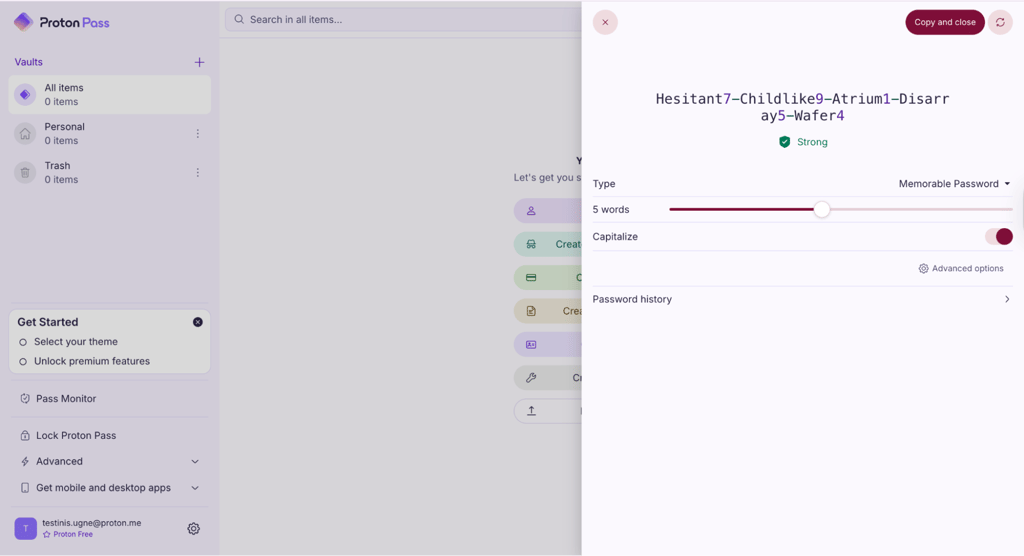
The autofill function also saved me plenty of time. Once enabled, Proton Pass suggested my saved credentials as soon as I landed on a login page or opened an app. It filled in details almost instantly, though I did notice it occasionally skipped offering to save new logins. Still, the overall experience was smooth, making signing in much quicker across devices.
Passkeys were another highlight. I tested them on both desktop and mobile through Proton Pass’s extension and apps, and they worked flawlessly. On supported websites, passkeys automatically appeared for future logins, making logging in feel effortless – all while staying completely secure and password-free.
Finally, password sharing is one of the most practical tools Proton Pass includes. It lets me share individual credentials or even entire vaults using encrypted links. I can set expiration dates, control how many times a link can be viewed, or revoke access anytime. I found it particularly handy for sharing streaming or joint accounts safely with family or teammates, without exposing my master credentials.
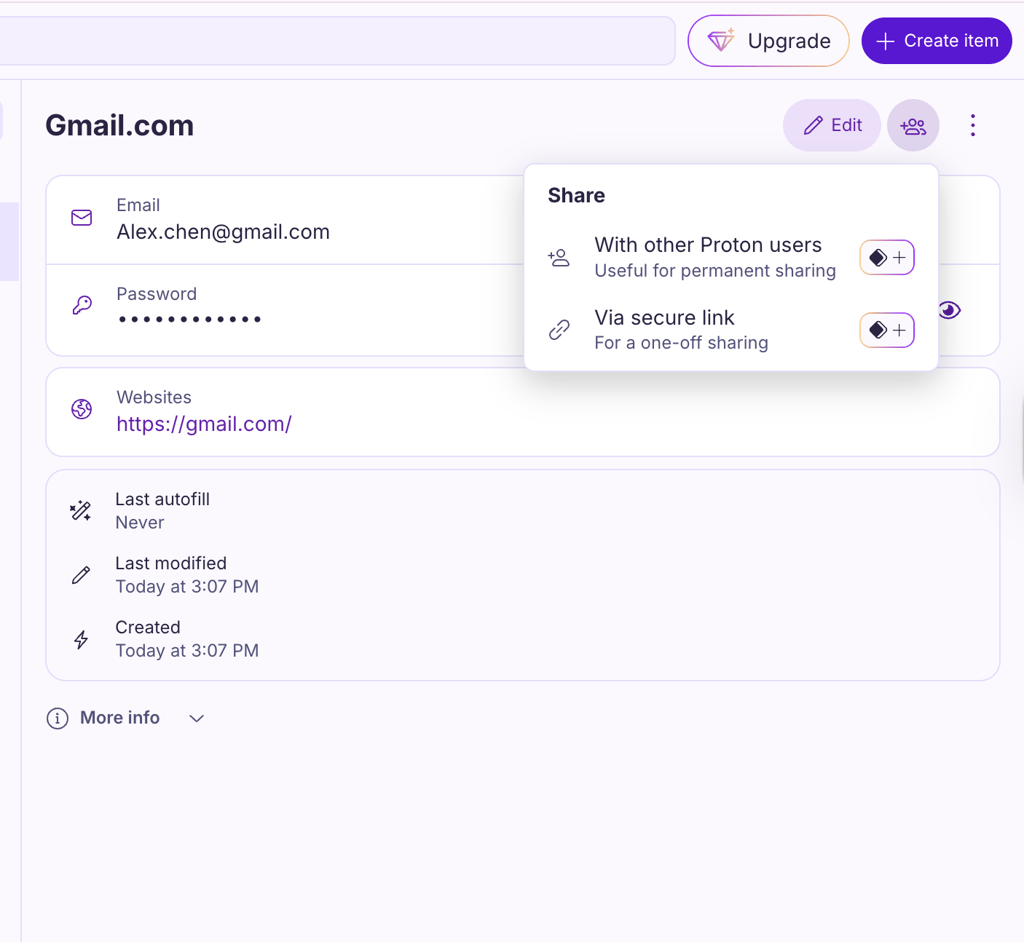
Altogether, these tools make Proton Pass feel like more than just a password manager – it’s an intuitive, all-in-one hub for managing and protecting digital life with minimal effort.
Proton Sentinel
Proton Sentinel blends artificial intelligence with real human monitoring to keep your account under constant, smart protection. Whenever a login attempt seemed a bit off, AI-powered Sentinel would step in to verify that there was no trespass. With 24/7 watch by security specialists, it gives a reassuring sense of always knowing what’s happening with your account.
That said, I did find a small drawback while testing it with shared accounts. Without built-in two-factor authentication on every profile, Sentinel can sometimes trigger extra verification prompts. Still, the feature adds a tough layer of defense against unauthorized access, which feels well worth it for personal use or sensitive accounts.
Pass Monitor
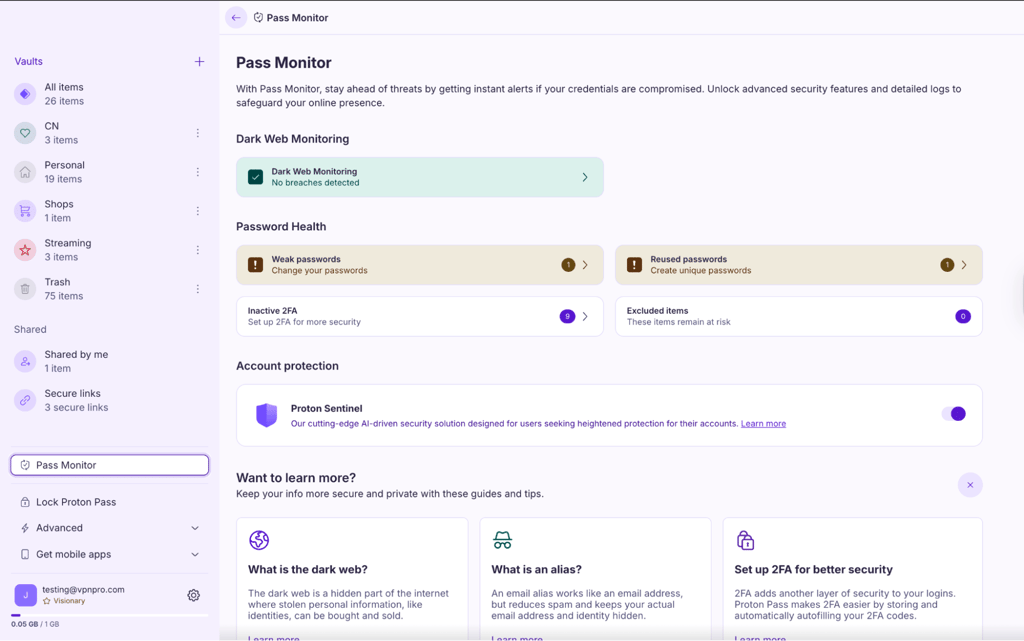
The Pass Monitor is Proton Pass’s built-in security auditor, and it’s surprisingly hands-on. It automatically checks the strength of all my saved passwords, flags reused or weak ones, and even points out which logins still lack 2FA. I liked how the interface made it effortless to fix these issues. With just one click, I could jump straight to the problematic entry and update it.
It reminded me of similar tools like NordPass’s Password Health or 1Password’s Watchtower. However, while Watchtower provides a neat aggregated dashboard with an overall score, Proton Pass keeps things very direct and functional. It’s perfect for when you just want to fix vulnerabilities fast without digging through extra menus.
Dark Web Monitoring
Proton Pass takes digital safety seriously, and its Dark Web Monitoring feature really demonstrates that. It keeps tabs on exposed data across a vast range of breach databases, including live intel from Constella Intelligence. During testing, I could track potential leaks involving my Proton Mail login details and up to ten personal email addresses.
The only disadvantage is that the monitoring caps at ten addresses, whereas services like NordPass let you track as many as you want. As I don’t juggle that many email addresses, Proton Pass works for me, doing an excellent job prioritizing alerts. The red markers warn you about severe breaches requiring urgent attention, while purple ones show less critical, encrypted leaks. This color-coded system helped me react much faster when something serious popped up.
Hide-my-email aliases
This feature might be the most underrated privacy tool in Proton Pass. Whenever I fill out signup forms or online surveys, I can use a randomly generated alias instead of exposing my real inbox. It’s a simple idea, but incredibly effective against spam and phishing. And if one alias ever gets leaked, I can just deactivate it and move on without any hassle.
Free users get ten aliases, while premium subscribers can create as many as they want. For me, this ended up being one of the handiest protection solutions while keeping my main email address clutter-free. Not many password managers include a full-featured alias system, and very few make it accessible to free users. While NordPass offers something similar, its masking tool is locked behind its paid plan, giving Proton Pass the clear edge if you’re looking for solid free-tier privacy.
Proton Pass setup and compatibility
I tested Proton Pass across multiple devices to see how it performs in everyday use, including an iPhone, a MacBook, a Samsung Android phone, and a Windows PC. Across all platforms, the app felt smooth, consistent, and easy to navigate. Whether on desktop or mobile, I could manage my passwords without any learning curve.
Proton Pass setup
Getting started with Proton Pass only took a few minutes. I downloaded the app from my device’s app store, but you can also get it from Proton’s website. Then I created a new account using my email and was ready to go. Adding my first saved login was straightforward. Just hit Create item, fill in the details, and save it to the vault.
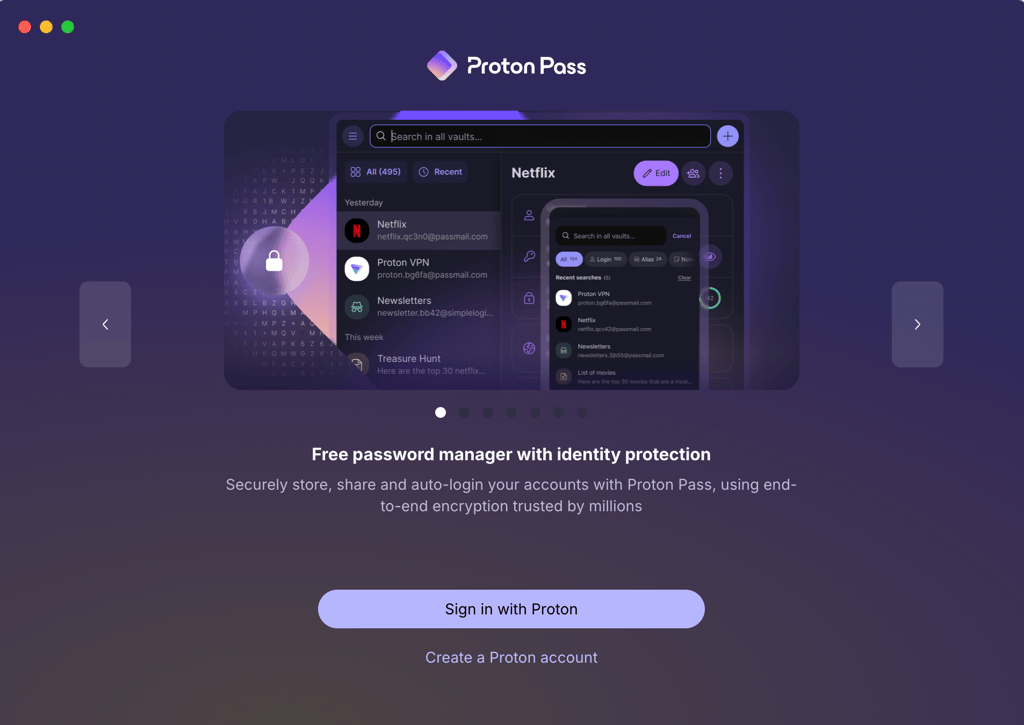
The setup was effortless and intuitive. I didn’t need any tutorials or technical know-how, and within moments, I had all my accounts organized in one secure place.
Get Proton Pass on your mobile device
Proton Pass desktop apps
On both Windows and macOS, Proton Pass looks and feels nearly identical. The clean sidebar layout makes it easy to jump between saved logins, autofill details, and use the built-in password generator. Editing entries or copying credentials is simple – one click does everything.
I liked how the app highlights weak or outdated passwords, keeping me aware of potential risks. The interface feels minimal yet powerful, and switching between my Mac and other PC was seamless thanks to the unified design.
Proton Pass mobile apps
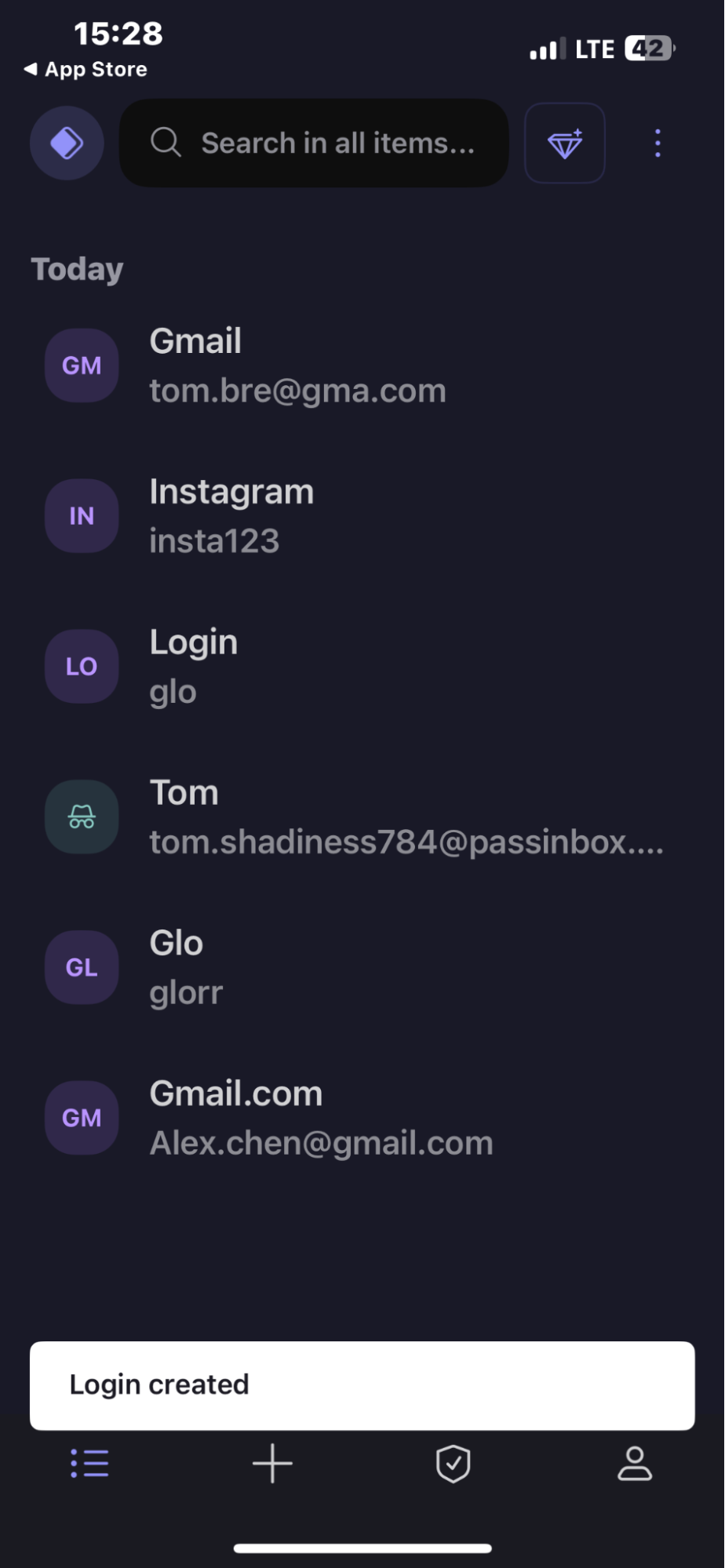
Proton Pass’s mobile apps for iOS and Android are just as intuitive as the desktop versions, perhaps even cleaner. I appreciated the uncluttered layout and smooth navigation, which made managing passwords on the go effortless.
I did notice that password import and export features aren’t available within the Android app yet, though iOS already supports them. Otherwise, the experience across platforms feels well-polished.
Get Proton Pass on your desktop
Proton Pass browser extension
The Proton Pass browser extension proved equally user-friendly. It took only a minute to install, and the compact interface mirrored the main app perfectly. From there, I could autofill, copy, or search passwords instantly without switching tabs.
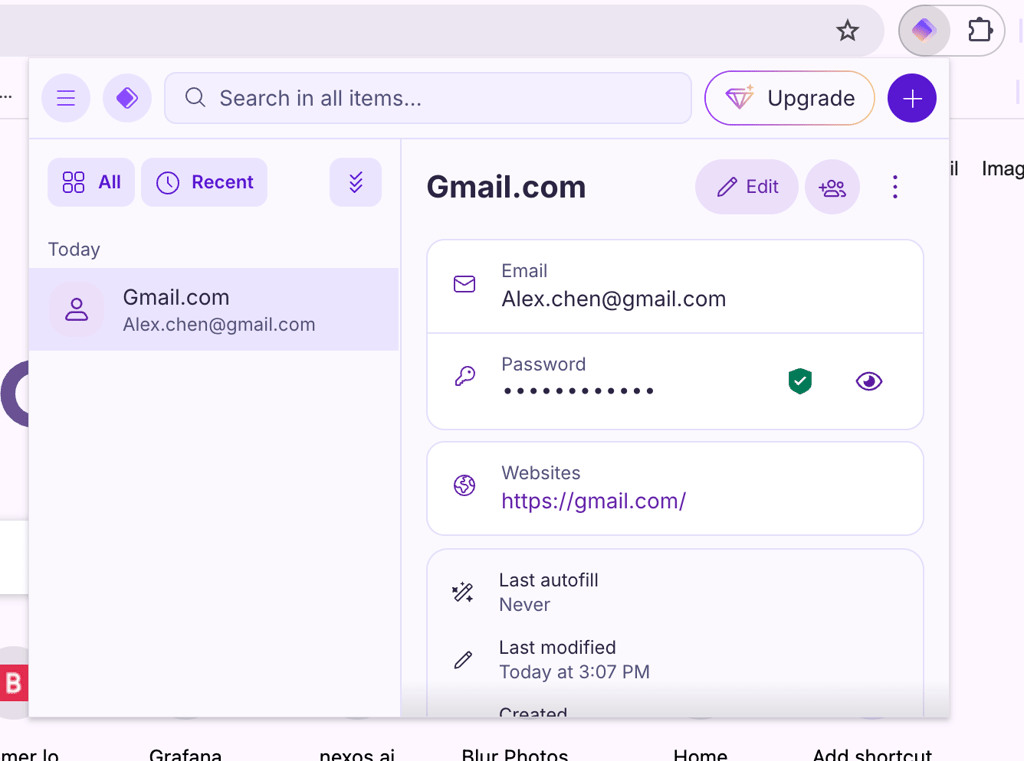
I also imported my old passwords in standard formats like CSV and JSON, and Proton’s recommendation to use PGP-encrypted JSON for exports made me feel confident about data security. Overall, the browser extension added flexible convenience to an already smooth experience, ideal for anyone wanting quick, secure logins while browsing.
Install Proton Pass in your browser
Proton Pass pricing
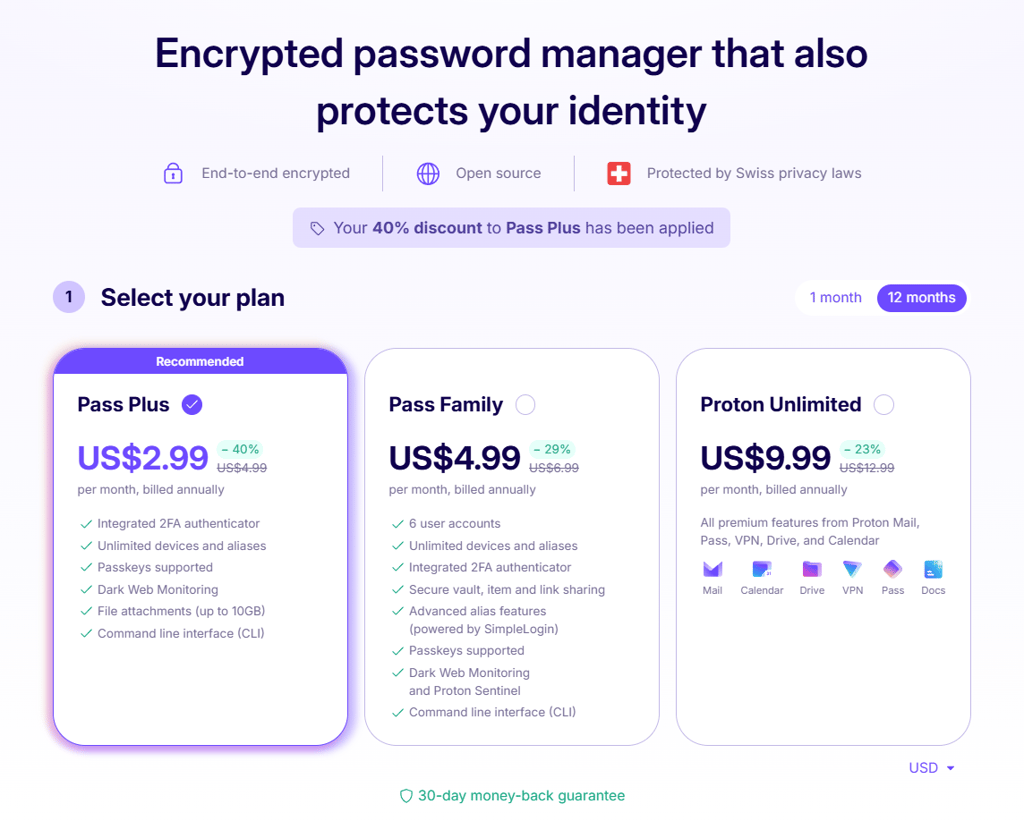
Proton Pass keeps things simple with one free plan and three paid tiers. You can pick the setup that matches your needs and budget, whether you just want a straightforward password manager or a full privacy suite.
| Plan | Price | Users | Key features |
| Proton Free | Free | 1 | Unlimited passwords, sync across devices, password generator, 10 email aliases |
| Pass Plus | $1.99/month | 1 | Unlimited aliases, 2FA, Dark Web Monitoring, Proton Sentinel, vault sharing (10 others) |
| Pass Family | $2.79/month | Up to 6 | Same as Pass Plus for each user, with shared vaults and family management |
Proton Free
I started with the free plan and was impressed by how capable it is for a no-cost service. You get unlimited passwords, syncing across devices, and even a built-in password generator. It also gives you 10 hide-my-email aliases for extra privacy. The only catch is that premium perks like Dark Web Monitoring and Proton Sentinel are locked behind paid plans. Still, for everyday password storage and autofill, Proton Free is easily one of the best no-cost options available.
Pass Plus
At $1.99/month, Pass Plus hits the right spot between features and affordability. It unlocks unlimited aliases, adds two-factor authentication, vault sharing with up to 10 people, and enables Proton Sentinel and Dark Web Monitoring. This plan feels ideal if you want stronger protection and more convenience without committing to the full suite.
Pass Family
Priced at $2.79/month, this plan supports up to six users, making it great for households that want secure password management under one subscription. Each user gets their own vault, with all the advanced features from Pass Plus included. That said, compared to alternatives like NordPass Family, Proton’s plan is on the pricier end for families.
Proton Pass Business pricing
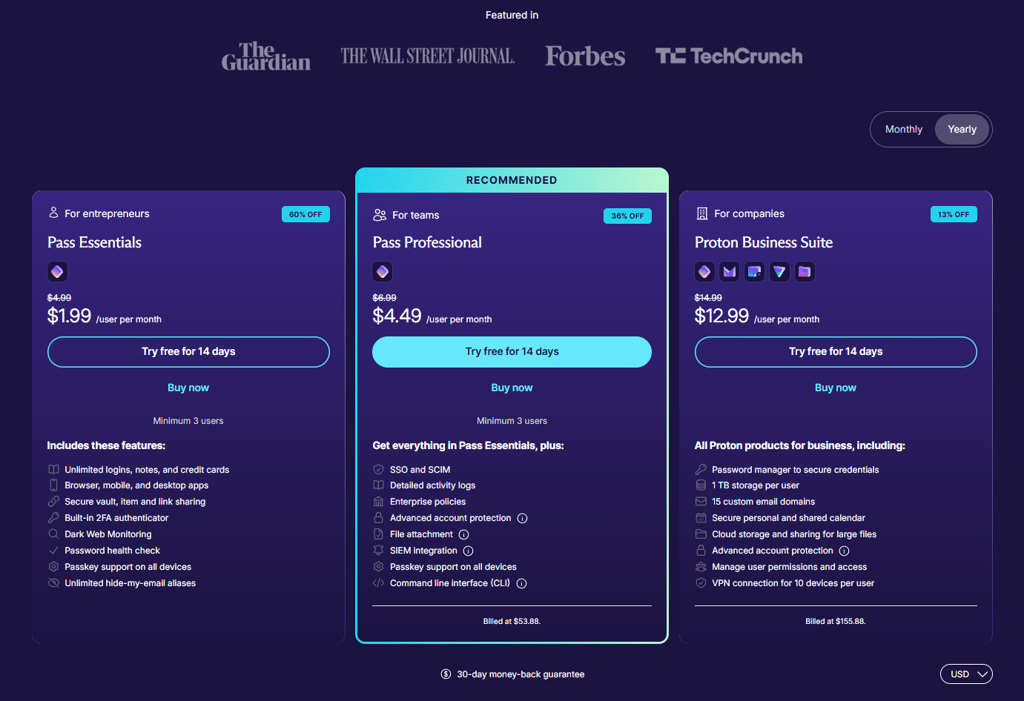
Proton Pass offers four business plans built for different team sizes and security needs. Whether you’re running a small startup or managing a large organization, there’s a setup that matches your scale and privacy goals.
| Plan | Price | Users | Key features |
| Pass Essentials | From $1.99/month | 3–10 | 2GB storage, secure email, Proton Calendar, basic VPN, Proton Scribe |
| Pass Professional | From $4.49/month | 3+ | 10GB storage, advanced account protection, SSO & SCIM, activity logs, Proton Scribe |
| Proton Business Suite | From $12.99/month | Unlimited | 1TB storage, 15 email domains, Proton Mail, VPN, Drive, Pass, Calendar |
| Enterprise | Custom pricing | Flexible | All Proton services, custom security options, dedicated account manager |
Pass Essentials
At $1.99/month per user, Pass Essentials is the entry-level plan perfect for small teams that just need secure email, calendars, and some cloud storage. It includes 2GB of storage per user, a Proton Calendar for scheduling, and basic VPN access on one device. It’s a good fit for businesses that want privacy-first communication with minimal setup.
Pass Professional
If your team needs more control and stronger security, Pass Professional at $3.49/month per user is a solid upgrade. It adds single sign-on (SSO), advanced account monitoring, and enterprise controls like detailed logs and policy management. When I tried it, it felt designed for teams dealing with sensitive data who can’t afford security gaps.
Proton Business Suite
Proton Business Suite, priced from $12.99/month per user, takes things up a notch by bundling Proton Mail, Pass, VPN, Drive, and Calendar into one secure ecosystem. Each user gets 1TB of encrypted storage, multiple custom email domains, and VPN connections for up to 10 devices. For organizations that want everything under one protected roof (communication, passwords, and storage), it’s a perfect all-rounder.
Enterprise
The Enterprise plan is Proton’s most flexible option, made for large organizations and institutions that need tailored security and compliance. It includes every Proton service, plus a dedicated account manager and the ability to customize features and storage limits. Pricing is quote-based, so you’ll need to contact Proton directly, but in return, you get a fully personalized setup.
Proton Pass subscription and refund
Proton makes its refund process fairly straightforward. All paid plans come with a 30‑day money‑back guarantee, which means if you cancel within that window, you can request a full refund. To do so, you’ll need to contact Proton’s support team using their official form and make sure both your cancellation and refund requests are submitted within those 30 days.
From my experience, the process is quick, as long as your payment was made directly through Proton’s site. Refunds aren’t available for cash or bank transfers, and the policy only applies once per user. If you signed up through an app store or another third‑party service, you’ll have to follow their own refund rules instead.
Customer support
| Proton Pass support option | Availability |
| 24/7 live chat | ❌ No |
| Email support | ✅ Yes |
| Knowledge base | ✅ Yes |
| How-to guides | ✅ Yes |
| Phone support | ❌ No |
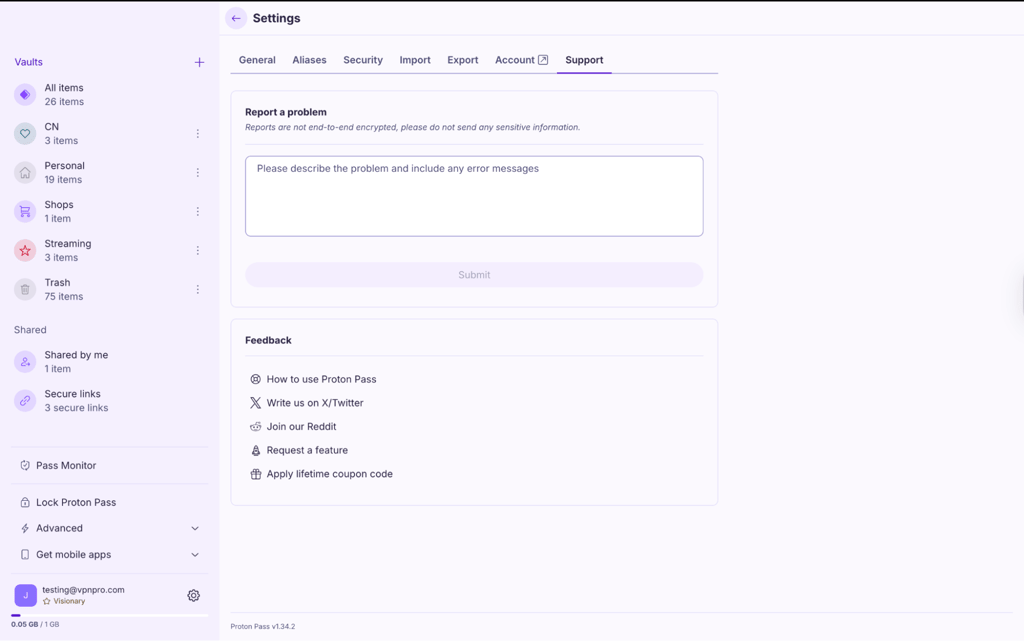
Proton Pass doesn’t include live chat or phone support, but you can reach the support team anytime via email or through the integrated Zendesk system. Since the service is open-source, there’s also a robust knowledge base filled with guides, tips, and community-contributed fixes for common issues.
From my own experience, Proton’s support team has been quick and professional. The first time I reached out was about a problem importing passwords, and their step-by-step email response solved it right away. Later, when I asked about the refund process, they were just as prompt and clear. Even without live chat, I felt my issues were handled efficiently.
You can also contact support directly from within the Proton Pass app, which makes things convenient. For community insights, the official r/ProtonVPN subreddit is another useful place to get help from Proton users who share real-world fixes and experiences.
Bottom line
After spending time using Proton Pass, I can confidently say it’s a secure and trustworthy password manager that strikes nearly perfect balance between privacy and practicality. The free version offers plenty of value, with unlimited passwords, sync across devices, and even email aliases – all without hidden catches.
While it doesn’t pack every advanced feature you’ll find in tools like 1Password or NordPass, it covers all the essentials smoothly and reliably. I’d recommend Proton Pass to anyone who wants a clean, privacy‑focused password manager that works well out of the box. Its open‑source foundation and end‑to‑end encryption give me real confidence that my data stays protected.
All in all, Proton Pass continues to grow into one of the most dependable password managers of 2026. It’s simple to use, highly secure, and built with privacy at its core.
FAQ
What is Proton Pass?
Proton Pass is a secure, privacy-focused password manager from Proton. It stores logins, notes, payment details, and email aliases in encrypted vaults across your devices.
How to use Proton Pass?
To use Proton Pass, create an account, then install the app or browser extension on your devices. Import or add passwords and enable autofill so Proton Pass can generate, store, and fill strong credentials automatically.
How does Proton Pass work?
Proton Pass encrypts your data locally with a master password before syncing it to the cloud. It then lets you autofill logins, generate strong passwords, and manage identities across devices.
How secure is Proton Pass?
Proton Pass is highly secure as it employs end-to-end encryption and a zero-knowledge design so only you can decrypt your vault. Strong cryptography greatly reduces the risk of breaches or unauthorized access.
How much is Proton Pass?
Proton Pass has a free plan plus paid tiers with more vaults, aliases, and security features. Paid plans with enhanced features start from $1.99/month. Check Proton Pass’s pricing page for the latest monthly and annual subscription costs.

