
Hotstar not working with a VPN: 7 quick fixes


- JioHotstar is available only in India, and users abroad can access it only with a VPN.
- If JioHotstar is not working with your VPN, you can try switching servers and tunneling protocols, clearing your browser data, running IP leak tests, launching JioHotstar on a different device, contacting your provider’s customer support, or choosing a streaming-optimized VPN like NordVPN.
🏷️ LIMITED OFFER: NordVPN deal! Get 78% OFF NordVPN + 3 months FREE 🏷️
JioHotstar (formerly Disney+ Hotstar) is one of India's most popular streaming platforms, with probably the most extensive library of Indian TV shows, movies, live sports, and Disney content. However, JioHotstar is only available in India, and users outside of the country must rely on VPN services to access the platform.
The frustrating reality is that Hotstar not working with a VPN is a common issue among users outside India. The platform uses strict geo-restrictions and robust VPN detection methods, and in some cases, even VPNs are unable to unblock the site. This could be due to a lack of Indian servers, poor security, or slow connection speeds.
In this article, you’ll find my recommendations for Hotstar VPNs that work with the platform, along with 7 quick troubleshooting steps that may help you access the platform outside India.
Why Hotstar is not working with a VPN
JioHotstar is not available outside India due to broadcasting and licensing agreements. To protect its content, Hotstar uses strict geo-restrictions, which block access based on IP address. This means that if you try to access the platform from abroad, you’ll see an error message saying: “Seems like we are not here yet. We’re not available in this location, thank you for your love!”

If you see the Hotstar error message, it means the platform has detected that your IP address is outside India. The simplest solution to avoid IP address detection is to use a VPN connected to a server in India to mask your real location. However, not all VPNs are powerful enough to bypass Hotstar’s geo-restrictions.
In addition to geo-restrictions, Hotstar uses VPN detection methods to block users who try to access the platform via VPN. If your VPN is detected, you will encounter an error message: “Looks like you are connecting through a VPN, proxy, or ‘unblocker’ service. Please turn off any of these services and try again.”
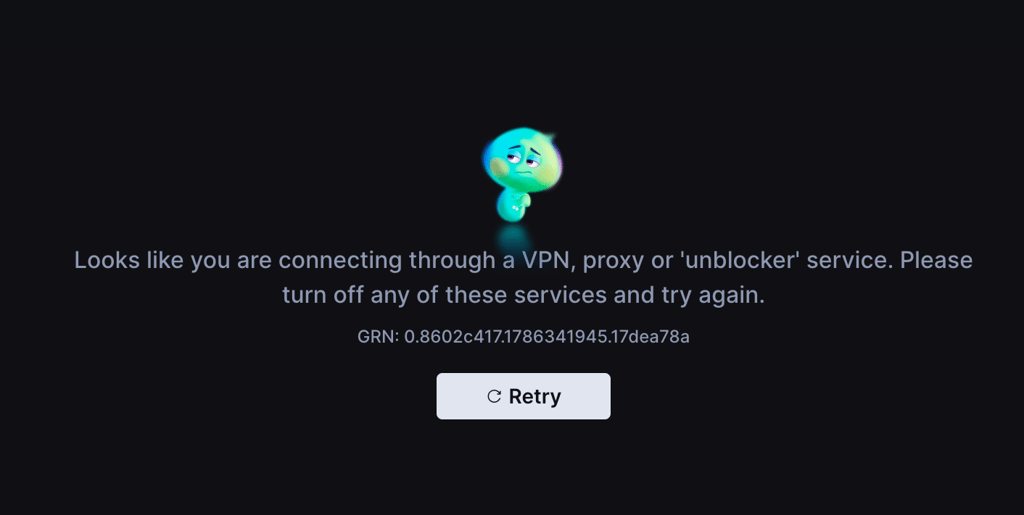
While VPN detection is the most common issue why a VPN is not working with Hotstar, there are several other reasons why that may happen:
- No servers in India. If your VPN does not have virtual or physical servers in India, you won’t be able to obtain a local IP address and access JioHotstar.
- Blacklisted server IP. JioHotstar blocks many IP addresses associated with VPN providers. Streaming services identify these using commercial IP intelligence services and their own detection systems, making it harder for VPNs to bypass geo-restrictions.
- Wrong server use. If you connect to a server outside of India, you won’t be able to access JioHotstar from abroad.
- Limited streaming support. Some VPNs simply can't bypass JioHotstar's VPN detection. If your provider doesn't regularly refresh its IP addresses or optimize servers for streaming, you may not be able to access the service. Additionally, poor security features might mean your VPN cannot bypass geo-restrictions.
- Browser cache and cookies. Old cookies and cached website data can interfere with location changes after connecting to a VPN. Clearing them forces JioHotstar to start a new session using your current VPN IP address.
- IP, DNS, or WebRTC leaks. If your VPN leaks your real IP address, DNS requests, or WebRTC information, JioHotstar may detect that your connection originates outside India or identify conflicting location data. As a result, it may deny access to its content.
VPNs that work with Hotstar in 2026
I tested 23 services to find the best VPNs for JioHotstar that reliably access the platform from abroad and deliver fast enough speeds for uninterrupted streaming. Ultimately, I found the top 3 Hotstar VPNs, which performed the overall best:
- NordVPN – overall best Hotstar VPN with virtual India servers and fastest connection speeds. Thanks to its robust security features, NordVPN makes it easy to access JioHotstar from abroad.
- Surfshark – fast and affordable Hotstar VPN with virtual servers in Delhi and Mumbai for accessing the platform from outside India.
- Proton VPN – privacy-first VPN for Hotstar to safely unblock the platform with virtual servers in India.
Stream JioHotstar from anywhere with NordVPN
Hotstar not working with a VPN: 7 ways to fix it
The simplest fixes to try when your VPN is not working with Hotstar include switching VPN servers, clearing stored browser data, and trying a different VPN protocol. Below, you’ll find my thorough guides for all 7 Hotstar not working with a VPN fixes:
1. Switch VPN servers
Make sure you're connected to an Indian server. If you still can't access JioHotstar, disconnect and reconnect or choose a different server in India to receive a new IP address. Since streaming services frequently block known VPN IPs, switching servers is often the quickest and most effective fix.
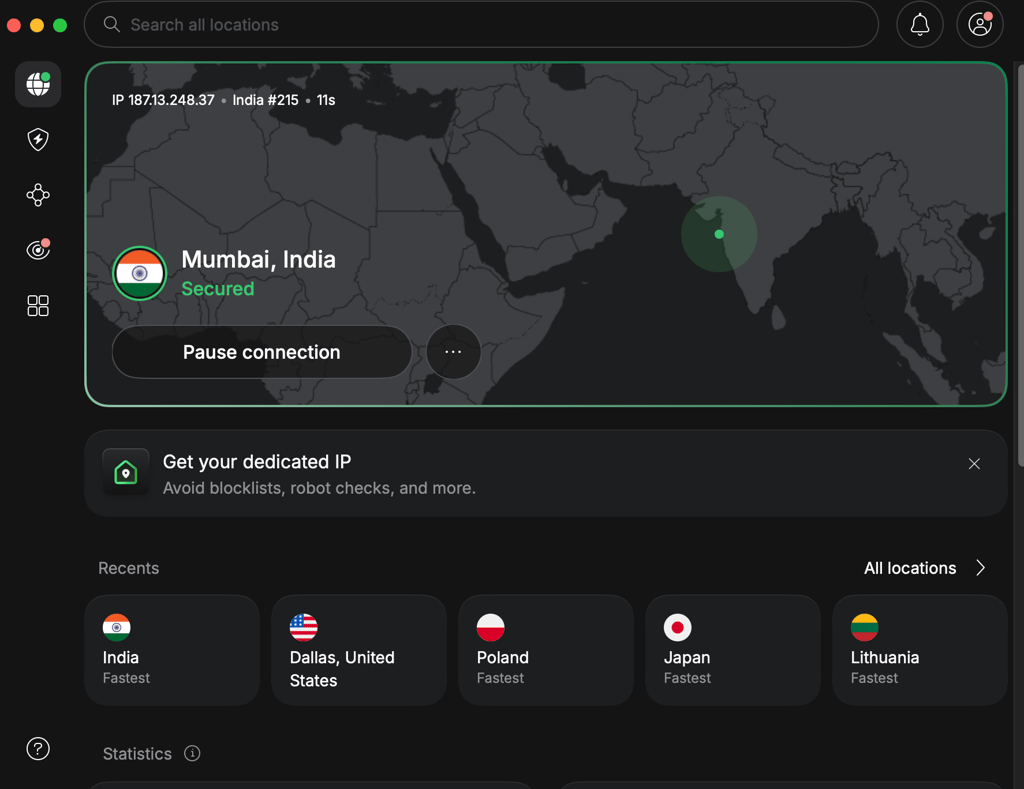
Access Hotstar from anywhere with NordVPN
2. Clear your browser cache and cookies
Stored cookies and cached website data can interfere with location changes after connecting to a VPN. Clearing them forces JioHotstar to start a fresh session using your current VPN IP address, which may resolve streaming issues.
Here’s how to clear stored cookies and cache on Google Chrome:
- Open Google Chrome and click the three-dot menu in the top-right corner.
- Select Delete browsing data.
- Set the Time range to All time.
- Check Cookies and other site data, and Cached images and files.
- Click Delete data.
- Reconnect to your VPN, reopen JioHotstar, and try streaming again.
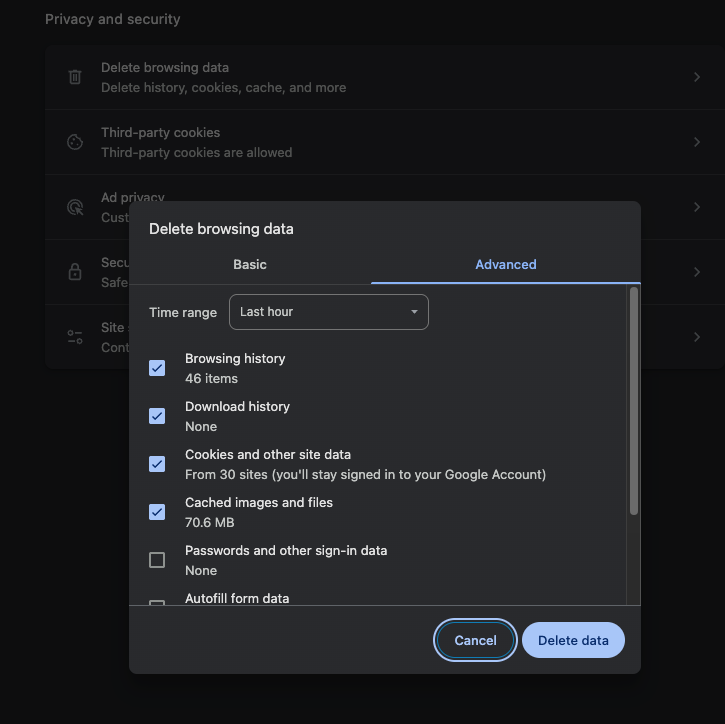
If you’re using a different browser than Google Chrome, the process will likely be slightly different but still very similar to my example. Look for the option to clear your browser data in the browser settings, delete the cookies and cache, and try accessing JioHotstar again.
3. Try a different VPN protocol
VPN protocols determine how your device connects to the VPN server. If JioHotstar isn't working with the tunneling protocol you are currently using, switching to another one may help by stabilizing your connection or bypassing VPN detection.
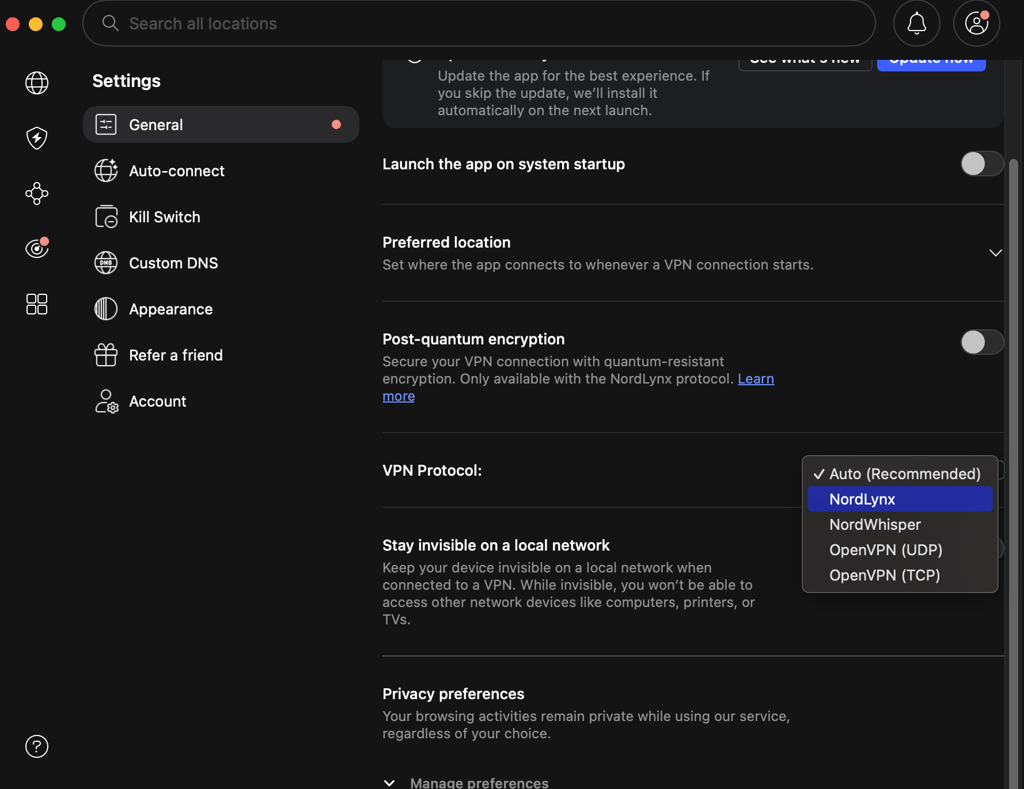
4. Try a different browser or device
Sometimes the issue isn't your VPN but the browser or device. Browser extensions, outdated apps, cached data, or device-specific settings can all interfere with JioHotstar. Try opening the service in a different browser, using a private/incognito window, or signing in from another device, such as your tablet or PC. If JioHotstar works there, the issue is likely related to your original browser or device configuration, and not the VPN itself.
5. Check for IP, DNS, or WebRTC leaks
JioHotstar can see your actual location instead of your VPN location if your service is leaking your IP/DNS/WebRTC information. If this happens, the platform will block your attempts to access it.
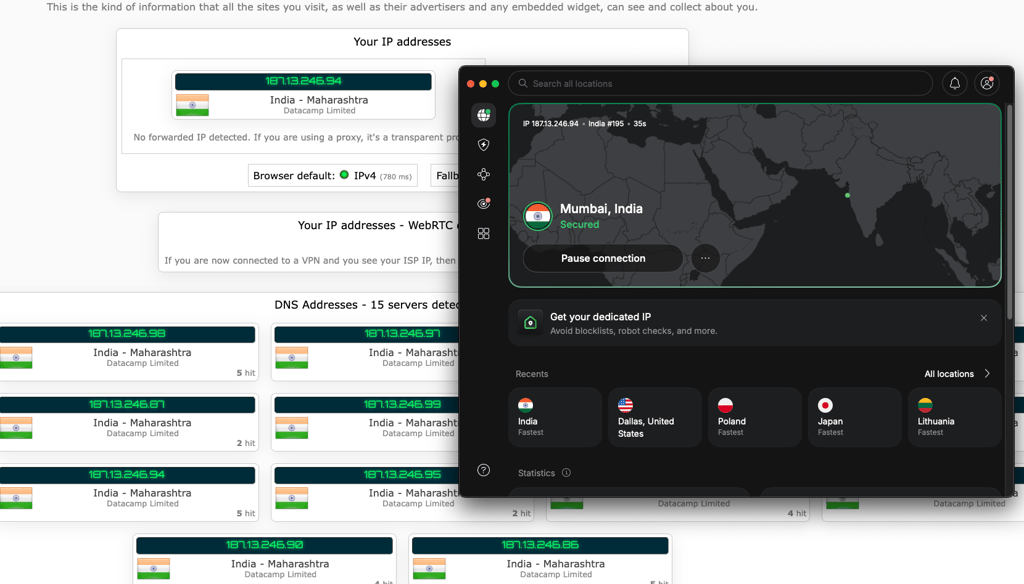
You can check if your VPN is leaking any data by using trustworthy free tools like ipleak.net or dnsleaktest.com. If a leak is detected, turn on your VPN's leak protection features, such as the kill switch, reconnect to the VPN, and test again.
6. Update your VPN software
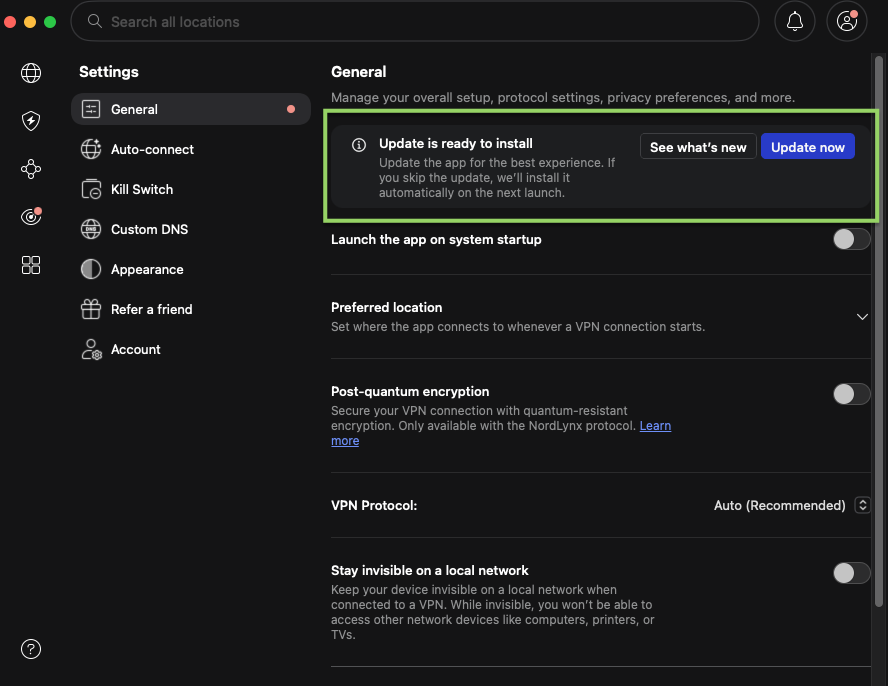
Using an outdated version of your VPN app can cause connection problems or compatibility issues with streaming services like JioHotstar. Always install the latest update to fix any bugs, add new security improvements, and improve server performance. This easy step may solve Hotstar streaming issues.
7. Contact VPN support or switch to a better VPN
If you've tried all the quick fixes mentioned in this guide but your VPN still isn't working with JioHotstar, contact your provider’s customer support. The agents will advise you which specific servers and what additional settings are best for accessing Hotstar from abroad.
That said, if you keep running into issues with your current VPN service, it may be time to look for one better suited to your needs. For example, NordVPN, Surfshark, and Proton VPN worked seamlessly with JioHotstar during my testing, and I did not run into any issues streaming from abroad.
![NordVPN responsive banner logo [IN USE]](https://media.vpnpro.com/images/160x40/2025/08/nord-responsive.png)
Conclusion
If your VPN is not working with Hotstar, you can try switching VPN servers, changing the VPN protocol, updating the app, or launching the platform in a different browser or on a different device. If that does not help, test for IP/DNS/WebRTC leaks or contact your VPN provider’s customer support.
That said, you could also try using a top Hotstar VPN to access the platform without issues from anywhere. Based on my experience, NordVPN is the best VPN for JioHotstar, offering fast and secure servers in India for uninterrupted access and smooth streaming.

![Surfshark weekly deals logo [IN USE]](https://media.vpnpro.com/surfshark-weekly-deals.svg)
![Proton VPN winner logo [IN USE]](https://media.vpnpro.com/2025/05/protonvpn-winner.png)
FAQ
Why is Hotstar not working with a VPN?
Hotstar may not work with a VPN due to an incorrect server selection, poor security features, streaming incompatibility, and other factors. To fix it, you can try switching VPN servers and protocols, running IP/DNS/WebTC leak diagnostics, launching JioHotstar using a different device, or subscribing to a more streaming-compatible VPN service, such as NordVPN.
How can I make Hotstar not detect VPNs?
To prevent Hotstar from detecting VPNs, start by selecting a robust VPN service with a reliable Kill Switch and secure servers in India. For example, NordVPN offers virtual servers in India, robust encryption, a customizable Kill Switch, and fast connection speeds to access and stream on Hotstar without detection.
How to bypass Hotstar VPN detection?
To bypass Hotstar VPN detection, make sure you are connected to a server in India and run an IP leak test to see if your address matches the server’s. If you can’t find anything wrong, try clearing your browser cookies and cache, as they may be exposing your location even when using a VPN. Lastly, if your VPN is still unable to bypass detection, I recommend subscribing to NordVPN, as it worked seamlessly with Hotstar during my tests.


