Max not working with a VPN? Here’s how to fix it

Short summary:
- Max is available in select regions with region-dependent libraries. The simplest way to access Max from an unavailable region or a different library is to use a VPN.
- If your VPN is not working with Max, you can try switching VPN servers, changing the tunneling protocol, checking for IP leaks, and other quick fixes from my guide.
🏷️ LIMITED OFFER: NordVPN deal! Get 78% OFF NordVPN + 3 months FREE 🏷️
Max, formerly HBO Max, is a hugely popular streaming platform that offers original content as well as titles from Discovery+. However, Max is not available globally, and its content library and availability vary by market. If you’re in a region where the service is unavailable, a VPN can help you access it. By connecting to a server in a country where Max is available, such as the US or the UK, you can change your virtual location and access the platform as if you were there.
However, Max uses strong VPN detection methods, and not all VPN services can bypass its geo-restrictions. Additionally, some VPN services are simply not strong or fast enough for streaming.
| VPNs that work with Max: | VPNs that don’t work with Max: |
| ✅ NordVPN | ❌ TunnelBear |
| ✅ Surfshark | ❌ Mullvad (basic tiers) |
| ✅ Proton VPN | ❌ Hola VPN |
I prepared a thorough guide on what to do if your HBO Max VPN is not working. Keep reading to learn the quickest fixes.


Since 2018, VPNpro has delivered unbiased, expert-backed insights through in-house research and thorough VPN testing. Our team ensures every review is fact-checked and reliable. Learn how we maintain these high standards in our testing methods.
Why is the VPN not working with Max?
You’re likely familiar with the concept of geographical restrictions if you’re a Max and VPN subscriber. It’s a frustrating problem that causes many movies and TV shows to be exclusive to specific countries. Luckily, the best VPNs for Max can resolve these issues by rerouting your traffic through remote servers and granting you a foreign IP address.
Sadly, Max isn’t too happy with how VPNs can bypass geo-blocking and undermine its efforts to comply with distribution obligations. Therefore, the service employs various methods to curb VPN users. The most common “solution” is blocking VPN server IP addresses.
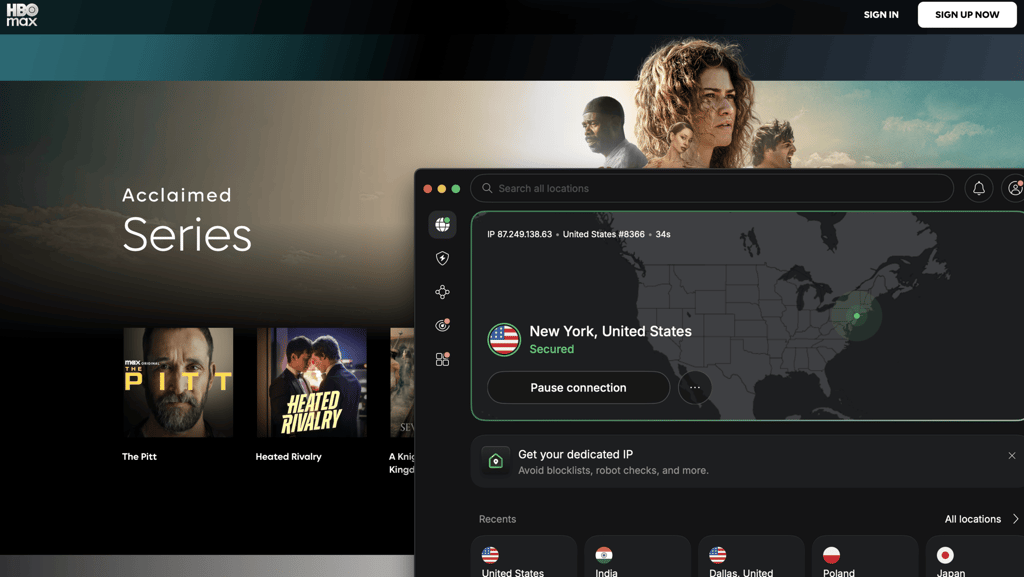
Besides that, the problem can also lie on your end. For starters, a low-quality VPN provider won’t unblock Max, no matter how hard you try. Additionally, a flawed connection leaking information won’t unearth the platform because your actual location is peeking through.
There are other likely causes behind your VPN not working with Max. Whatever it is, you’ll need to try every possible solution. Or, consider getting a tried-and-tested streaming VPN and forget about ever encountering issues while watching Max (or any other platform).
Best VPNs that still work with Max
The most substantial movie library is included in Max’s USA library. That means you’ll have the best results with VPNs for the USA that have hundreds of servers in the United States. After all, more IP addresses mean fewer chances of encountering a blocklisted one.
We've tested numerous VPN services to find which work with Max and which don't. Listed below are the finest VPNs for Max that reliably unblock this streaming platform. Try them out if they’re not on your radar.
- NordVPN. The overall best VPN that reliably works with Max. It has thousands of servers in the US and facilitates industry-leading speeds with the NordLynx protocol for a seamless 4K UHD streaming experience.
- Surfshark. An affordable and well-performing Max VPN for sharing with friends. The provider allows protecting an unlimited number of devices, supports WireGuard-powered connections, and offers access to hundreds of US servers.
- Proton VPN. Privacy-first VPN for Max to stream from regions where streaming is unavailable. The service helps bypass Max’s geo-restrictions and enables smooth streaming, thanks to consistently fast connection speeds.
Not sure how to combine your VPN service with Max and your home entertainment system? Have a look at our detailed guides on how to watch Max online.
Max VPN not working: quick fixes
If you're using a reputable VPN that's supposed to work with Max, but the platform still shows you errors, we have a few solutions for you. Best of all, these fixes are applicable when your VPN isn’t working with Max or any other streaming platform. Try all of them to find out what the underlying issue was.
Step 1. Check for IP and DNS leaks
A faulty VPN connection that reveals your true location is unable to bypass geographical restrictions. In particular, we're talking about IP addresses and DNS request leaks. It's vital to keep them hidden as they contain information about your actual location.
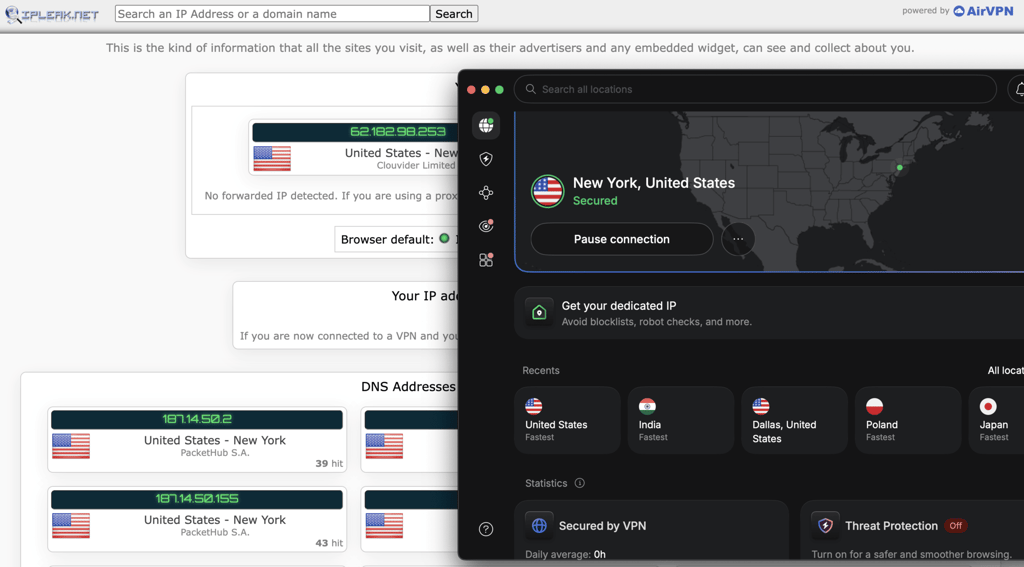
Check whether everything is airtight by using third-party tools like dnsleaktest.com and ipleak.net. And if leaks are happening, make sure your VPN's security features, such as the kill switch and leak protection, are turned on. Additionally, try using other tunneling protocols if available.
Step 2. Clear the browser’s cache
Browser cookies from previous sessions can accidentally expose your actual location and prevent effective geo-block removal. Therefore, you should delete them to give yourself a better chance to unblock Max.
Different browsers let you clear the cache from different settings menus. In Chrome and Firefox, you can do it from Privacy & Security; in Edge, it's under Clear Browsing Data; and in Safari, it’s under Manage Website Data.
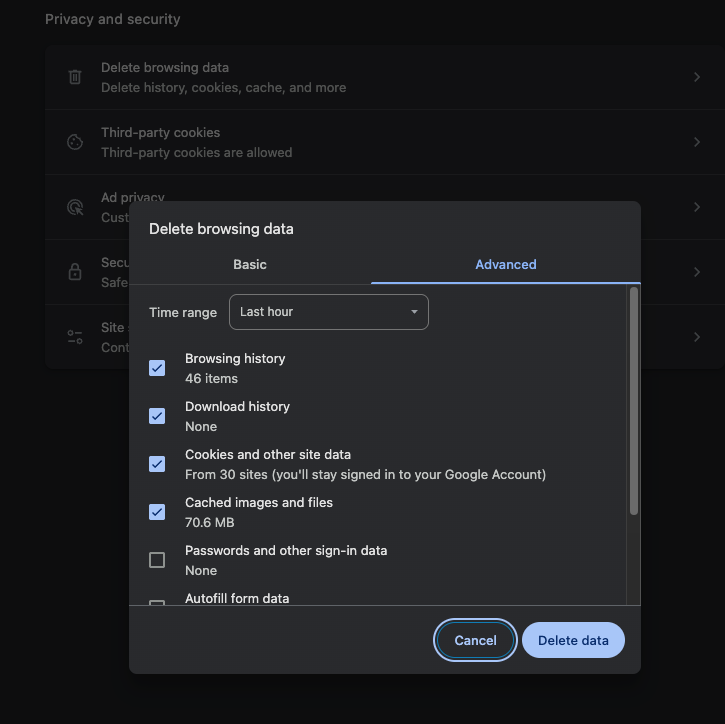
Another method is to use Incognito or Private mode whenever you want to stream foreign TV. However, we always advise clearing the cookie cache when trying this option as well.
Step 3. Switch servers
You can suspect a blocked IP address if the previous steps didn’t help. Max is known for blocking IP addresses associated with VPNs, so you likely connected to a blacklisted one. Simply pick another server, or connect to a different country where Max is available. Afterward, refresh your streaming app or browser.
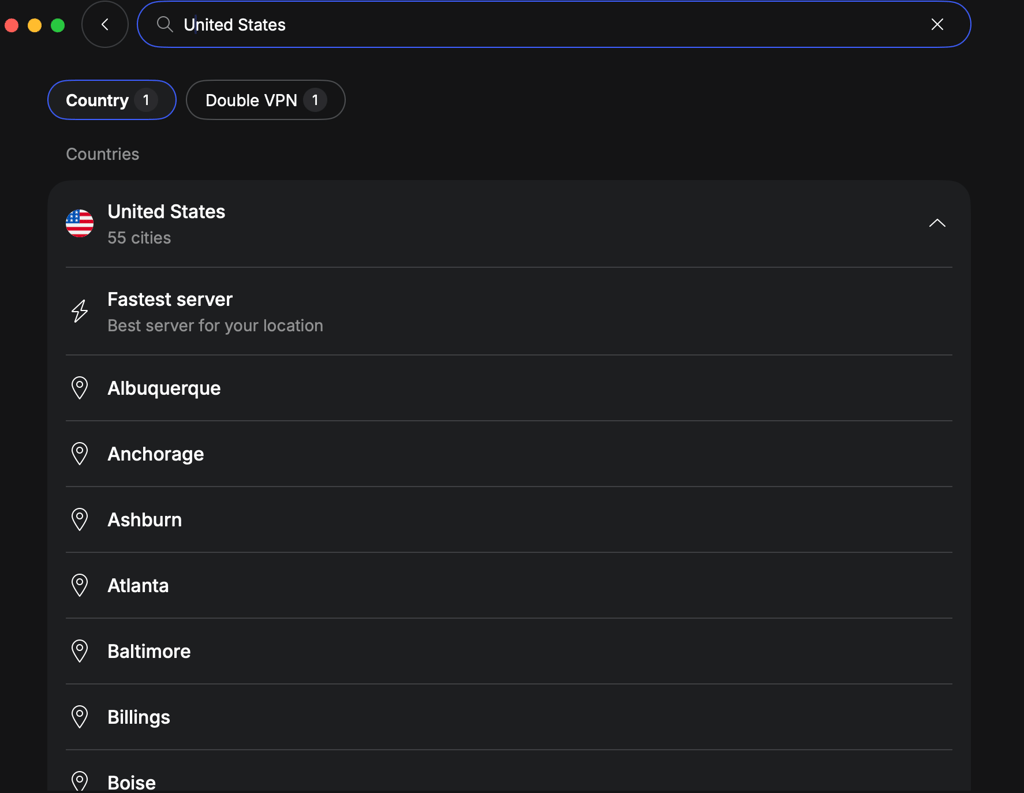
It’s important to note that blocked IP addresses also occur when many users connect from the same IP address. You can avoid this issue by using a VPN with dedicated IP addresses. In this case, you own a particular IP, and only you can connect to it, raising less suspicion and significantly reducing the chances of detection.
Step 4. Try another tunneling protocol
Some online services block all VPN traffic rather than specific IP addresses. While this is an unlikely scenario when streaming Max, switching to another tunneling protocol could do the trick.
Another caveat is that some VPN tunneling protocols are better at unblocking restricted content than others. Usually, we recommend using WireGuard or NordLynx, but trying OpenVPN and even IKEv2 can be a good idea, too. Each service implements them differently, so testing each one is always good practice.
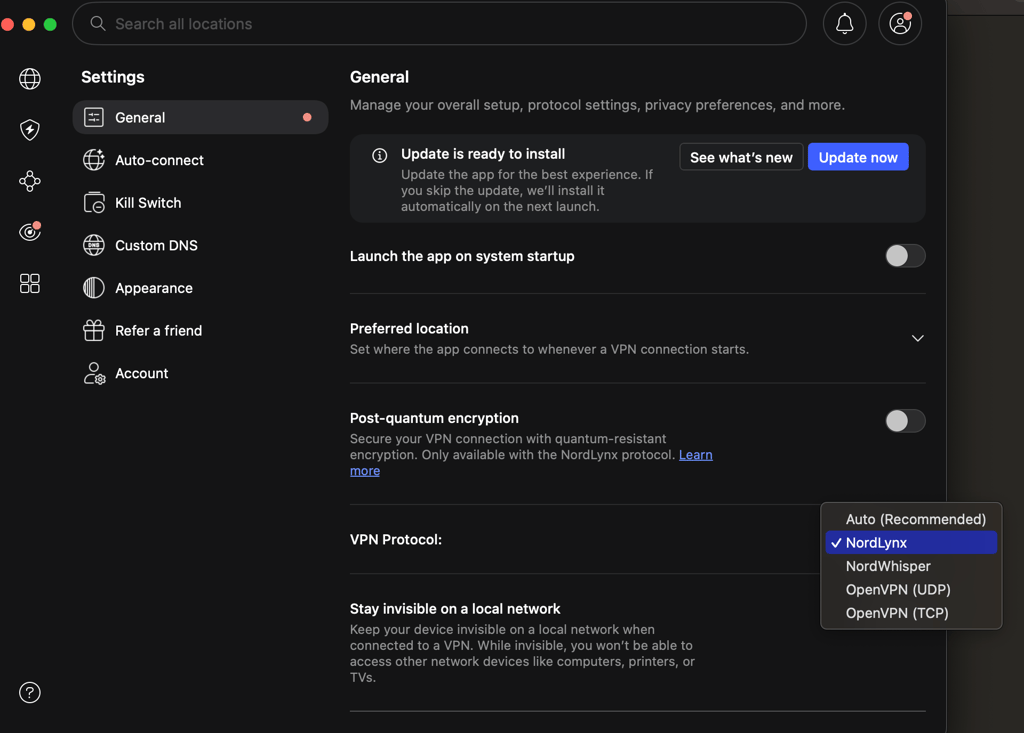
Additionally, the top VPN providers offer technologies specifically for bypassing VPN blocks. Enable obfuscation if it's available since it masks VPN traffic altogether.
Step 5. Update your VPN software
Perhaps you’re not getting the desired results because your VPN app is outdated. Make sure it’s running the latest version in the settings menu.
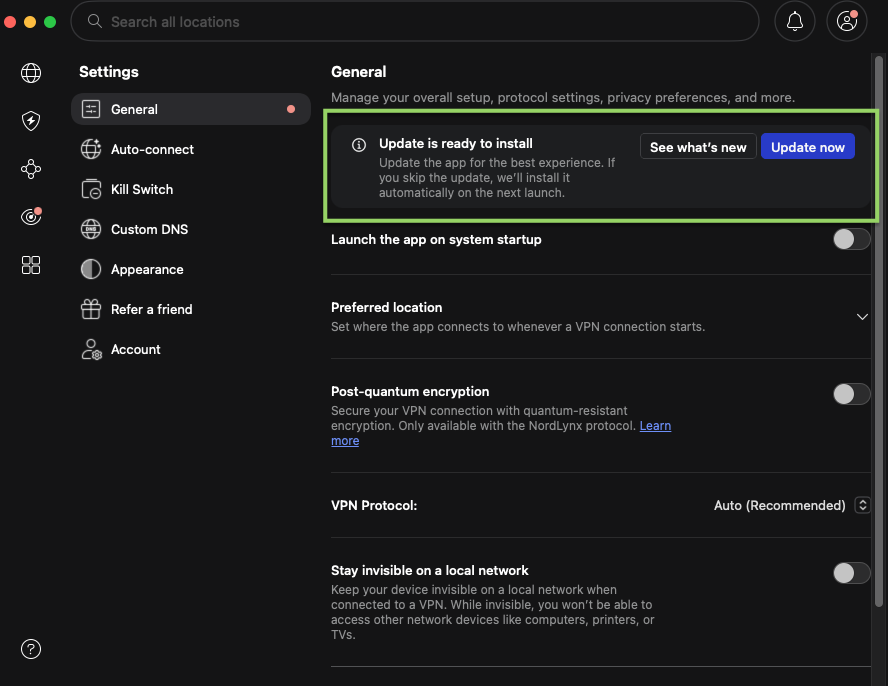
Consider reinstalling the software if it won’t update automatically. You should also ensure that the Max application is running on the latest version, too. Out-of-date software is notorious for being buggy and causing issues.
Step 6. Change your Max account password
If you've been using a VPN with Max for quite a while, you might get blocked from logging in. People report receiving a notification that their username and password are incorrect, even though they never edited their account.
It happens because Max and other websites interpret a constantly changing IP address as multiple people using your account. This can even be considered a sign that someone hacked your account and is using it from abroad. Whatever the cause, the website locks you out until you reset your password.
Step 7. Contact your VPN provider’s customer support
Never hesitate to contact your VPN provider’s customer service experts if you run into persistent issues with your VPN. They’ll know which servers are best suited for unblocking Max from anywhere. Plus, the support agents will help troubleshoot any other issues with your connection or streaming setup.
And if the VPN unfortunately doesn't work with Max, customer support will let you know. If you get this dreaded answer, it's time to look for better, tested Max VPNs.
Step 8. Switch VPN providers
The situation is dire if customer support cannot help. At this point, you can be certain that your VPN provider doesn't work with Max. Therefore, you should switch to a more reliable service, such as NordVPN, which is, in my experience, the best VPN for Max.

How to fix Max error codes 905, 100, 321
Streaming services often frustrate customers with unhelpful coded error messages. Sadly, Max is no exception. The most common codes you’ll encounter are 905, 100, and 321. Here's a comprehensive list:
| Max error code | Meaning | Solution |
| 905 | Connectivity issue | Clear the cookies cache, check your internet connection, then reboot your device |
| H | Max app device compatibility error | Update the Max app and check your internet connection. Try accessing Max from another device |
| 100 | Unsupported device or outdated browser | Update your browser or try using another device to access Max |
| 321 | Account problem | Reconnect to another VPN server, then restart your device |
| 420 | Video playback error | Update video drivers and reboot your device |
And here are some additional tips for resolving these error-related obstacles.
- Ensure that the Max service isn’t down due to traffic overload. You can do so with services like downdetector.com.
- If you’re using the dedicated Max app, make sure it’s up to date.
- Try disconnecting the VPN, and then check Max. You’ll need to switch to a different server or provider if the streaming platform works without the VPN.
- Always clear your device’s or browser’s cache and cookies. Restart the device to drive the point home.
Finally, the best way to determine the root cause of these errors is to contact Max's customer support.
VPNs that don't work with Max
Even top-tier VPN services are not always a one-stop shop for every possible scenario. Despite employing advanced encryption and robust IP masking, some VPNs still face persistent challenges from Max's ever-evolving anti-VPN technology. If you want to avoid sporadic roadblocks (and we're sure you do), then you need to know what works and what doesn't.
Using a VPN for streaming Max is not just about connection speeds or server selection, but a whole mix of different features. While we gave you our experts’ top picks, they also outlined a few VPNs that are not quite up to par for optimal Max experience. Hence, you should probably have some second thoughts before using the following VPNs for Max:
- Private Internet Access (PIA). Although managed to unblock Max initially, but repeated attempts led to regional blocks not long after. The streaming performance wasn’t quite what you’d expect for a fully enjoyable HD experience either.
- TunnelBear. Has a lot of servers? Yes. Any of them helped watch Max? Not really. In fact, TunnelBear didn’t really cut through Max’s detections, and we got blocked after a couple of minutes. Top that with sudden connection drops, and you’ll see why we can’t really recommend it.
- Mullvad. While it’s widely known for its immense focus on online security and speed, it’s simply a subpar pick for streaming. The main problem you’ll face is that most of Mulvad’s IPs are already banned by Max, and without proper IP rotation, it’s not going to get better.
- VyprVPN. VyprVPN struggles significantly with popular streaming platforms like Max due to a lack of well-maintained streaming servers. Despite the efforts, this VPN couldn’t slip past platform detection, with IP addresses blocked in a flash.
Conclusion
Although a VPN is usually the simplest solution for accessing Max in unavailable regions or switching between its libraries, you may still run into issues, such as a VPN not working with Max from time to time. Usually, such problems can be solved by switching VPN servers, selecting a different tunneling protocol, and checking for IP leaks. However, if that does not help, it may mean your VPN service is simply incompatible with streaming or cannot bypass Max’s geo-restrictions.
If you need a VPN that will ensure consistent access to Max, I can recommend NordVPN. The service stood out as the best overall VPN for Max during my tests, thanks to its fast and secure servers, geo-restriction bypass capabilities, and strong IP and DNS leak protections.

![Surfshark weekly deals logo [IN USE]](https://media.vpnpro.com/surfshark-weekly-deals.svg)
![Proton VPN winner logo [IN USE]](https://media.vpnpro.com/2025/05/protonvpn-winner.png)
You may also like to read:
How to fix Disney Plus not working with a VPN
How to fix BBC iPlayer not working with a VPN
How to fix Amazon Prime not working with a VPN
How to fix VPN not working on Android
How to fix World of Tanks lag
FAQ
Why doesn’t Max work with my VPN?
Max may not work with your VPN due to streaming incompatibilities, poor geo-restriction bypass capabilities, blocked IP addresses, and other reasons. You can try various quick fixes to resolve these obstacles.
What is the best VPN that works with Max?
NordVPN is the best option for unblocking Max anywhere. It has over thousands of serversacross 224 locations for accessing worldwide content. Furthermore, the lightning-fast NordLynx protocol ensures a lag-free streaming experience even when watching in UHD resolution. You can enjoy the many perks of this VPN on almost any device, thanks to SmartPlay.
Can I use a free VPN for Max?
Technically, you can use a free VPN for Max, but I do not recommend it. Although there are many reliable free VPNs with US servers, they aren’t optimized for streaming. To be precise, these freemium providers reserve content-unblocking capabilities for paying customers. Additionally, free VPNs have other debilitating drawbacks, such as throttled connections, limited server variety, and subpar security features.
Is Max region-locked?
Yes, Max is only available in the US and select countries in Europe, Latin America, and the Caribbean. You can find the complete list of supported countries on the official Max website.
Is it legal to use a VPN with Max?
Yes, it’s perfectly legal to use VPNs in most Western countries. On the flip side, streaming platforms like Max typically mention in their terms of service that location-altering software (e.g., virtual private networks) isn’t permitted. Luckily, they don’t impose serious restrictions on paying customers.


