
Guardio antivirus review 2026

Guardio is a browser-based antivirus and online security tool designed to protect users from phishing attacks, malicious websites, scams, and data leaks in real time. Instead of scanning files on your device, it focuses on stopping threats at the browsing level — where many modern attacks now happen.


Guardio is a browser-based security tool that claims to protect you from online threats like phishing, malicious websites, scams, and data leaks. Unlike traditional antivirus software, it focuses on preventing browser-based threats before they can reach your device. Since Guardio isn’t a cheap antivirus, I researched and wrote this Guardio antivirus review to see whether it offers good value for money.
Guardio offers strong real-time browsing protection, clear alerts, and reliable phishing detection for people who spend a lot of time online and want proactive protection rather than system-level scans. In this review, I tested Guardio’s malware prevention, phishing protection, ransomware features, real-time browsing alerts, identity theft coverage, and data leak monitoring to see how safe and effective it really is.
| Guardio Antivirus pros | Guardio Antivirus cons |
| ✅ Reliable real-time protection against phishing and malicious websites | ❌ Higher price than many traditional antivirus but without advanced features |
| ✅ Easy-to-use browser-based interface that doesn’t slow your device | ❌ Limited ransomware protection that mostly focuses on prevention |
| ✅ Clear, beginner-friendly security warnings that recommend actions | ❌ No system-level malware or file scanning for active malware infections |
![totalav responsive banner logo [IN USE]](https://media.vpnpro.com/images/160x40/2026/01/totalav-banner-logo.png)
How Much Does Guardio Cost?
Guardio’s pricing is higher than competing antivirus products, with plans ranging from $4.67 – $9.99/user for an annual subscription. Because it lacks a true system-level virus scanning feature, the product offers less value for money compared to options like TotalAV or Norton AV.
Users on the free tier only get basic browser protection and manual security scanning that identifies device weaknesses but doesn't uncover or fix malware infections. On the paid plans, however, you get access to mobile compatibility, scam and phishing protection, data leak alerts, and account security insights, as well as 24/7 support.
| Guardio antivirus plan | Members | Price/month | Price/year | Device coverage | System-level malware scanner | Phishing protection | Data leak alerts | Account security insights | 24/7 support |
| Guardio Free | 1 | Free | Free | Browser only | ❌ No | ✅ Yes | ❌ No | ❌ No | ❌ No |
| Guardio Individual | 1 | $9.99/member |
$143/year | Mobile & desktop (browser-based) | ❌ No | ✅ Yes | ✅ Yes | ✅ Yes | ✅ Yes |
| Guardio Duo | 2 | $7.67/member |
$227.88/year | Mobile & desktop (browser-based) | ❌ No | ✅ Yes | ✅ Yes | ✅ Yes | ✅ Yes |
| Guardio Family | 5 | $4.67/member |
$303.90/year | Mobile & desktop (browser-based) | ❌ No | ✅ Yes | ✅ Yes | ✅ Yes | ✅ Yes |
Try TotalAV – cheap Guardio alternative
How we test and rate antivirus software
To test any antivirus software, we install and test both desktop and mobile apps using our refined in-house testing process. This allows us to score malware detection accuracy and compare it against industry results from companies like AV-Test and AV-Comparatives. We also consider other factors, such as impact on system performance, device compatibility, pricing, and more.
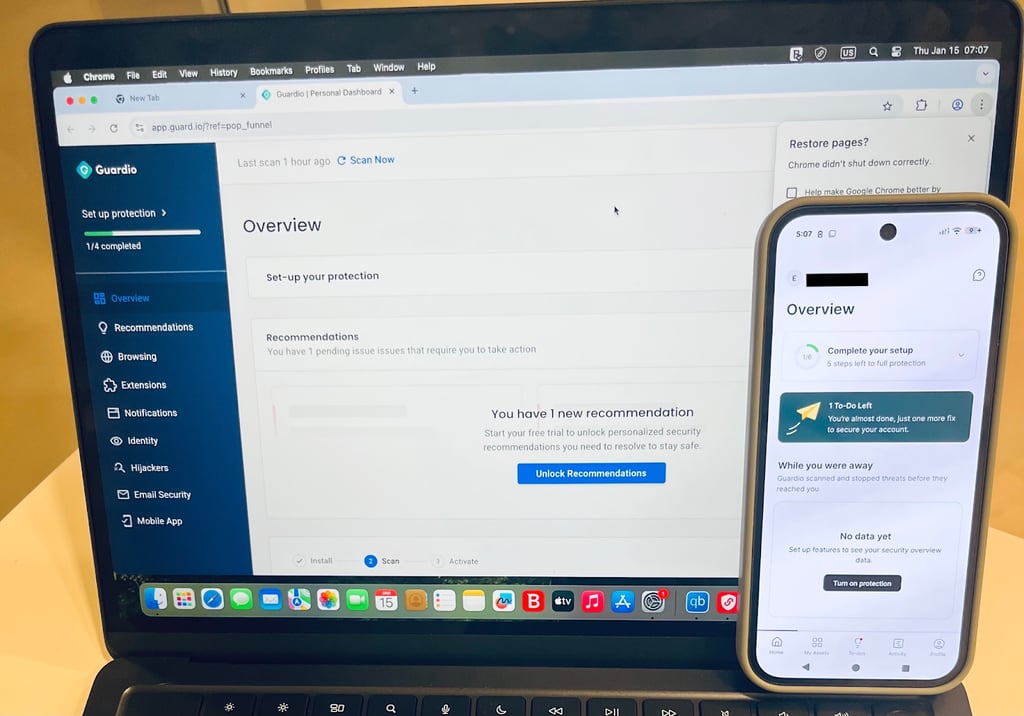
We test antivirus software on a range of devices, including Windows, macOS, iOS, and Android, to ensure that we see results that mirror real user experience as closely as possible. As a result, our rating is an accurate depiction of what any user might expect when testing the software themselves.
We tested Guardio Antivirus on February 5th, 2026, giving it a score of 8.4/10.
Our verdict: As a basic browser protection tool, Guardio is a useful piece of software that can safeguard you against malicious websites, phishing attacks, and other browser-based threats. However, its lack of a malware scanner and high pricing mean that better-value-for-money options are available. For example, choosing TotalAV gets you all the same protection and a built-in malware scanner, but the price point is much more affordable.
Is Guardio antivirus safe: In-house testing results
To assess whether Guardio is safe to use, I tested its core protection features in real browsing scenarios. Guardiois browser-based security tool focused on preventing online threats like phishing and malicious websites rather than a system-level antivirus scanner. With that in mind, my testing focused on how effectively it detects threats during everyday internet use.
Guardio does not work like a full antivirus suite that scans local files or system processes. Instead, it works in the browser, analyzing URLs, site reputation, and suspicious behavior. The results below reflect this scope. In testing, Guardio consistently showed strengths in proactive threat prevention but also had limitations compared to full antivirus software.
- Malware and antivirus scan
- Phishing protection
- Ransomware protection
- Real-time browsing protection
- Identity theft insurance
- Data leak alerts
1. Malware and antivirus scan
During my tests, I found that Guardio does not offer a traditional malware or antivirus scanner. It doesn’t pre-scan downloaded files, system folders, or background processes in the way that a product like Norton AV or TotalAV does. Instead, Guardio focuses on preventing malware by blocking malicious websites and other download pages before anything can reach your device.
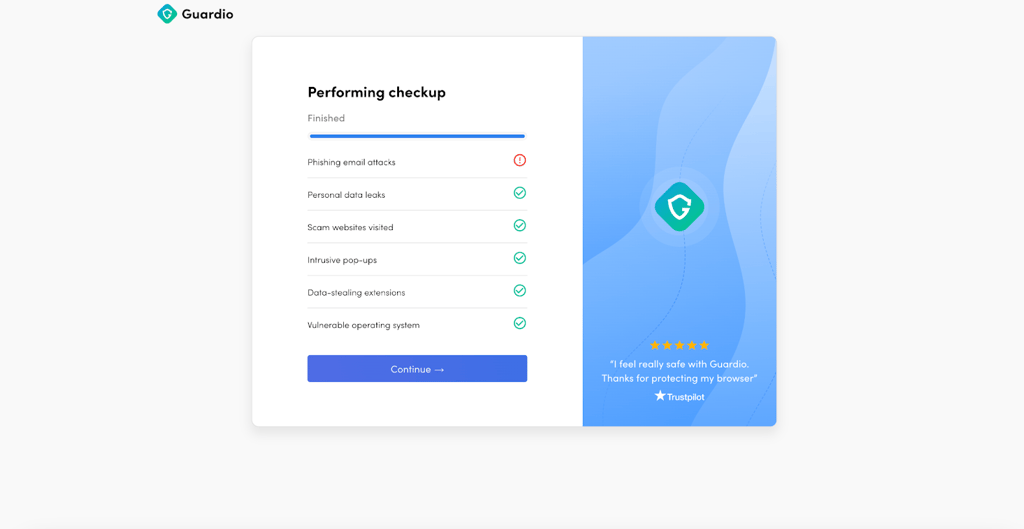
I tested Guardio’s anti-malware features by visiting confirmed malicious URLs and fake software download pages. In most cases, Guardio detected the threat quickly and blocked access with a warning about why the page was blocked. I noticed that websites known to serve browser-based malware and fake updates were routinely flagged.
That said, in my tests, Guardio did not scan EICAR test malware files that were already preloaded onto my device for testing. This means Guardio is best suited as a preventive software, but it isn’t a replacement for a true antivirus tool. For users who want full malware removal or system-level protection, Guardio works better as a supplement rather than a replacement for traditional antivirus software.
2. Phishing protection
I tested Guardio’s phishing protection features using known phishing links embedded in spam emails. In most cases, Guardio detected phishing pages almost instantly, preventing me from accessing them and risking my personal data.
When I clicked on suspicious links, Guardio displayed alerts explaining that the page intended to steal login information or personal data. The warnings were easy to understand and didn’t use technical information, so I found them effective for beginners and advanced users.
I also tested some other edge cases, such as newly registered domains and lookalike login pages that fake popular brand websites. While not every malicious site was blocked immediately, Guardio still did well overall. For everyday browsing and email use, I found its phishing detection reliable with decent results.
3. Ransomware protection
Guardio doesn’t include any dedicated ransomware removal or recovery tools, which puts it behind the most popular antivirus software. It won’t decrypt files, nor will it stop ransomware processes or restore encrypted data. Much like with malware, I found its features to be geared toward stopping a ransomware infection in the first place.
In testing, Guardio helped reduce ransomware risk by blocking malicious websites, fake download pages, and malicious ads that are some of the most common ransomware delivery methods. My tests were much the same as with the malware and phishing protection circuit, checking that Guardio could effectively prevent access to risky domains.
Unfortunately, this design means that Guardio does not protect against ransomware introduced through other means, like with USBs or email attachment downloads outside the browser. Compared to traditional antivirus tools, its ransomware tool offers limited protection.
4. Real-time browsing protection
Real-time browsing protection is where Guardio felt most consistently effective during my test circuit. The extension monitored websites as I browsed the internet, scanning URLs and page behavior in the background. I tested Guardio against unsafe websites and browser hijacker websites, and in most cases, my access was blocked immediately with a warning explaining the risk.
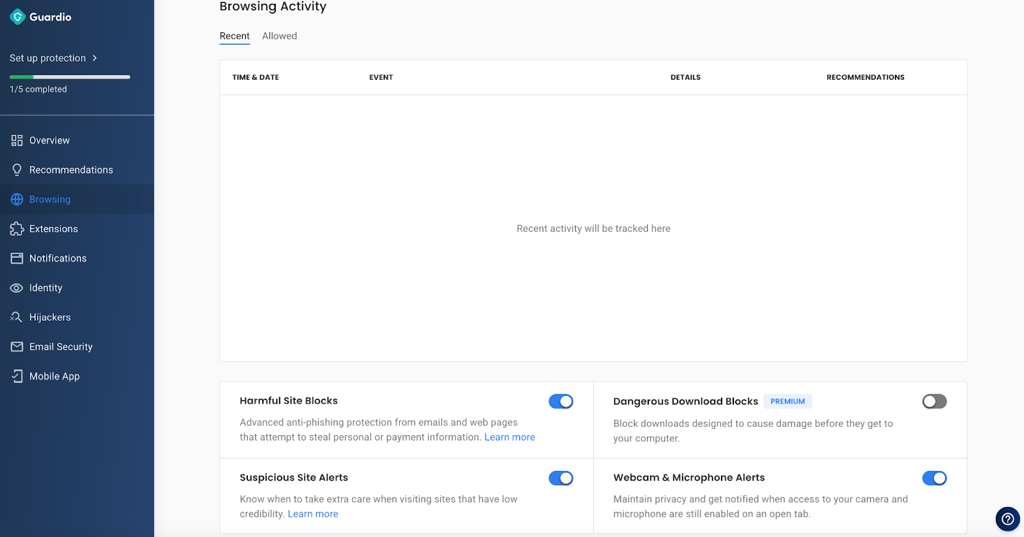
In terms of performance, I didn’t notice slowdowns or annoying pop-ups. The alerts were simple but easy to dismiss. If you spend a lot of time browsing, clicking links, or searching online, Guardio’s real-time protection adds a useful extra line of defense.
Try Guardio antivirus alternative now
5. Identity theft insurance
Guardio includes identity theft insurance with some of its paid plans, but actual coverage varies depending on your region and subscription. During my tests and review, I found that Guardio’s insurance is designed as a backup safety feature rather than a comprehensive identity protection service.
Compared to standalone identity theft protection services, Guardio’s insurance offering is fairly basic in my opinion. However, for users who want an added layer of reassurance alongside their browsing protection, it can be useful when combined with Guardio’s phishing and data monitoring features.
6. Data leak alerts
Data leak alerts were another area where Guardio performed well in real-world testing. The service monitors exposed passwords, email addresses, and personal data linked to known breaches. When I tested with previously compromised email addresses, Guardio detected past leaks and showed clear alerts explaining what data was exposed.
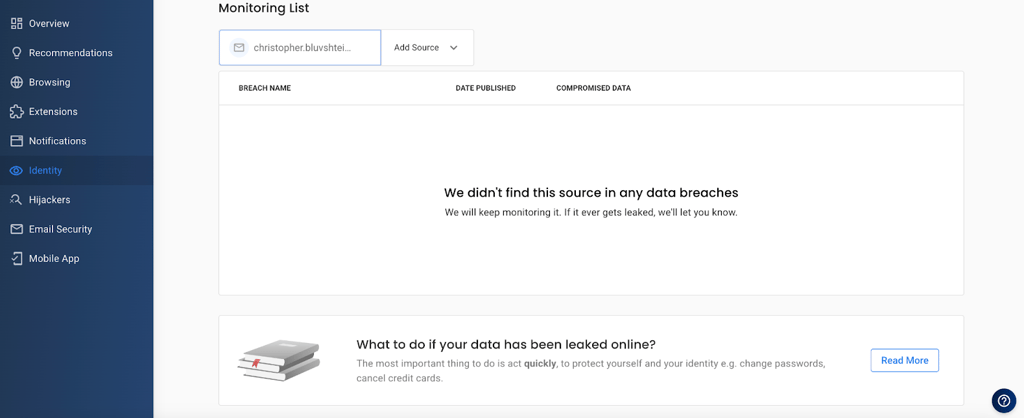
I found it useful that these alerts included guidance on what steps to take next, such as changing passwords or enabling two-factor authentication. While Guardio doesn’t fix the breach itself, the alerts mean that you can fix the problem quickly yourself. If you tend to reuse passwords or manage multiple online accounts, I found these alerts genuinely useful. While similar features exist in other security tools, Guardio’s integration directly into the browser makes the warnings hard to miss.
Testing results by independent experts: AV-Test and AV-Comparatives
While we always look at official antivirus lab tests from AV-Test and AV-Comparatives for any review, there are no current results for Guardio. These labs focus on evaluating desktop and mobile security software and benchmarking their ability to detect, block, and remove malware. Since Guardio is a browser-based security tool that focuses on browser protection and malware prevention, it tends to be left out of independent lab testing.
Additional Guardio features
Guardio includes some additional security features beyond basic browsing protection, phishing detection, and data leak alerts. Many of these are built into the browser add-on to help protect your online activity more thoroughly:
- Malicious download blocking: In addition to warning you about malicious websites, Guardio actively blocks dangerous downloads before they can reach your device. This helps to keep malware from getting onto your device in the first place.
- Malicious browser extension detection: During my tests, I found that Guardio can detect and block malicious extensions or recommend that you remove them if already installed, helping you to avoid keyloggers.
- Email and SMS security filters: Guardio protects email inboxes and text messages by scanning for phishing links and other malicious content that slips past standard spam filters. On iOS, Guardio can automatically filter scam SMS messages into junk folders.
Get TotalAV – the best alternative to Guardio antivirus
Guardio installation process
Getting started with Guardio is straightforward, as it’s designed to work at the browser level rather than as a traditional system-wide antivirus. The setup process is quick on both mobile and desktop, and in my experience, adding the extension took less than ten seconds.
Android and iPhone
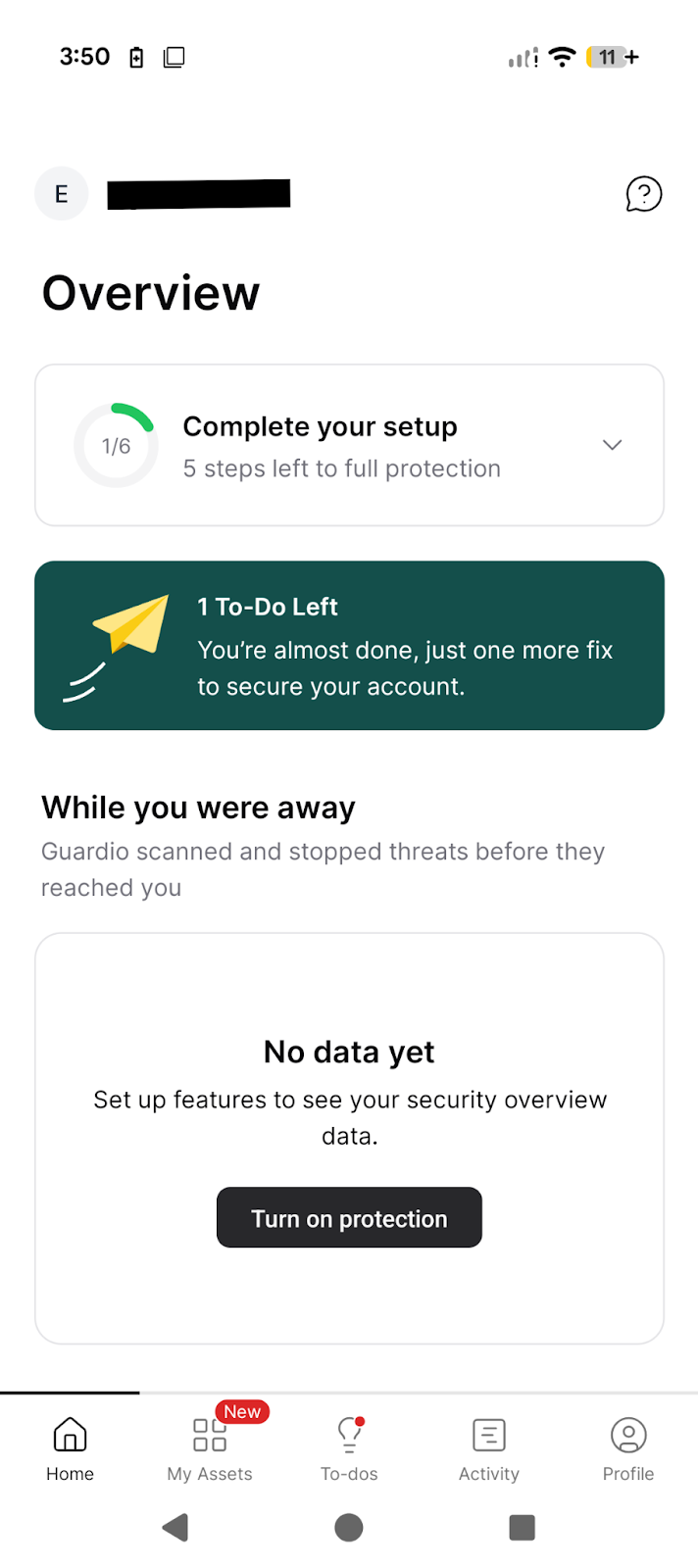
- Download Guardio from the official website. On a mobile device, you can get the dedicated app from the Google Play Store or Apple App Store and follow on-screen prompts to set the app up.
- Create an account and activate Guardio. After installation, I was prompted to create a Guardio account using my email address or to log in. Once logged in, Guardio automatically activates your subscription or offers you a free version if you’d prefer. You have the option to provide a mobile number for breach scanning, but you don’t have to.
- Recommended first steps after installation. After activation, I recommend letting Guardio run its initial security check, as this picks up any security weak points. I also recommend enabling all real-time browsing and phishing protections, and reviewing any alerts or warnings it displays.
Windows and Mac
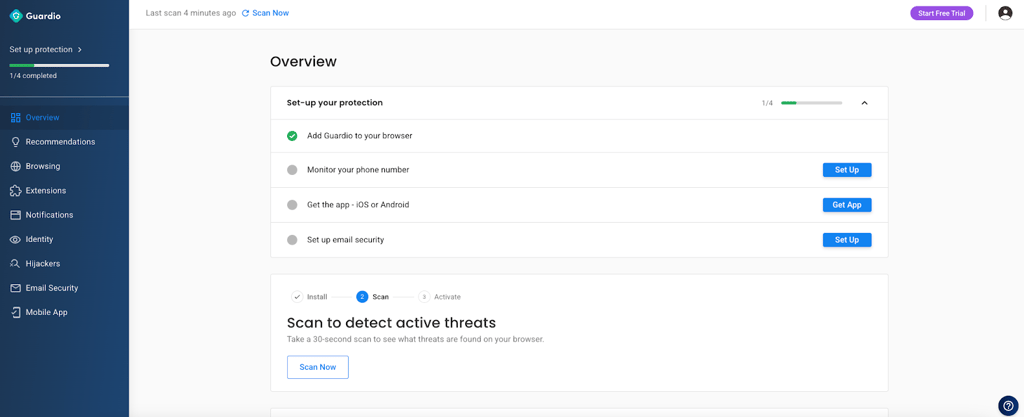
- Install Guardio from the official website. On Windows and macOS, Guardio is installed as a browser extension. You can get it directly from the official Guardio website or from your browser’s extension store, such as Chrome Web Store, Edge Add-ons, Firefox Add-ons, or Safari Extensions.
- Account creation and activation. Once the extension is installed, Guardio will prompt you to sign up or log in. After completing the account setup, the extension activates automatically and connects to your subscription or free trial without requiring additional steps.
- First recommended steps after install. After installation, I suggest that you review Guardio’s dashboard, checking that phishing and malicious site protections are enabled. While Guardio doesn’t run a traditional system scan, enabling real-time protection is key to protecting your device.
Guardio compared to other antivirus software
When choosing security software in 2026, it helps to understand not just what a product does but how it stacks up against traditional antivirus suites. Some tools, like Guardio, focus mainly on browsing protections and online threat prevention, while others offer full-device malware scanning, system-level ransomware defense, and comprehensive endpoint protection. Below, I compare Guardio head-to-head with two major antivirus options to help you decide which approach best fits your needs.
Guardio vs. TotalAV
TotalAV provides comprehensive antivirus protection, including real-time malware detection, ransomware defense, file scanning, and system optimization tools. It’s designed to protect your entire device rather than just your browser activity as Guardio does.
Guardio keeps things simple with a browser extension that focuses on phishing prevention, scam detection, and data leak alerts, but it doesn’t scan files or remove malware.
✅ Choose Guardio if your main concern is phishing, scams, and unsafe websites
✅ Choose TotalAV if you want full-device antivirus protection and better overall value
Try TotalAV for a full-device antivirus protection
Guardio vs. Norton AV
Norton is a full antivirus suite with system-level malware scanning, ransomware protection, firewall tools, and cloud backup. It’s well suited to users who want to secure their entire device, but it can sometimes miss browser-specific threats like malicious extensions or scam pop-ups.
Guardio, by contrast, focuses on preventing threats before they reach your system. It excels at blocking phishing sites, scam links in emails or SMS, and harmful browser extensions, all without deep system access.
✅ Choose Guardio if you want fast, lightweight, browser-first protection
✅ Choose Norton if you need full antivirus and firewall control across your OS
Try Norton Antivirus for full antivirus and firewall control
User reviews and complaints about Guardio antivirus
User feedback for Guardio tends to be generally positive, with many users liking it for its web protection features. However, it also attracts some critical feedback. On Trustpilot, Guardio has mostly favorable scores, with many reviewers referring to its ability to block scam sites and phishing links effectively. This mirrors my experience in in-house tests.
| Website | Apple App Store | Google Play Store | TrustPilot |
| Guardio review | 4.8 ⭐⭐⭐⭐⭐ | 4.1 ⭐⭐⭐⭐ | 4.4 ⭐⭐⭐⭐ |
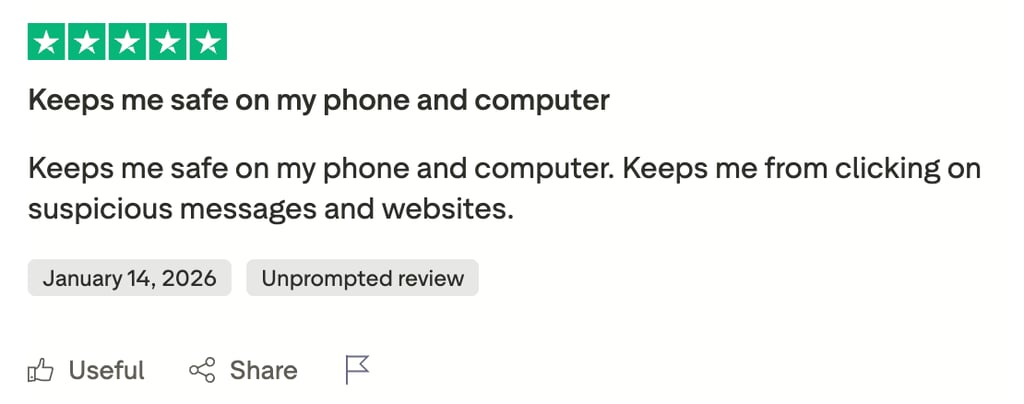
Positive reviewers overwhelmingly praise Guardio’s anti-phishing and malicious website blocking features, particularly among older users who are more commonly susceptible to such scams. I was impressed with Guardio’s ability to detect and block malicious sites during my tests, so this is one area in which it excels.
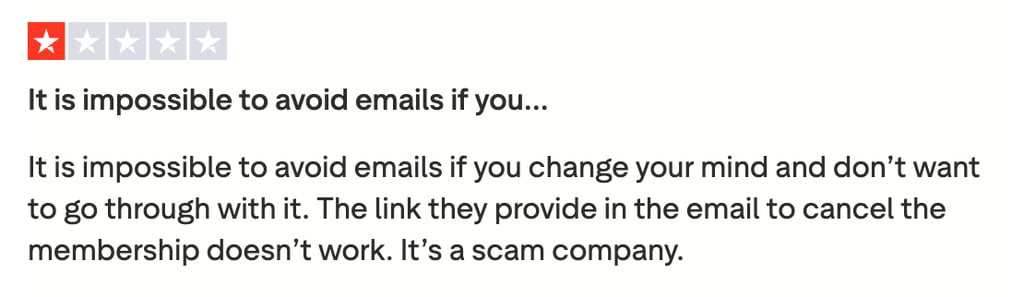
The only negative reviews I’ve seen tend to focus on issues with cancellation and auto-renewal. However, during my tests, I subscribed to the Individual plan for testing purposes, and I was able to avoid future charges and get a refund by cancelling through my account. Guardio also offers a 7-day free trial and 30-day money-back guarantee to ensure there’s time to change your mind.
Final verdict: Is Guardio worth the money?
In 2026, Guardio is worth using only if you specifically want browser-level protection against phishing, scams, and malicious websites. It’s easy to use and reliable for stopping web-based threats, but its high price and lack of full system malware scanning mean it won’t suit you if you’re looking for total device protection. If you need full antivirus coverage, ransomware protection, and file scanning, Guardio will feel limited.
For a more complete and better-value option, I recommend TotalAV as the stronger choice. It offers full device protection, real-time malware detection, and robust web security across all major platforms, making it the better all-around antivirus in 2026.
![Norton weekly deals logo [IN USE]](https://media.vpnpro.com/Norton.png)
![Bitdefender weekly deals logo [IN USE]](https://media.vpnpro.com/Bitdefender.png)
FAQ
What is Guardio antivirus?
Guardio is a browser-based antivirus and online security tool that protects you from phishing attacks, malicious websites, scams, and data leaks in real time. Unlike traditional antivirus software, it focuses on preventing threats in the browser rather than scanning files on your device. Based on my tests, it’s best suited for users who want proactive web protection and safer everyday internet use.
Is Guardio a legit antivirus?
Yes, Guardio is a legit product, but it isn’t a traditional antivirus in that it’s a browser protection extension that helps block phishing, malicious sites, and scam downloads. While effective at preventing web-based threats, I found that Guardio doesn’t scan your system for viruses or remove malware.
Is Guardio a free antivirus?
Yes, Guardio offers a completely free version, but there are also paid plans ranging from $4.67/month to $131.88/month. The free version offers more limited features, including basic browser protection and a limited security scan. For full access, you’d need to subscribe to one of the premium tiers.
How much does Guardio antivirus cost?
Guardio costs $4.67/member for the Family plan, $7.67/member for the Duo plan, or $9.99/member for the individual plan when you subscribe for a year-long plan. There is also a Free tier for a single user, though it only includes basic browser protection and a simple security scan.
What are the cons of using Guardio?
During my in-house tests, I found that the main drawback of Guardio was a lack of on-demand system-level malware scanning. Guardio also charges a much higher price than many traditional antivirus brands that offer more in-depth protection, and Guardio lacks true ransomware protection, too.
Does Guardio work on mobile devices?
Yes, Guardio works on mobile devices, but its protection is via supported mobile browsers rather than as a standalone app. You can install Guardio’s extension on compatible browsers, like Chrome or Safari, on Android and iOS. However, because it’s browser-based, it won’t offer system-wide protection outside the browser, such as a full mobile antivirus scanner.

- How Much Does Guardio Cost?
- How we test and rate antivirus software
- Is Guardio antivirus safe: In-house testing results
- Testing results by independent experts: AV-Test and AV-Comparatives
- Additional Guardio features
- Guardio installation process
- Guardio compared to other antivirus software
- User reviews and complaints about Guardio antivirus
- Final verdict: Is Guardio worth the money?
- FAQ
