AVG antivirus review 2026
 Good antivirus solution
Short summary: AVG Antivirus performs strongly in independent lab tests, earning top protection scores from AV-Test and Advanced+ awards from AV-Comparatives, with malware detection rates around 99.3%. However, AVG showed higher-than-average system impact when running scans, found occasional false positives, and displayed intrusive upsell prompts.


AVG antivirus is a good security suite compatible with Windows, macOS, Android, and iOS, protecting devices against viruses, malware, and ransomware. The antivirus also offers web protection, a firewall, and optional identity and breach alerts in premium tiers.
However, while preparing our AVG antivirus review, we encountered some false positives during our in-house tests and observed intrusive ads and upselling prompts. Additionally, since Avast acquired AVG, concerns have been raised about the handling of user data in terms of privacy.
For a well-rounded review, we evaluated AVG’s malware detection, false positives, performance impact, web defense, and cross-device behavior on available OSs.
| AVG antivirus pros: | AVG antivirus cons: |
| ✅ High malware detection | ❌ Occasional false positives |
| ✅ Cross-platform support | ❌ Upselling and ads in the free version |
| ✅ Web and real-time protection | ❌ Limited advanced privacy tools |
| ✅ Low performance impact | ❌ Somewhat outdated app designs |
Quick verdict: AVG delivers comparatively strong protection. However, it shows high system impact during scans, displays upsell prompts, and lacks a richer feature set compared to premium antivirus software.

How we test and rate antivirus programs
We test and review every antivirus software based on our in-house testing methods, as well as comparing our findings with those of independent AV testing labs, such as AV-Comparatives and AV-Test. Our primary goal is to determine the accuracy of antivirus software in detecting malware; however, we also evaluate its performance impact, compatibility, price, offered features, and other relevant parameters. Our testing is formulated to check every aspect of each antivirus software, so that you would get a truly well-rounded, in-depth, and unbiased review.
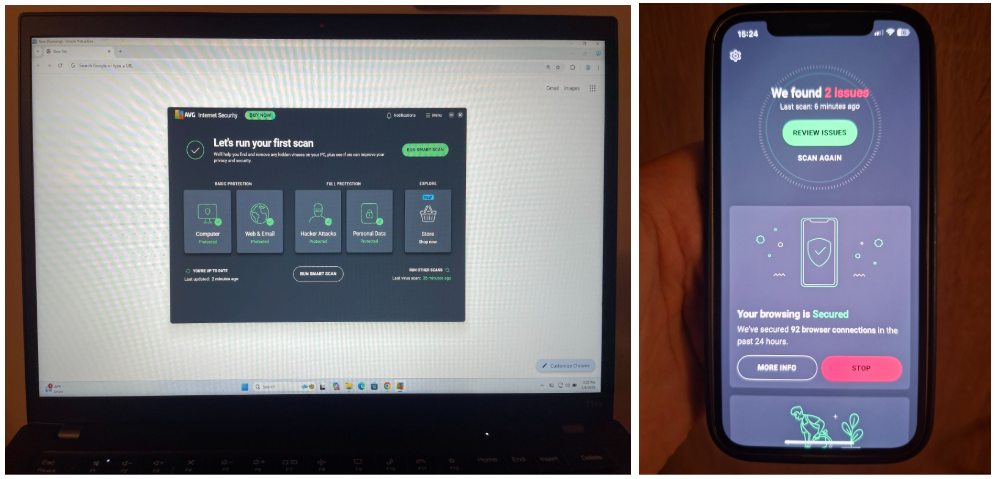
We download and test different available suites for each antivirus software, including the free version if available, as well as one with the most features we can try out. We use various devices operating on different OSs and run each software on real-life scenarios. Ultimately, this allows us to evaluate the software from a real-life user's perspective, and our reviews reflect both the results obtained in lab-like environment testing and the everyday cyberthreats.
We tested AVG antivirus on January 6, 2026, giving a score of 4.1/10.
Although AVG consistently shows relatively high malware detection rates of around 99%, it comes with caveats. For one, AVG offers a limited feature choice even in its Ultimate package, and the scans take a lot of system resources while running. Additionally, AVG’s parent company, Avast, has been involved in a data privacy scandal for collecting and selling some user data to third-party marketing agents. While AVG performs its primary job well, some users may find its privacy policy concerning. If you’d rather get an antivirus software with an iron-clad privacy policy and even higher malware detection rates, I can recommend TotalAV.
AVG antivirus prices and plans
In the table below, I’ve listed the three core AVG plans – AVG AntiVirus Free, AVG Internet Security, and AVG Ultimate – and compared their initial prices, renewal prices, and the features included in each plan.
Please note that these AVG plan prices are applicable to users in the US. Other regions may have different prices.
| AVG antivirus plan | AVG AntiVirus Free | AVG Internet Security | AVG Ultimate |
| Starting price | $0.00/year | $39.99/year | $59.99/year |
| Renewal price | - | $99.99/year | $149.99/year |
| Devices | 1 | 1 to 10 | 10 |
| Operating software | Windows, Android, macOS, iOS | Windows, Android, macOS, iOS | Windows, Android, macOS, iOS |
| Wi-Fi network security | ❌ | ✅ | ✅ |
| Ransomware protection | ✅ (basic) | ✅ | ✅ |
| Real-time malware protection | ✅ | ✅ | ✅ |
| Web & phishing protection | ✅ (basic) | ✅ | ✅ |
| Enhanced firewall | ❌ | ✅ | ✅ |
| Unlimited VPN | ❌ | ❌ | ✅ |
| Anti-tracker | ❌ | ❌ | ✅ |
As you can see in the table, AVG offers a completely free version, called AVG AntiVirus Free. While this version includes basic features, such as real-time malware and phishing protection, it does not offer much more. So, choose it only if you want the complete basic protection.
The AVG Internet Security plan starts at $39.99/year and includes all the features of the free version, as well as Wi-Fi network security, an enhanced firewall, and ransomware protection.
The AVG Ultimate plan starts at $59.99/year and covers all features in the Internet Security plans, adding unlimited VPN and anti-tracking protection on top.
Overall, AVG prices are above average, and some antivirus brands, such as TotalAV, offer cheaper plans, starting from $19.00/year with more well-rounded feature sets.
Protect your device with AVG today
How good is AVG antivirus free?
The AVG AntiVirus Free is a good choice for users who want basic protection. The plan includes essential features such as malware detection, real-time scanning, and simplistic web & phishing protection, which scans and blocks malicious URLs and websites. The AVG AntiVirus Free is easy to use and works across all major platforms, including Windows, Android, macOS, and iOS.
That said, the AVG AntiVirus Free is not the best choice for comprehensive online security. The plan lacks advanced phishing protection, advanced privacy tools, and features such as a firewall, VPN, or identity monitoring. Ultimately, it’s mostly suitable for basic malware defense, but if you want a more well-rounded approach, then paid AVG plans or free antivirus software offered by competitors might be a better option for you.
Is AVG antivirus safe? In-house testing results
The strongest AVG antivirus feature is malware detection, which consistently scores above 99% in independent antivirus testing labs. Additionally, AVG includes such security-enhancing features as ransomware and phishing protection, a Secure VPN, and an Enhanced Firewall in its top-tier plans. However, AVG does not offer as extensive a feature set as some of its competitors, which are further brought down by privacy concerns and annoying upselling in the free version.
Here’s what AVG antivirus has to offer:
Malware and virus scans
AVG offers three different scan types, which can be used depending on your specific needs:
- The Quick Scan checks common malware locations. This is the fastest scan, which usually runs under a minute, but is not as thorough as the full system scan.
- The Full Scan checks the entire system, picking deep-hidden malware. This scan takes much longer than the Quick Scan and, in our tests, ran up to 35 minutes.
- The Custom Scan is most useful for checking specific locations, such as files or folders. The AVG Custom Scan also supports boot-time scans and scans of removable drives. The run time of such scans depends on the location you're targeting and can take anywhere from seconds to several minutes to complete.
Our in-house test results did not closely match those of independent testing labs, such as AV-Comparatives and AV-Test. Ultimately, AVG showed a malware detection accuracy rate of around 90%, while independent lab test results are much higher, at around 99.3% to 99.6%. Additionally, we encountered occasional false positives, so that's something to keep in mind when using AVG.
Our tests also showed that the AVG Quick Scans are very fast as well as unimpactful to the system's CPU and memory. That said, the Full Scan takes up significantly more resources. For example, the Full Scan ran for 25 minutes, scanned 92k folders and 650K files (100GB of data), and detected 9/10 prepared malware samples or 90% of threats. It did show one false positive, which was legit VPN software. The CPU load was fluctuating between 55% and 100% throughout the whole scanning process.
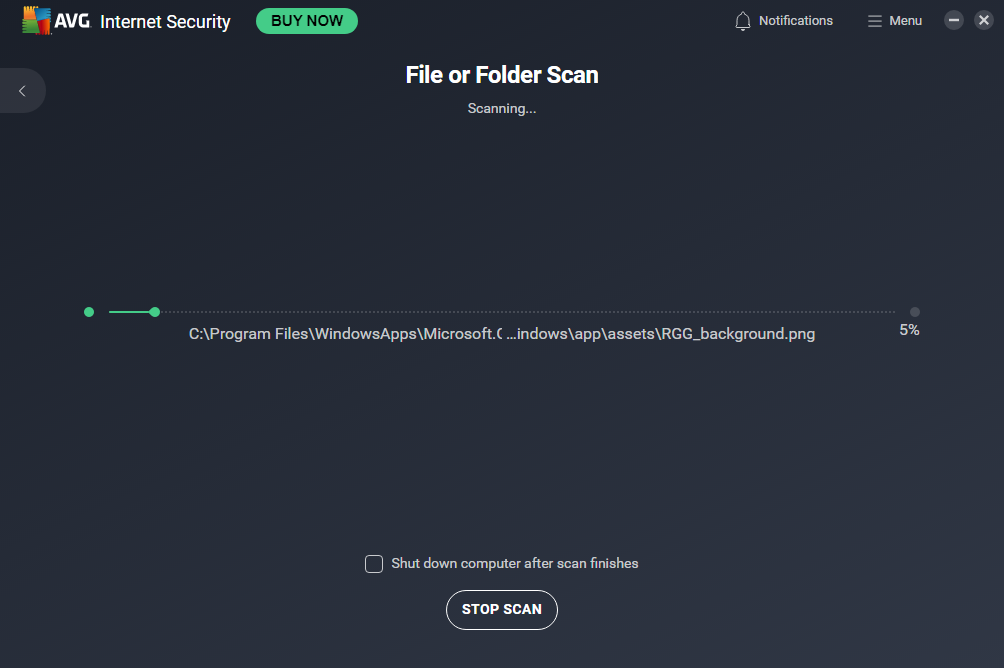
Compared to competitors, AVG's scans are more impactful on the device system and not as accurate as those of top antivirus software, such as TotalAV or Bitdefender. Additionally, AVG shows a significantly higher number of false positives and is less effective against advanced malware, such as malicious scripts or fileless attacks, compared to the best providers.
Overall, AVG is good for basic malware protection, but it is less effective in handling edge cases and deeply embedded malware. Additionally, the scans might render your device unusable when running, due to high CPU and memory usage.
Phishing protection
AVG’s phishing protection consists of Web Shield and Email Shield features. Web Shield works by scanning web traffic, including HTTPS sites, and blocking known malicious or phishing URLs before they load in your browser. Email Shield works by scanning email attachments – if it finds anything suspicious, it warns you and quarantines all potentially dangerous files. And although it is not included in any AVG package, you can also download the AVG Online Security browser extension, which flags unsafe sites in search results.
In our in-house phishing protection efficiency tests, AVG performed quite well, blocking around 99% of verified phishing samples and malicious URLs. This meets industry standards, as AVG has received certification for blocking phishing URLs from AV-Comparatives.
However, AVG still lacks a dedicated phishing approach, such as you can find with TotalAV, instead relying on different features to recognize and neutralize known phishing files and sites. Additionally, the AVG Online Security browser extension sometimes incorrectly marks safe sites as neutral, rather than identifying them as risky.
Ransomware protection
AVG’s ransomware protection is only available in its paid plans, such as AVG Internet Security and AVG Ultimate, and is not included in the AV AntiVirus Free plan. The ransomware protection allows you to select specific folders or files that you want to protect against unauthorized access, thereby preventing encryption or modification. If an unknown app attempts to modify the protected files, the software alerts you, allowing you to block the action if necessary.

AVG’s ransomware protection setup is very simple – all you have to do is open the Ransomware protection panel in your AVG app and select the folders or files you want to add. This way, the feature can be easily used by first-timers.
To test the AVG Ransomware Protection efficiency, we did simulated tests. In them, we ran controlled ransomware samples in a safe environment to check if AVG can stop the malware from encrypting protected folders and files. At the same time, we also monitored alerts and system behavior while running the tests. Ultimately, we got results showing mixed effectiveness. While AVG managed to protect selected folders, it failed to prevent the ransomware sample we used from encrypting many files outside these folders.
AVG’s ransomware protection is a useful tool to enhance your device’s security, but bear in mind it will only protect the files and folders you select, leaving others vulnerable to unauthorized encryption and modification. For optimal protection, ensure that real-time malware blocking is always enabled.
Enhanced firewall
AVG’s Enhanced Firewall is included in the two paid plans – Internet Security and Ultimate – and is not available with the Free plan. Typically, a firewall operates by monitoring both incoming and outgoing traffic, blocking any attempts at unauthorized access and network-based attacks. In AVG’s case, the firewall also adds leak protection, port scan alerts, and ARP spoofing alerts.
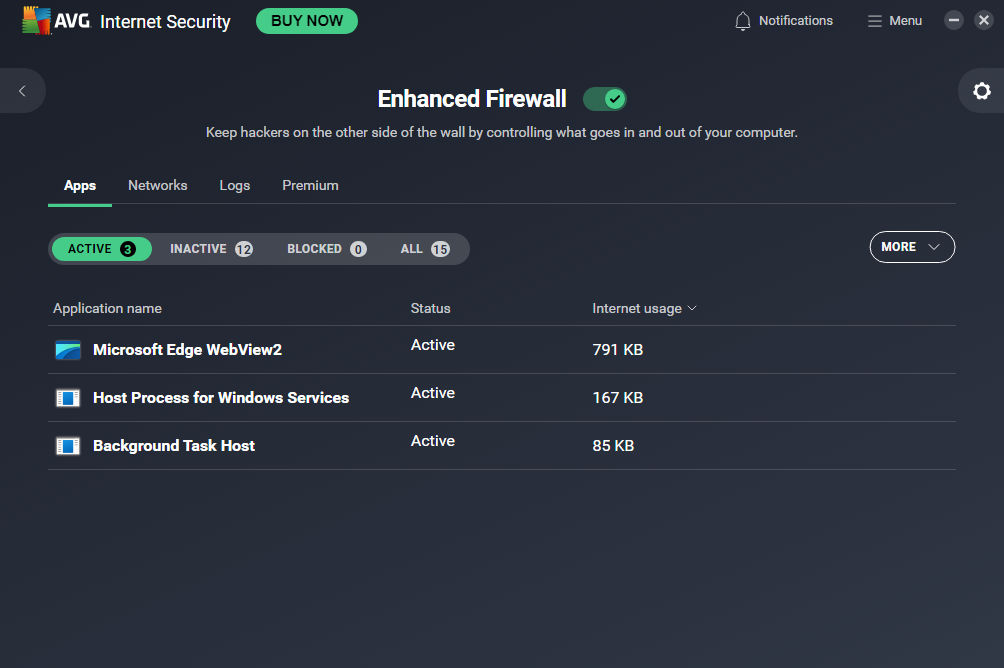
AVG’s Enhanced Firewall works by default – new users don’t have to set it up manually and can rely on sensible preset rules to defend their devices. However, advanced users can also fine-tune the firewall to their specific needs through detailed settings, such as rules, profiles, and application permissions.
Overall, AVG’s firewall is great for everyday casual use, but it also lacks the deep customization and logging features offered by some antivirus software competitors.
Secure VPN
AVG Secure VPN is only available with the AVG Ultimate plan; however, it can be purchased as a standalone product if you wish to add it to your current plan. The AVG VPN includes all basic features, such as AES-256 encryption and secure tunneling protocols like OpenVPN, and provides protection for public Wi-Fi connections.
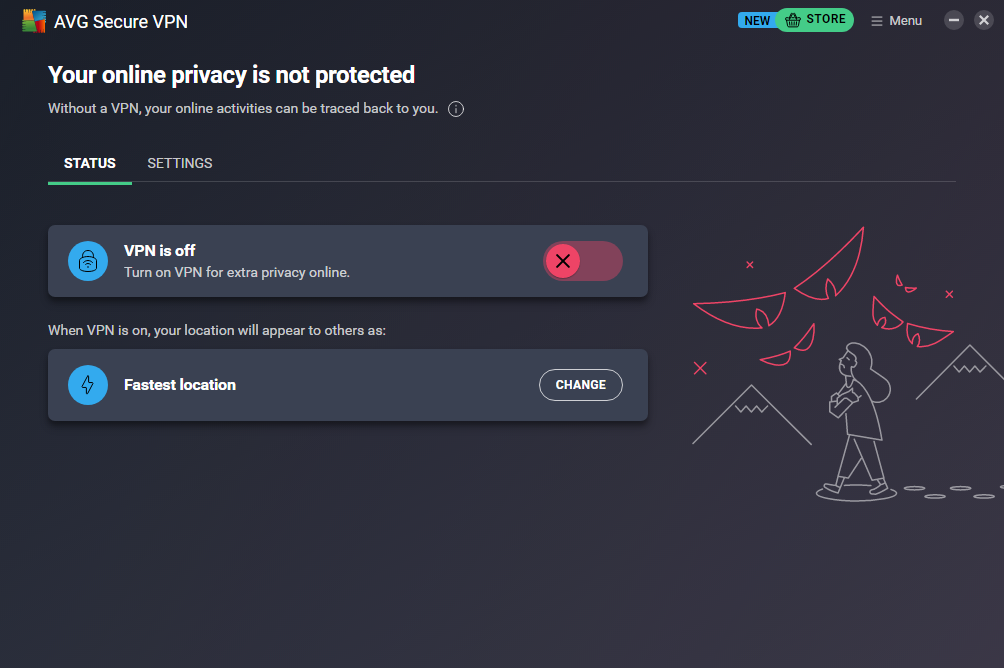
During our in-house tests, we found that AVG VPN offers decent connection speeds for casual browsing, but it might be too slow for high-quality streaming. Additionally, AVG VPN’s server fleet is quite minimal, and there aren’t many advanced features to choose from. Geo-restriction bypassing with AVG VPN is more of a chance than a given. Lastly, the service logs connection data, which may be an issue for privacy-conscious users.
Overall, AVG VPN is safe, but mostly useful for basic network traffic encryption and public Wi-Fi safety; however, its usability, speeds, and efficiency are nowhere near the top VPN providers. So, if you’re looking for an antivirus software that includes a VPN with faster connection speeds, a bigger server fleet, and more consistent geo-unblocking capabilities, I suggest choosing TotalAV, which includes a reliable VPN service.
Enhance your digital security with AVG antivirus
Testing results by independent experts: AV-Test and AV-Comparatives
AV-Test and AV-Comparatives are independent antivirus software testing labs that test the most popular antivirus software more than once a year. The tests include such parameters as protection level, usability, and performance. Once the reviews are complete, each software receives a score, making it easy to compare with competitors or gain a general, unbiased idea of its effectiveness. We always compare our in-house test results with those of independent laboratories for a comprehensive evaluation.
AV-Test last reviewed AVG in September through October 2025, ultimately granting it a 6/6 score for protection, 5.5/6 for performance, and 6/6 for usability. The effectiveness against zero-day malware ranged from 99.3% to 99.8%, while the detection rate of known threats achieved a 100% accuracy score. As for performance, AVG did show a higher-than-average percentage of slowing down the system during website launch and while using certain types of software. As for usability, AVG did not display any false positives during scans and website visits, according to the AV-Test review.
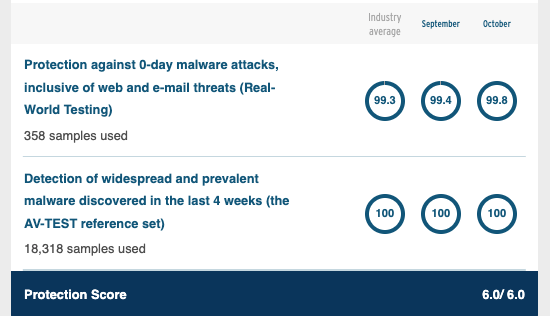
I found a similar situation while reviewing the latest AVG report from AV-Comparatives. This lab primarily focuses on real-world protection, malware protection, and performance, all of which achieved a 100% effectiveness score.
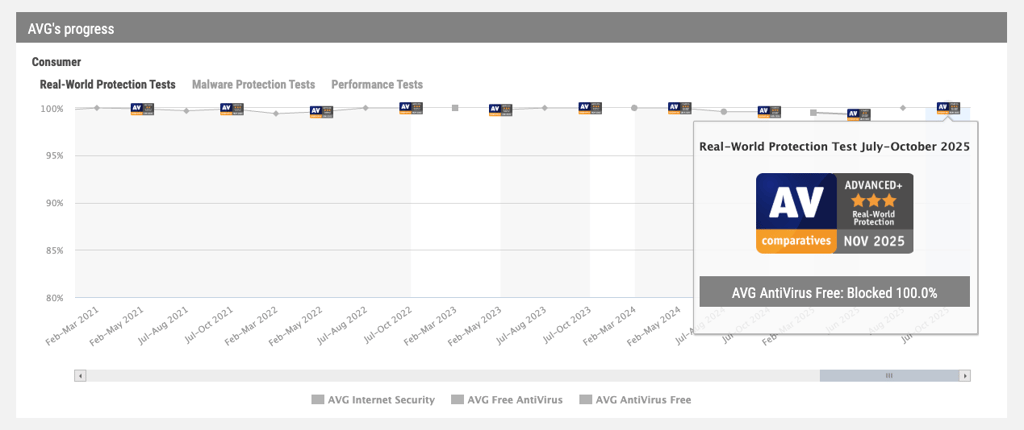
That said, you should remember that independent AV testing labs typically use secure environments for their testing, which may not always reflect the experience a regular user might encounter. That’s why our own in-house tests showed lower malware detection rates, as well as generating false positives, and experiencing the impact on the device system in a much more tangible way.
Get reliable protection with AVG antivirus
Other AVG antivirus security features
In addition to the core malware, firewall, and ransomware protection features, AVG includes several extra features:
- Behavior Shield. This feature monitors for unusual app behavior in real-time, blocking suspicious activity before a typical antivirus recognition approach can catch it. Behavior Shield is useful against zero-day threats.
- File Shredder. Permanently deleted files beyond recovery, which is helpful in disposing of sensitive data.
- Vulnerability Scanner. Scans the system and installs software for any missing patches or outdated apps. The Vulnerability Scanner is a valuable tool to enhance your system’s defenses against cyber threats.
- Rescue Disk. Allows users to create a bootable recovery drive to remove malware from unbootable systems.
- Sensitive Data Shield. Scans and protects private document types, such as PDF, DOC, and TXT, from unauthorized access.
- Remote Access Shield. Works by blocking remote connections to your device.
- Fake Website Shield. Prevents visits to fraudulent sites designed for phishing or data theft.
These extra AVG features are not available in the Free AVG plan. However, some of their actual usefulness is doubtful, as good real-time malware, ransomware, and web protection usually works just as well in place of these features.
My experience using AVG antivirus on different devices
My experience using AVG across Windows, Android, macOS, and iOS was straightforward and consistent. I liked the unified menus and simple installation, which made setup easy on every platform. The Windows and macOS apps have almost identical interfaces and feature layouts. On mobile, Android includes extras like a Wi-Fi checker and network inspector, while the iOS app is more limited, as expected for iOS antivirus apps. You may encounter occasional pop-ups or upsell prompts, but overall navigation and feel remain consistent across OSs.
Ease of use and setup
AVG is generally easy to install and navigate, with a clean dashboard and automatic setup. This makes AVG beginner- or first-time user-friendly. During installation, you may encounter some upsell prompts, but they do not disturb the process.

Here’s how to install AVG on your device:
- Download AVG from the official website at avg.com, or search for the app in the Google Play Store or Apple App Store for mobile devices.
- Launch the installer and accept the license terms. The setup runs automatically with minimal input required.
- Select and purchase your plan (Free, Internet Security, Ultimate, or a trial). This can be done during or after installation.
- Allow AVG to update its virus definitions for up-to-date protection.
- Run a scan to remove malware from your device.
You can also create an AVG account through the official website. While this step is optional, it is helpful for managing subscriptions and multiple devices.
Once you’ve installed AVG, I recommend running an initial full system scan, checking if real-time and web protections are enabled, and reviewing initial security settings to ensure they meet your requirements.
AVG app review for Android and iPhone
Both the Android and iOS AVG apps appear very similar, but the Android version is more feature-rich and offers a higher protection level than the iOS app.
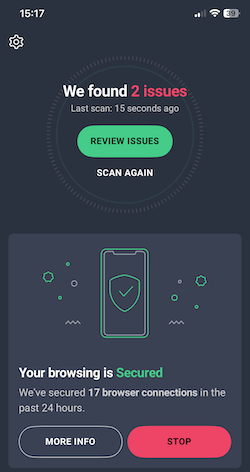
AVG’s Android app offers a well-rounded mobile protection solution, featuring malware scanning, web protection with malicious URL blocking, Wi-Fi network checks, identity and photo vault features, and an optional VPN with top-tier plans. Overall, I found the Android app easy to navigate, with clear menus and quick access to scans. However, I did experience occasional battery usage spikes, some false positives, and upsell prompts.
AVG’s iOS app, however, cannot perform deep system scans due to the iOS architecture and restrictions. It primarily focuses on web protection, identity breach alerts, Wi-Fi security, a photo vault, and other optional tools. The app interface is simple, and unlike Android, I did not experience battery usage spikes. That said, since it lacks most security features, the AVG iOS app is more of a privacy tool than an antivirus suite.
Overall, I found AVG’s mobile apps to be light and efficient, despite a slight impact on battery life when running scans. Additionally, I found user reports indicating that the app may experience lag on older devices.
Protect your smartphone with AVG antivirus
AVG app review for Windows and Mac
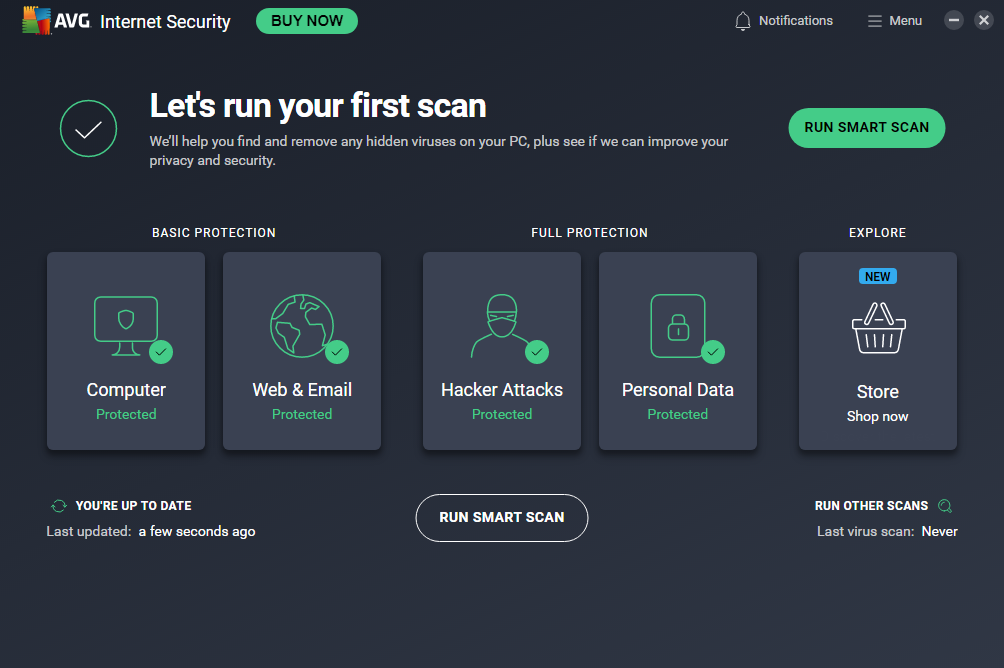
AVG offers a clean dashboard for both Windows and macOS, which is easy to navigate, even for first-time users. The key functions, such as scans, updates, firewall, ransomware protection, and a few others, are displayed on the main screen, and it also shows the protection status. On Windows, the app feels slightly more intuitive, while the Mac version is simpler with fewer advanced features. Similar to the mobile apps, I encountered occasional upsell prompts.
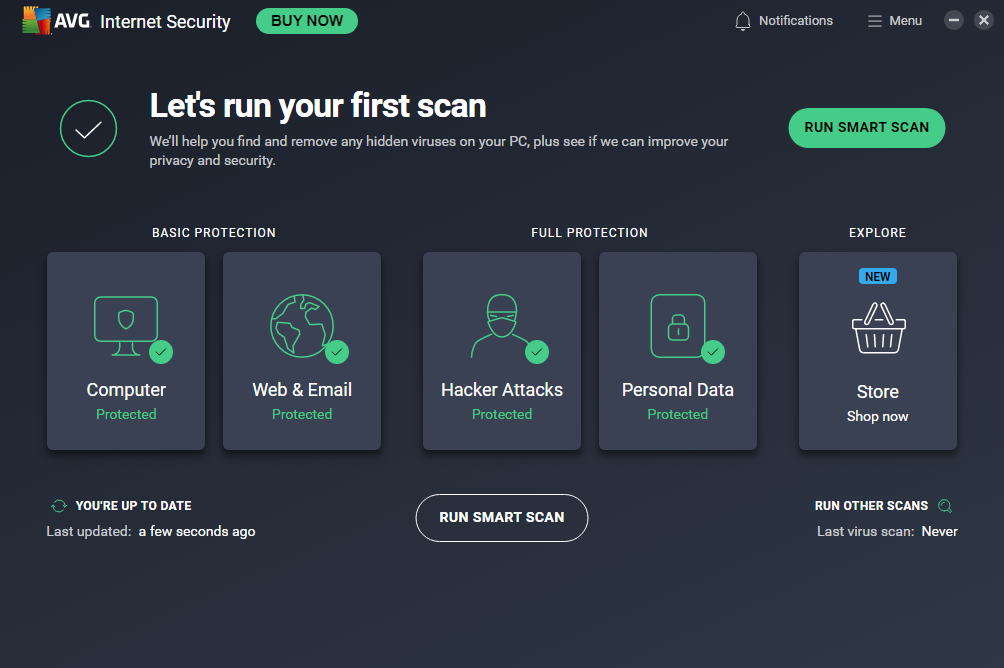
Scans, including the Quick, Full, and Custom, run efficiently on both platforms. I found that Full scans are complete in a reasonable time, taking 25- 35 minutes to finish. However, CPU load jumped between 55% and 100% throughout the whole scanning process, which made my device unusable at times.
As usual, the Windows AVG version has more features and includes Enhanced Firewall and full system shields. On Mac, some advanced features, such as phishing shields or firewall controls, are more limited, but core protections remain solid.
Overall, the AVG Windows app offers more features and a slightly more polished look, while the Mac version ensures robust basic protection but with a simpler feature set.
Secure your laptop with AVG antivirus
AVG compared to other antivirus software
While AVG offers decent malware detection capabilities and essential protections, it is always a good idea to compare any antivirus software with its competitors before making a choice. Below, you’ll find a compact table comparing AVG with some of the top AV software:
| Antivirus Software | Protection | Features | Price and user-friendliness |
| AVG | Good | Good core selection plus some extras | From $39.99/year; moderately easy to use |
| TotalAV | Excellent | Includes many bundled extras | From $19.00/year; very user-friendly |
| Bitdefender | Excellent | Very feature-rich | From $12.99/year; broader tool availability requires some knowledge to use |
AVG is an overall good choice with reliable malware detection and some extra features; however, neither the feature set nor effectiveness is as polished as with the top AV software. Bitdefender generally wins for protection, earning near-perfect lab results and deep threat defenses. Bitdefender also offers more built-in tools across its plans and excels in phishing, ransomware, and exploit prevention. TotalAV offers a user-friendly interface, competitive pricing, and excellent malware protection rates. Ultimately, TotalAV might be the top choice for a majority of users who look for an effective, yet uncomplicated and inexpensive security solution.
User reviews and complaints about AVG antivirus
For a full AVG evaluation, I also looked at what actual AVG users have to say about the software and the brand. I checked reviews and rankings on Trustpilot, the Apple App Store, and the Google Play Store. The overall AVG rank score varied from 4.5 to 4.8 out of 5, with positive reviews noting the reliability, ease-of-use, and protection level of the software. Meanwhile, the negative reviews mostly complained about aggressive upselling tactics, the AVG antivirus software being prone to crashing, and not being helpful in eliminating persistent malware.
Here’s how AVG ranking stands in Trustpilot, Apple App Store, and Google Play Store:
| Website | Trustpilot | Apple App Store | Google Play Store |
| AVG score | ⭐4.5 | ⭐ 4.8 | ⭐ 4.6 |
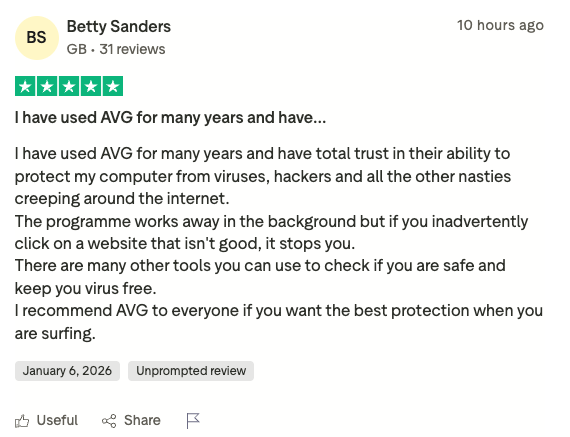
For a more detailed look, I read reviews on Trustpilot. For example, this positive review praises AVG’s reliability while also appreciating its web security performance.
That said, there are also plenty of disappointed users who mostly note the aggressive upselling and feeling unsafe while using the software. Additionally, some people found AVG’s customer service to be quite poor, while others complained about the apps being prone to crashing.
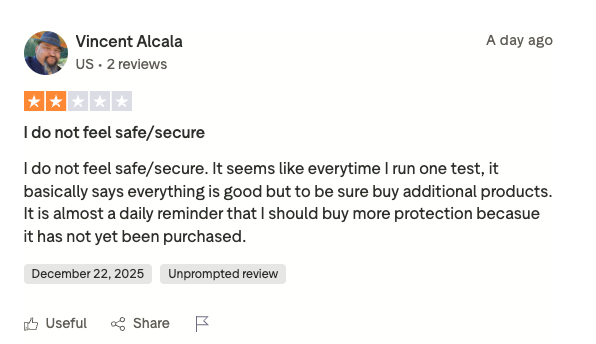
Overall, these negative and positive AVG reviews on Trustpilot give a good outlook on the pros and cons real-life users experience when using the software. Keep it in mind when making the ultimate choice.
Get well-reviewed AVG antivirus for your device
Final Verdict: Is AVG Antivirus a Good Choice?
AVG is a decent everyday antivirus for users who want simple software and basic protection. While independent labs report malware detection rates around 99%, our in-house testing reached closer to 90%. Its feature set covers the basics well, but doesn’t offer anything truly unique or innovative.
If you want top-tier protection with lower system impact, fewer false positives, and less aggressive upselling, there are stronger alternatives. TotalAV stands out as a better option, offering higher detection rates, a more user-friendly interface, a broader feature set, and lower performance impact.
AVG is also affected by privacy concerns. Its parent company, Avast, was previously linked to selling browsing data through Jumpshot. Although this subsidiary was closed, it still raises trust questions.
In terms of value, AVG is mid-priced, but many premium features are locked behind higher tiers, which gives you less value for your money. Overall, our AVG review concluded that AVG is acceptable for casual use, but power users should look elsewhere.

![Norton weekly deals logo [IN USE]](https://media.vpnpro.com/Norton.png)
![Bitdefender weekly deals logo [IN USE]](https://media.vpnpro.com/Bitdefender.png)
FAQ
Is AVG antivirus legit?
Yes, AVG antivirus is a legitimate product with around 35 years of experience in the cybersecurity field. AVG provides users with good basic malware protection and offers a completely free version. However, it is not as efficient as top-rated antivirus software and is tied to privacy concerns after it has been purchased by Avast.
Is AVG antivirus good?
Yes, AVG is a good antivirus if you’re looking for decent basic protection. AVG includes features like real-time and ransomware protection, as well as web security. However, its malware detection rates are not as high as some of its competitors, and if you’re looking for a more robust cybersecurity approach, I can recommend TotalAV.
How much does AVG antivirus cost?
AVG antivirus costs from $39.99/year to $59.99/year, depending on the plan you choose. The cheapest plan is the AVG Internet Security, which is priced at $39.99/year. It includes malware and ransomware protection, web security, an Enhanced Firewall, and some additional features. The top-tier AVG plan, the Ultimate, is priced at $59.99/year and includes everything from the Internet Security Plan, plus adds a Secure VPN and optional identity protection tools. AVG also offers a free plan, called the AntiVirus Free, which includes only the basic protections.
Is AVG free actually free?
Yes, AVG Free is actually free. The plan is called the AntiVirus Free and includes basic protections, such as real-time malware protection and web security. For a more well-rounded approach, you may want to consider AVG’s paid plans.
How long does AVG free antivirus last?
AVG free antivirus software lasts for 12 months; after the period, it automatically renews for free for another 12 months. However, the free version is quite aggressive with upselling, and you may encounter frequent pop-ups suggesting an upgrade.
What are AVG’s best features?
AVG’s best features include real-time malware and ransomware protection, web security tools, and Secure VPN. That said, AVG does not offer any unique features, and its overall set is not as extensive as its competitors. Additionally, the scans might use a lot of system resources, and you may encounter quite a few upsell prompts.

- How we test and rate antivirus programs
- AVG antivirus prices and plans
- How good is AVG antivirus free?
- Is AVG antivirus safe? In-house testing results
- Testing results by independent experts: AV-Test and AV-Comparatives
- Other AVG antivirus security features
- My experience using AVG antivirus on different devices
- AVG compared to other antivirus software
- Final Verdict: Is AVG Antivirus a Good Choice?
- FAQ