Where to watch the 2026 World Cup live online: complete streaming guide

You can watch the 2026 World Cup online free through several different broadcasters worldwide, but coverage depends on local streaming rights. Some countries, like the UK and Australia, offer full World Cup tournament coverage for free via platforms such as BBC iPlayer, ITVX, and SBS On Demand. Meanwhile, other countries may only show selected matches for free, depending on broadcaster agreements and local schedules.
The catch is that most free World Cup live streaming services are geo-restricted, so they only work inside the country where the broadcaster owns the rights. So if you’re abroad, you will need a VPN to get around geo-blocks and watch World Cup online for free through the official broadcaster.
🏷️ LIMITED OFFER: NordVPN deal! Get 75% OFF NordVPN + 3 months FREE 🏷️
How to watch the World Cup online for free
- Get a reliable VPN for free World Cup streams. I recommend NordVPN due to its fast speeds, strong unblocking, and servers in countries with free coverage.
- Connect to a VPN server in a country with free World Cup coverage, like the UK or Australia.
- Go to the official streaming site, such as BBC iPlayer, ITVX, or SBS On Demand.
- Create a free account if the platform asks for one.
- Open the live match stream and watch the 2026 World Cup online for free.
Where to watch World Cup 2026 online
Several countries offer free World Cup live streaming through official national broadcasters. For instance, if you want English commentary, then the UK and Australia are the strongest options, since both regions provide full coverage via platforms like BBC iPlayer, ITVX, and SBS On Demand.
Here are the main official services where you can watch World Cup 2026 online for free:
- Australia (English): SBS / SBS on Demand. Free live and on-demand coverage for every match.
- UK (English): BBC iPlayer / ITVX. Free full-tournament coverage shared between BBC and ITV.
- Belgium (French/Dutch): RTBF Auvio and CRT MAX. Free full-tournament coverage in French and Dutch.
- Brazil (Portuguese): CazéTV on YouTube. Official free World Cup coverage available on YouTube.
- Netherlands (Dutch): NOS. Free World Cup coverage from the Dutch public broadcaster.
- Poland (Polish): TVP Sport. Free live streams for all World Cup matches.
- Switzerland (German/Italian/French): SRF Play, RSI Play, and RTS Play. Free coverage across Switzerland’s regional broadcasters.
- Türkiye (Turkish): TRT World / Tabii. Free live coverage throughout the tournament.
All services listed above are free official World Cup broadcasters, but they are geo-restricted to their broadcast regions. To access them from another country, you’ll need to use a VPN for sports and connect to a server in the matching location.
Best countries for free FIFA World Cup coverage (UK & Australia)
The UK and Australia are the best countries for free FIFA World Cup coverage if you’re looking for full matches with English commentary. In the UK, the free coverage is split between BBC iPlayer and ITVX. Meanwhile, Australia offers free World Cup live and on-demand streams through SBS On Demand.
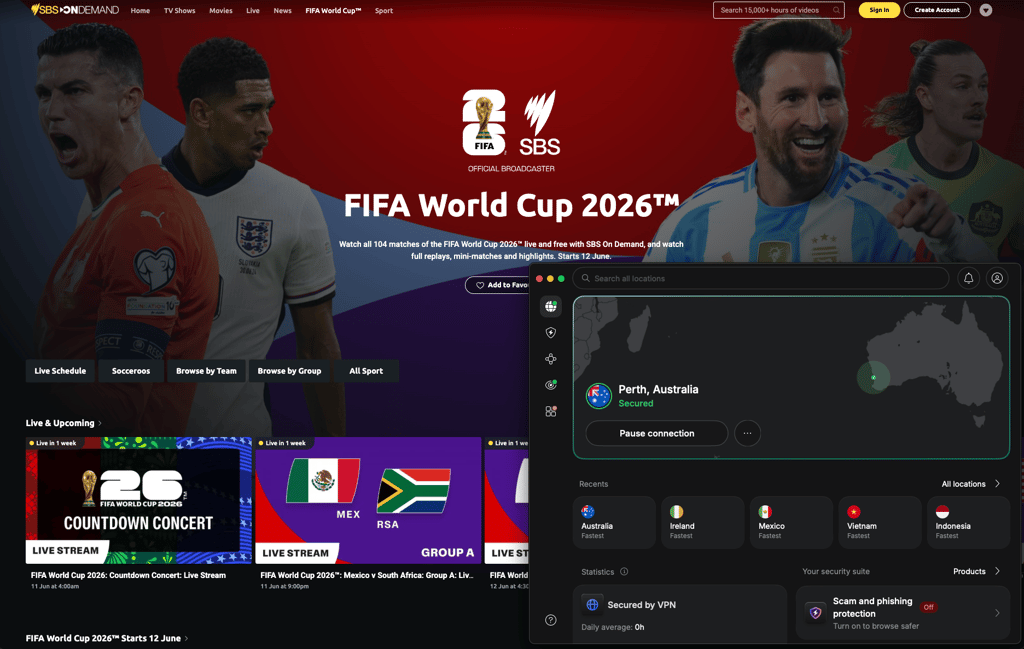
Since these platforms cover the entire tournament rather than just selected matches, they are especially useful for those who want simple, official English-language streams. However, access to these services depends on your geo-location, as BBC iPlayer, ITVX, and SBS On Demand are geo-restricted. If you’re outside the UK or Australia, use a reliable VPN to connect to the right country and access the official free World Cup 2026 stream.
Can you watch the World Cup 2026 for free on YouTube?
Yes, you can watch some World Cup 2026 matches for free on YouTube, but these broadcasts are not available worldwide. For example, Brazil’s CazéTV and Portugal’s LiveModeTV will stream selected matches on YouTube for free, but they’re only accessible in their licensed regions.
Since YouTube streams follow local broadcasting rights, free World Cup streams on these YouTube channels are geo-restricted. So if the YouTube stream is blocked in your location, you’ll need to use a VPN to connect to the right region and access the official free broadcast.
Use NordVPN to unblock World Cup streams on YouTube
World Cup live stream not loading with VPN: How to fix
If free World Cup streams aren’t working with your VPN, the most likely cause is that streaming platforms are actively blocking known VPN IP addresses. Your real location can also leak through browser cookies, DNS or WebRTC leaks, or mobile app permissions. In some cases, the issue is simpler: you may be connected to the wrong country, an overloaded UK or Australia server, or using an app that detects VPNs more strictly than the browser version.
To fix World Cup live stream issues with a VPN, try these steps:
- Switch to another VPN server in the same country. For example, if one UK or Australia server doesn’t work, connect to a different city.
- Clear your browser cookies and cache. This removes old location data that’s saved by the streaming site.
- Use incognito or private browsing mode. That way, you’ll open the stream in a cleaner browser session without old site data interfering.
- Disable GPS/location permissions, especially on mobile. Apps usually have easier access to your device's location data, which can conflict with your VPN’s virtual location.
- Check for IP, DNS, or WebRTC leaks. You can do this on sites like dnsleaktest.com to make sure your real IP address or location isn’t exposed.
- Update your VPN app. This ensures that you’re using the latest servers, leak protection, and streaming fixes.
- Try a different browser or device. This can help if the streaming app or browser keeps blocking your VPN connection.
- Confirm the match is free in that region. Some broadcasters only show selected games, so the issue may be the broadcast schedule rather than your VPN.
How to watch World Cup on different devices
You can watch the World Cup on most devices as long as you can install a VPN, open the broadcaster’s website, or use a streaming app. The easiest setup is on a desktop or mobile device, while smart TVs, Roku, Chromecast, and consoles need workarounds like casting, AirPlay, HDMI, or router VPN setup.
- Windows/Mac: Install the VPN app, connect to the correct country, and open the broadcaster’s website in your browser. Desktop browsers usually work well with VPNs, so this is the easiest setup.
- iPhone/iPad: Connect to the VPN, then use the broadcaster’s app or open the site in Safari, Chrome, or Firefox. If the app is unavailable because of your Apple region, use the browser version instead.
- Android phones/tablets: Install the VPN app, connect to a server in the right country, and stream through the broadcaster’s app or website. Android devices usually support VPN apps without extra setup.
- Fire TV/Android TV: Install both the VPN app and the broadcaster’s app, or YouTube if the match is available there. Connect to the VPN, then open the streaming app on your TV.
- Apple TV: Use the broadcaster’s tvOS app if available. Many major VPN providers now offer native Apple TV apps, so you can connect to a server in the broadcaster’s supported region directly on your Apple TV. Alternatively, connect your iPhone or iPad to the VPN and use AirPlay. You can also use Smart DNS if your VPN supports the streaming site, or set up the VPN on your router.
- Smart TV: Some Samsung, LG, and other smart TVs support broadcaster apps, but most don’t support native VPN apps. That said, you can cast from another device, connect a laptop with HDMI, share a VPN connection from a laptop, use Smart DNS if your VPN supports the streaming service, or set up the VPN on your router.
- Chromecast: Use the VPN on the device you’re casting from, then cast or mirror the stream to your TV. For better location matching, you may need to set the VPN on your router.
- Roku/consoles: These devices usually don’t support VPN apps. The easiest workaround is to stream on a laptop or phone and cast via HDMI, share a VPN connection from your laptop device, or set up the VPN on your router.

![Surfshark weekly deals logo [IN USE]](https://media.vpnpro.com/surfshark-weekly-deals.svg)
![Proton VPN winner logo [IN USE]](https://media.vpnpro.com/2025/05/protonvpn-winner.png)
FAQ
Where can I watch World Cup 2026 games online for free?
You can watch World Cup 2026 games online for free on official broadcasters like BBC iPlayer, ITVX, SBS On Demand, RTBF Auvio, VRT MAX, TVP Sport, and CazéTV on YouTube. Use the free streaming service available in your country, or connect to a UK or Australia VPN server with a provider like NordVPN to access full free English-language coverage.
Is the 2026 World Cup free to watch?
Yes, the 2026 World Cup is free to watch in some countries, including the UK and Australia, through official broadcasters. BBC iPlayer, ITVX, and SBS On Demand offer free tournament coverage, but availability depends on your location. Other free streams may be geo-restricted, limited to selected matches, or require subscriptions.
How to watch World Cup 2026 online for free from USA?
To watch World Cup 2026 online for free from the USA, connect to a VPN server in the UK or Australia and use an official free platform like BBC iPlayer or SBS On Demand. These platforms are free, official, and offer English-language coverage.
Can I watch World Cup on YouTube for free?
Yes, you can watch some World Cup 2026 matches on YouTube for free through official channels like Brazil’s CazéTV or Portugal’s LiveModeTV. However, these streams are geo-restricted, so they only work in licensed regions unless you use a VPN, like NordVPN.
Do I need a VPN for free World Cup streams?
You need a VPN for free World Cup streams if the official broadcaster is blocked in your location. Free platforms like BBC iPlayer, ITVX, and SBS On Demand are geo-restricted, so a VPN like NordVPN helps you connect to the correct country and access the stream.
Which country has the best free World Cup coverage?
The UK and Australia have the best free World Cup coverage if you want English commentary. BBC iPlayer and ITVX share free coverage in the UK, while SBS On Demand streams the tournament for free in Australia. Since both options are official but geo-restricted, use a VPN if either service is blocked in your location.


