
NordVPN in Canada review: Price, deals, server testing

Short Summary:
- A good Canada VPN should have plenty of local servers, fast connection speeds, and robust security features.
- NordVPN stands as one of the top VPNs for Canada, combining the fastest speeds in the industry with advanced security and privacy.
🏷️ LIMITED OFFER: NordVPN deal! Get 78% OFF NordVPN + 3 months FREE 🏷️
Plenty of people in Canada use VPNs to improve online privacy, stream local content while traveling, or browse more securely on public Wi-Fi. NordVPN is already one of the biggest names in the industry, but I wanted to find out how well it performs for Canadians.
I spent several weeks testing NordVPN across all four of its Canadian server locations. My goal was to evaluate its speeds and consistency, security and privacy features, and streaming performance. I also checked its ease of use and overall experience.
NordVPN consistently delivered fast speeds, reliable access to Canadian and international streaming services, and strong privacy protections. Overall, I thought it was one of the best VPNs I've tested for Canada, and in this review, I'll explain exactly why.
![NordVPN responsive banner logo [IN USE]](https://media.vpnpro.com/images/160x40/2025/08/nord-responsive.png)
NordVPN Canada quick overview
NordVPN is a hugely popular VPN provider and not without reason. Combining fast speeds, excellent usability, and robust security, it leaves a little to be desired. Here’s a brief look into its core features and Canadian coverage, before I dive deeper into the details:
| Based in: | Panama (outside the Eyes Alliance) |
| No-logs policy: | Independently audited, with the latest report published in early 2026 |
| Canadian servers: | 300+ servers in 4 Canadian cities (Toronto, Vancouver, Montreal, Calgary) |
| Security and privacy features: | AES-256 and post-quantum encryption, IP/DNS/WebRTC leak protection, kill switch, Threat Protection Pro, NordWhisper and NordLynx protocols, obfuscation, DoubleHop, and more |
| Free trial: | 3-day free trial for Android devices |
| Money-back guarantee: | 30-days |
| Current deal: | Get 78% OFF NordVPN + 3 months FREE |
NordVPN pricing and plans in Canada
NordVPN offers 3 different plan tiers in Canada – Basic, Complete, and Ultra. Every plan can be purchased with a 1-month, 1-year, or 2-year subscription. Typically, the longer subscription you choose, the better the monthly price you get, and that works for NordVPN Canada prices, too. For example, the Basic plan is priced at only CA$4.39/month with the 2-year subscription, while the same plan is CA$9.39/month with a 1-year subscription.
In the table below, I compiled detailed information on NordVPN Canada prices, plans, duration, and the features they include:
| NordVPN Canada plan | 1-month price | 1-year price | 2-year price | Features |
| Basic | CA$18.79 | CA$9.39/month | CA$4.39/month | Secure VPN, scam and phishing protection, 10 device coverage, dark web monitor |
| Complete | CA$24.99 | CA$10.59/month | CA$5.69/month | Everything in the Basic plan + scam call protection, next-gen antivirus, password manager, 1 TB of encrypted cloud storage |
| Ultra | CA$28.59 | CA$13.29/month | CA$8.29/month | Everything in the Ultra plan + personal data removal tool |
As you can see, the Basic plan is the most affordable one with subscriptions starting at CA$4.39/month if you purchase the 2-year option. In my opinion, if you only need a high-performance VPN and have your other cybersecurity needs already covered, this plan is more than enough.
The Complete plan is the mid-tier NordVPN plan, starting at CA$5.69/month. In addition to the premium VPN, this plan also includes scam call protection, a password manager, encrypted cloud storage, and a next-gen antivirus with anti-malware protection and several other antivirus-like features. If you need a more well-rounded cybersecurity solution, the Complete plan may be the better choice.
Lastly, if you’re especially particular about your online privacy, the top-tier NordVPN Canada plan, Ultra, priced at CA$8.29/month, may cover all your needs. In addition to the features in lower-tier plans, this plan also includes a data removal tool that can help remove your data from company databases and people search sites.
I should also mention that you can purchase a Dedicated IP option with any plan. Although it may not be necessary for casual everyday use, a dedicated IP (an address assigned to you only) can make remote work and bypassing restrictions smoother. Any NordVPN plan you choose comes with a 3-day free trial for Android devices and a 30-day money-back guarantee for everyone.
NordVPN coupon code Canada
Since I’ve been following NordVPN deals and coupons for a while now, I can say that you can always find a good deal and save on your subscription. Currently, you can get the biggest discount on the 2-year Complete plan, which is 78% off + 3 months free.
Here’s a selection of NordVPN discounts:
- NordVPN Basic 1-year plan is now 35% off. This brings down the total price from CA$173.88 for the first year to only CA$112.68, or CA$9.39/month.
- NordVPN Complete 1-year subscription is currently discounted 53%, knocking the plan price from CA$273.48 for the first 1 year to CA$127.08 or CA$10.59/month.
- NordVPN Ultra 1-year subscription is now 52% off. This means that instead of paying CA$337.08 for the first year, you’ll spend only CA$159.48, or CA$13.29/month.
- NordVPN Basic 2-year subscription is currently 69% off, with 3 extra months free. Now, instead of the original CA$391.23 for the first 27 months, you’ll only be paying CA$118.53 or CA$4.39/month.
- NordVPN Complete 2-year subscription is also 75% off with 3 extra months. This deal brings the price down from CA$615.33 for the first 27 months to CA$153.63, or CA$5.69/month.
- NordVPN Ultra 2-year subscription is currently discounted by 70% with 3 extra months, bringing the price down from CA$758.43 for the first 27 months to CA$223.83, or CA$8.29/month.
NordVPN Canada servers
Last time I checked, NordVPN had over 300 servers in 4 major Canadian cities – Toronto, Vancouver, Montreal, and Calgary. The latter is a very recent addition to the list, and not something you’d often find with premium VPNs. For example, Surfshark, Proton VPN, ExpressVPN, CyberGhost, and IPVanish do not offer servers in Calgary. This gives users in Alberta and other parts of Western Canada another nearby connection option, which may yield faster connection speeds compared to connecting through Vancouver or servers farther east.
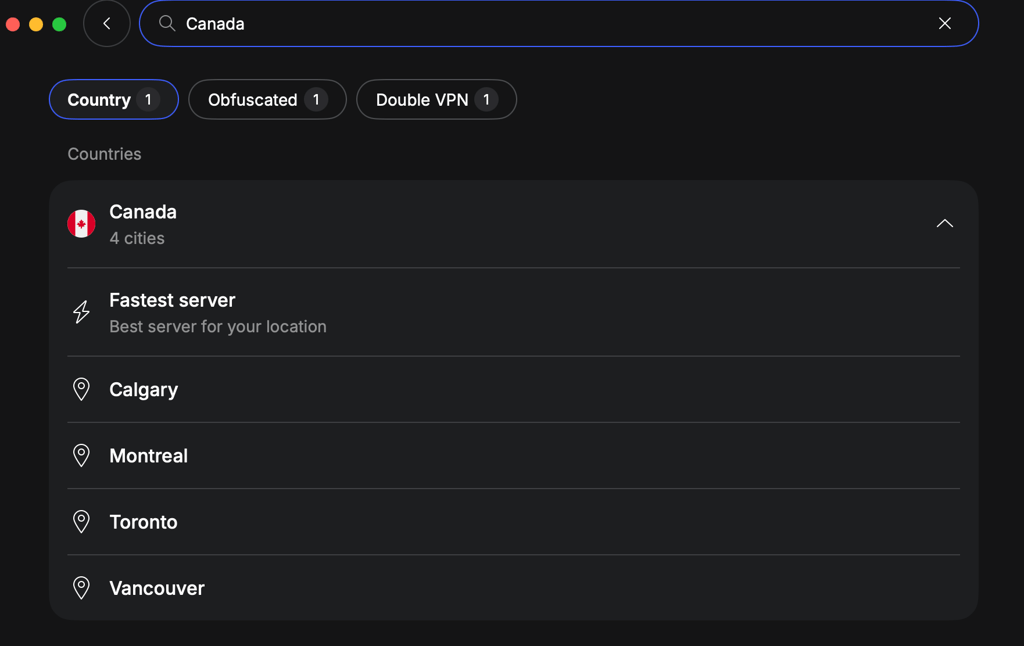
NordVPN Canada servers also come in different types, and you can choose from regular servers in all 4 locations, obfuscated servers in Toronto, Double VPN in Toronto and Montreal, or purchase a Dedicated IP option in Montreal, Vancouver, and Toronto.
I also noticed that NordVPN does not have any streaming-optimized servers. At first, this may seem like a drawback if you’re used to seeing these servers, but in fact, it’s an improvement. NordVPN has optimized all of its servers for streaming and P2P activities, which makes using it much easier, as you don’t really have to look for a special server and simply use whichever you like.
NordVPN Canada speed test results
A good selection of Canadian server locations is a great place to start. However, servers alone mean little if they’re slow, frequently overcrowded, or use IP addresses that are often blocked. To find out how NordVPN’s Canadian servers perform in real-world conditions, I tested them myself.
My baseline connection speed during testing was 700Mbps download and 700Mbps upload, and I used the Speedtest by Ookla tool to measure my results. I connected to servers in all four Canadian locations at different times of the day and used them for a variety of activities, including streaming, gaming, and torrenting. This gave me a good picture of both their peak performance and day-to-day consistency.
NordVPN Toronto server speed test results
I started my testing by connecting to a NordVPN server in Toronto. My baseline connection speed was 700Mbps, and with the VPN on, I got 574Mbps with 126ms ping, translating to an 82% initial speed retention rate.
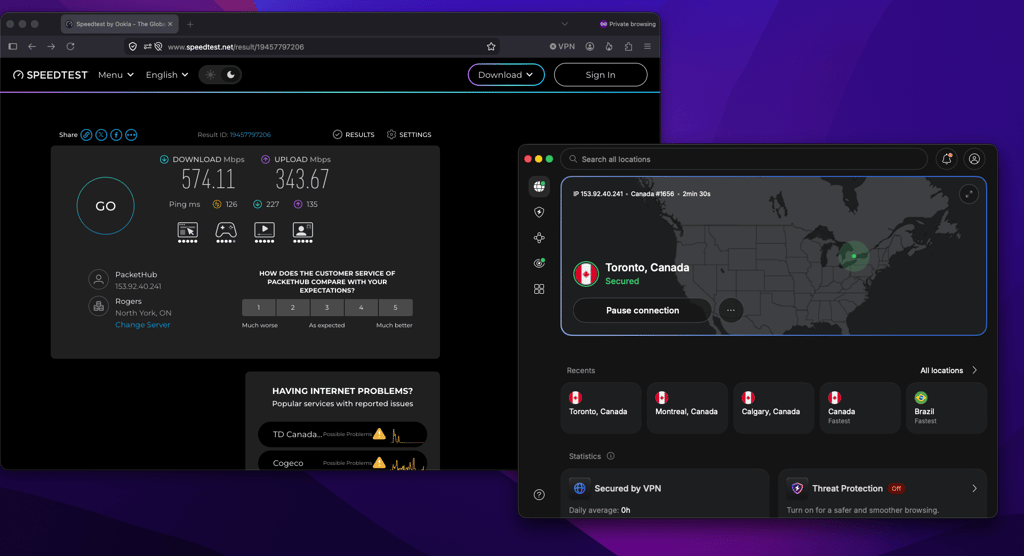
Of all the NordVPN Canada servers I tested, Toronto was the slowest. That’s likely because I was physically furthest from it, but it may also be because Toronto is the most popular location to connect to. Despite the slower connection speed, my initial connection speed dropped by only 18%, which is still pretty good and shows excellent results.
NordVPN Vancouver server speed test results
Next, I connected to a NordVPN server in Vancouver. My baseline connection remained at 700Mbps, and once connected, I got 615Mbps with 178ms ping. This meant that NordVPN retained 87% of my initial connection speed.
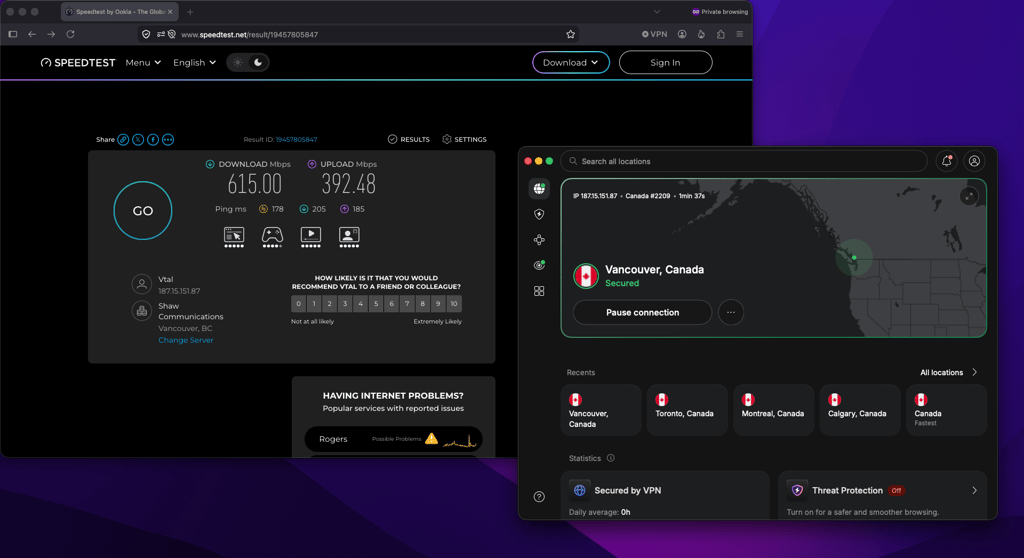
Testing any other VPN, I’d say that a drop of only 13% is unusually low, and yet NordVPN delivered it consistently. With this sort of speed, using the VPN felt almost invisible, as I didn’t notice any slowdowns in page load times or interruptions while streaming.
NordVPN Montreal server speed test results
For my third test, I connected to a NordVPN server in Montreal. Again, my baseline connection speed was 700Mbps. Once connected, I got 628Mbps with 114ms ping, translating to an 89% initial speed retention rate.
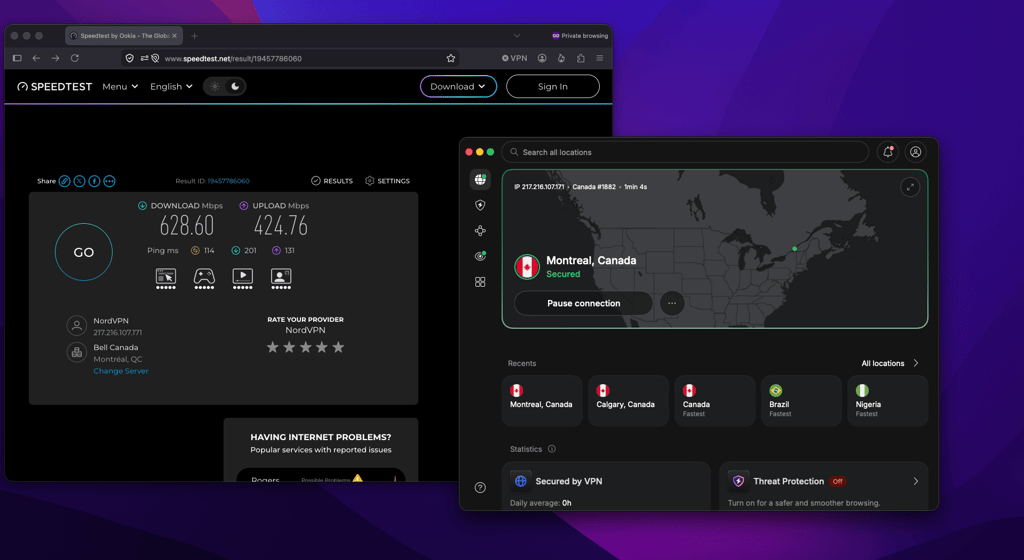
Although the NordVPN Montreal server wasn’t even the fastest, I thought I struck gold with it. Not only did it slow down my initial connection by a mere 11%, but it also showed the lowest ping at 114ms. For me, this server was optimal not only for streaming but also for more intensive online gaming. Remember that your results may differ from mine, as they depend heavily on your physical location and baseline connection speed.
NordVPN Calgary server speed test results
NordVPN’s Calgary location is the latest addition to Canada’s server list, so I checked it last. As usual, my baseline connection stayed at 700Mbps, and once connected, I got 651Mbps with 164ms ping, translating to a 93% initial speed retention rate.
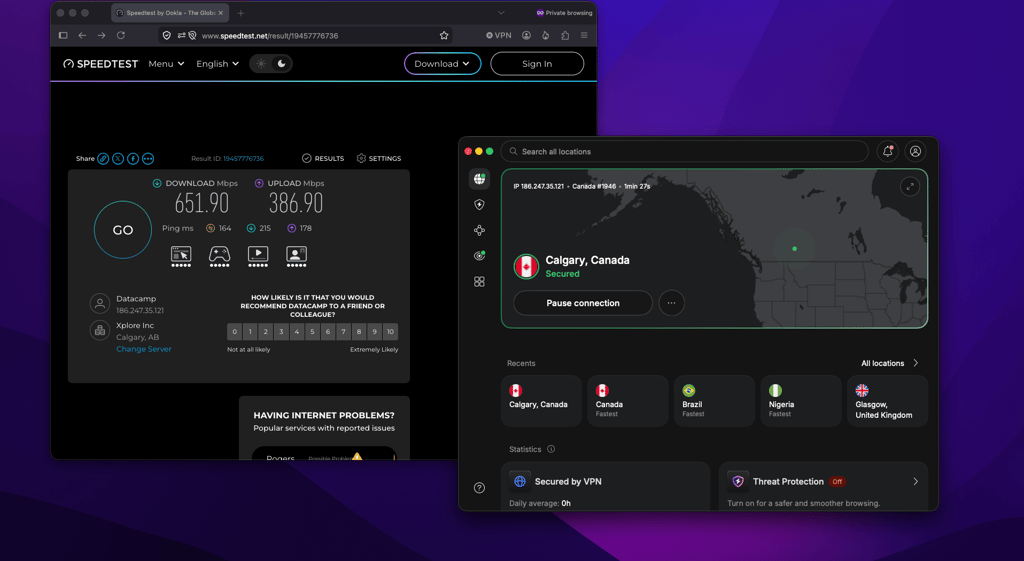
The Calgary server ended up being the fastest of the four, with only a 7% slowdown. Risking sounding too excited, I must admit I wasn’t expecting such a result at all. Despite the somewhat slower ping, I could easily see the Calgary server being used for fast-speed torrenting and other bandwidth-heavy activities.
Get NordVPN and enjoy fast speeds in Canada
NordVPN user experience and interface
A VPN can have all the latest security features and advancements, but if it is too difficult to use or feels built for tech-savvy users only, most people won’t stick with it. Fortunately, that wasn’t the case with NordVPN. I liked the modern, somewhat minimalist design of the apps and found them easy to navigate, quick to connect, and, most importantly, consistent across different devices. NordVPN offers quite a few advanced settings, but in my opinion, the interface does not feel overly complicated, placing everything I need within a few clicks.
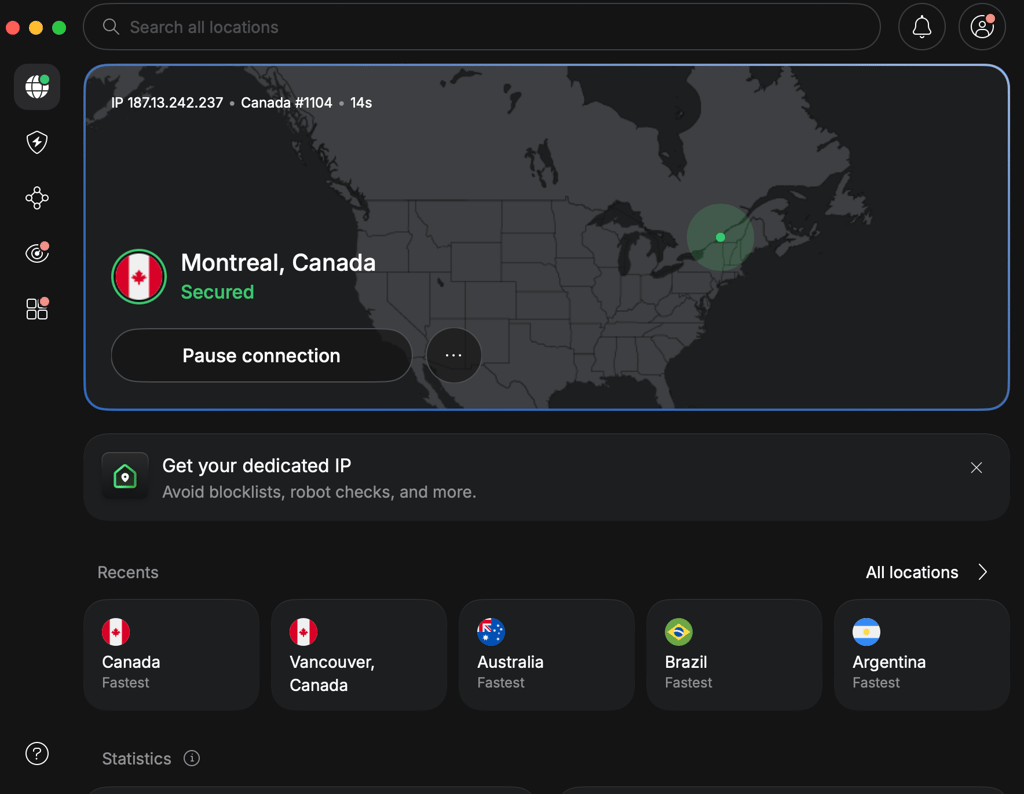
One thing I thought was very well thought through was that NordVPN is just as beginner-friendly as it is tech-savvy. New or first-time VPN users can simply hit the Quick Connect button, let the app automatically choose the fastest server, and that’s it. Meanwhile, more experienced users can manually browse server locations and specialized servers via the Search Bar or adjust almost any security setting they want.
That said, the recent interface update wasn’t entirely positive. For example, now the disconnect button is no longer clearly visible. Instead, I first had to click Pause connection and then select Disconnect from the drop-down menu. It’s only a minor inconvenience, but hiding such a basic control behind an extra step feels a bit unnecessary.
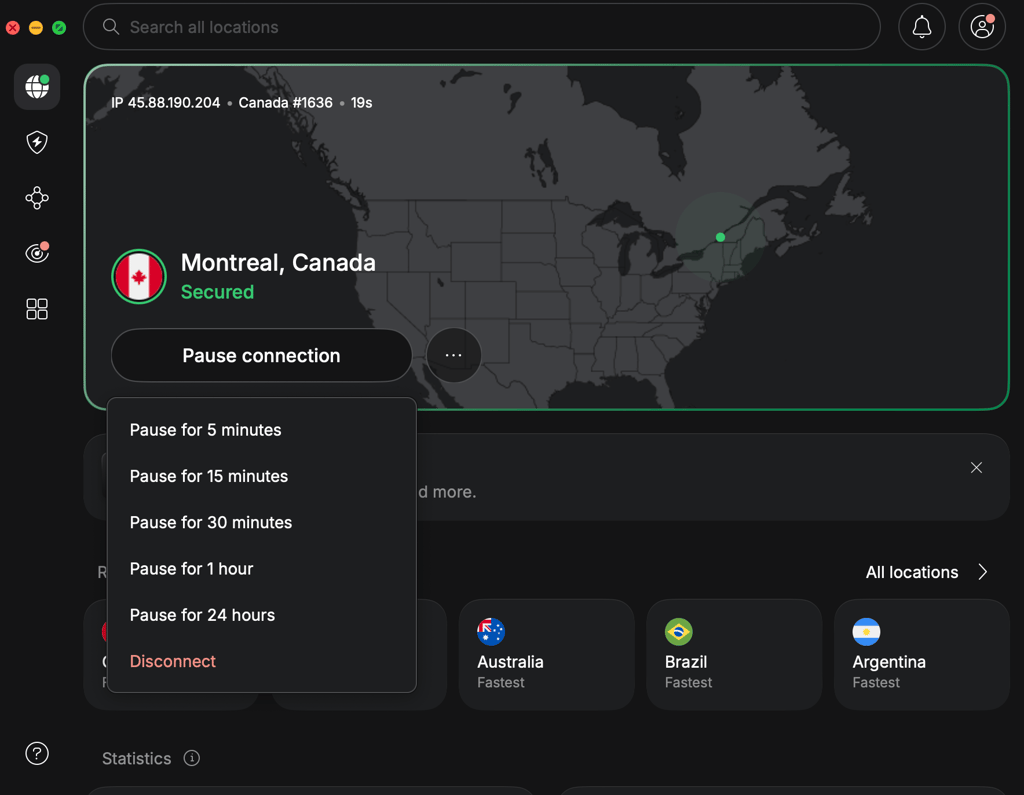
Overall, NordVPN’s interface is still intuitive enough for beginners without limiting users who want more control. However, I’d still like to see the standard disconnect button restored to make everyday use slightly more streamlined.
Cross-platform UI and device compatibility
During my testing, I used NordVPN on Windows, macOS, Android, and iOS. What I liked most was that the experience was nearly identical across all platforms, and I didn't have to relearn how to use the app when switching. All of the apps worked seamlessly, connecting to servers in seconds. No crashing apps, no weird UI decisions, made me appreciate the designers of the apps even more.
Although I didn’t focus too much on Linux app in this NordVPN review, it still deserves a mention. Unlike the basic command-line client offered by many VPN providers, NordVPN’s Linux client is well-developed and supports most of the features available on other platforms.
In addition to Windows, Android, macOS, and iOS, NordVPN also supports Android TV, tvOS, Fire TV, ChromeOS, numerous routers, and browser extensions for Chrome, Firefox, and Edge. The service allows for 10 simultaneous connections, which should be enough for most users. However, with several premium VPNs now offering unlimited connections, I wouldn’t mind at all if NordVPN raised this limit at some point.
Customer support experience
If you run into problems using NordVPN, you can contact customer support via the 24/7 live chat on the NordVPN Support Page, submit an email ticket, or use the Knowledge Base. As usual, the 24/7 live chat is the quickest option, although you will first be greeted by an AI chatbot before being connected to a support agent. Placing an email ticket is quick, but you may have to wait up to a couple of hours for a response. This might not be the ideal choice if you’re in a hurry. Lastly, if you prefer to troubleshoot on your own, the Knowledge Base is full of setup guides, FAQs, and articles covering most issues users run into.
Although my own NordVPN use was pretty smooth, I still wanted to test the customer support team’s responsiveness. So, I opened the 24/7 chat, placed a couple of questions on Canadian server locations and specialized servers, and was connected to a real agent within the first few minutes. Overall, I liked the clear, accurate answers and appreciated that they didn’t feel like they were copied and pasted from a manual, but were tailored to my specific needs.
While my own experience with Nord’s customer support did not leave me wanting, I also double-checked if that’s the case for most users by browsing on subreddits and public forums. From what I found, real users typically praise the live chat for being quick and helpful. Many people also seemed to appreciate that you do not need to be a registered user to get your answer. More complex technical issues and billing-related requests, however, appear to produce more mixed experiences, with some users reporting longer conversations before reaching a resolution.
NordVPN features for Canada
As I’ve already mentioned a couple of times before, NordVPN is positively packed with features. However, from my experience, not all of them will matter for everyday use. So, in my testing, I focused mostly on the features I thought were most useful and impactful for people using NordVPN in Canada. Below, you’ll find my list of NordVPN features for Canada and how they can make a real difference.
NordLynx for fast everyday use
NordLynx is NordVPN’s proprietary VPN tunneling protocol based on modern WireGuard technology. While WireGuard is already pretty fast and secure, Nord has tuned it up to deliver even faster connection speeds than older VPN protocols, but without sacrificing security or privacy.
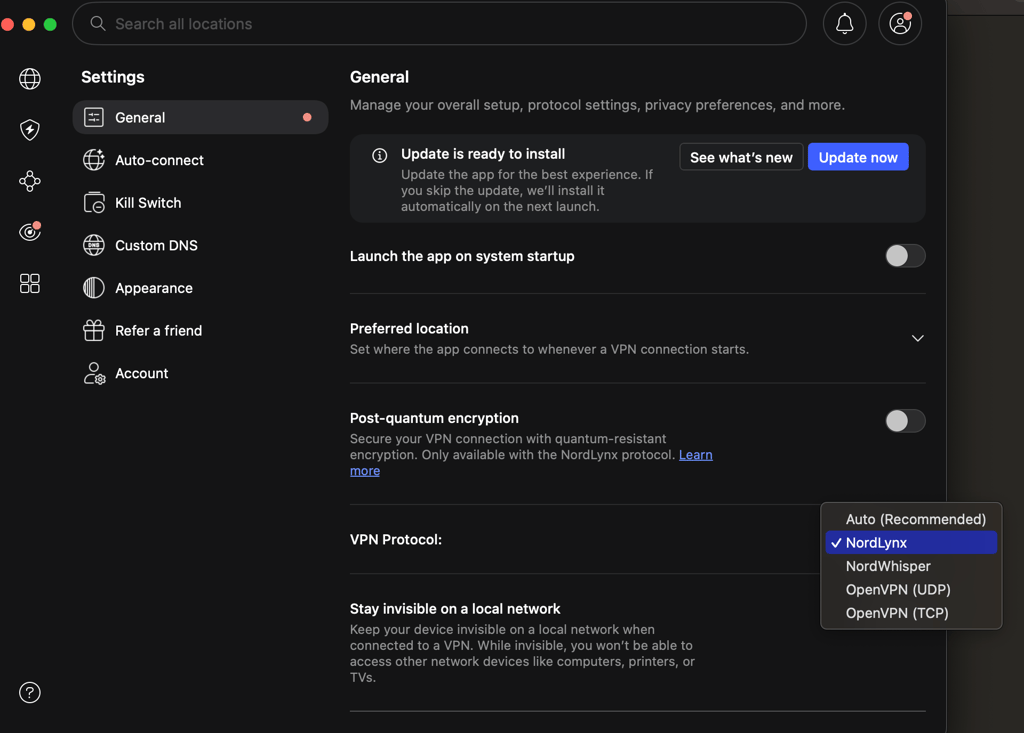
Because the NordLynx protocol provided the smoothest experience, I found myself using it most during my testing. This tunneling protocol was also one of the main reasons I got such impressive speed test results with Canadian servers. With the NordLynx protocol, streaming, gaming, downloading large files, or just reading online news posed no issues at all, and at times I even forgot I was using a VPN. In my opinion, users in Canada will appreciate the 4K streaming or online gaming without the VPN becoming an obvious hindrance to their activities.
Threat Protection Pro for safer browsing
NordVPN’s Threat Protection Pro is a built-in tool that blocks malicious websites, phishing attempts, trackers, intrusive ads, and even malware downloads. In Canada, it is included in the Complete and Ultimate plans, while Basic users get the standard Threat Protection feature version instead.
The differences between Threat Protection and Threat Protection Pro may seem slight, but they are, in fact, quite impactful. The non-Pro version works only while you are connected to a NordVPN server and mainly blocks ads, trackers, and malicious sites. Meanwhile, the Pro version continues to work even when the VPN is disconnected and offers broader protection, including scanning downloaded files, app vulnerability checks, scam alerts, and URL cleaning. So, while it’s not yet a full-blown antivirus, it does show some similarities.
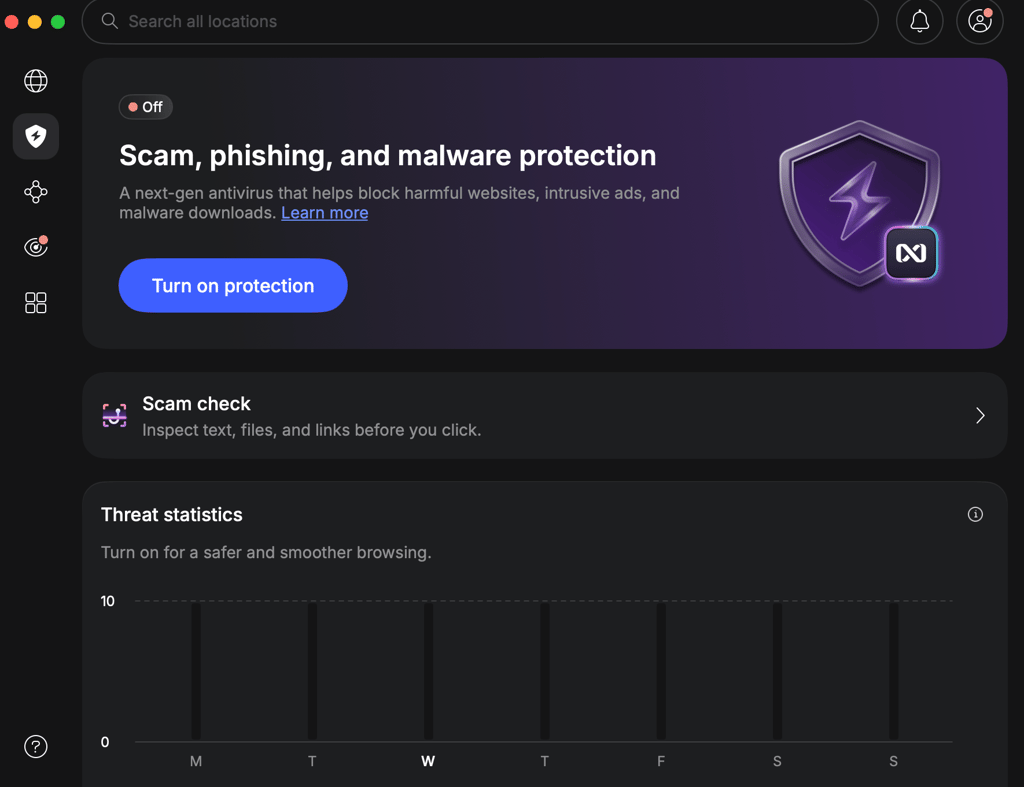
I found Threat Protection Pro particularly useful when browsing sites that might not look so trustworthy and downloading files. The tool blocked all suspicious sites before they could even load, possibly saving me from malware. It also made my overall browsing experience cleaner by removing most ads and trackers. Anyone who often uses public Wi-Fi in Canada or tends to download files from unfamiliar sources should enable Threat Protection Pro for an additional layer of protection beyond the VPN tunnel itself.
Post-quantum encryption and NordWhisper
Post-quantum encryption and NordWhisper tunneling protocol are two of the newer NordVPN features. While they address quite different aspects of online security, they nonetheless add an extra layer to NordVPN’s overall robustness.
Post-quantum encryption is a future-proof feature, designed to protect encrypted traffic against potential attacks from quantum computers. While that may sound a bit Sci-Fi and not like something most people should worry about today, it’s the new direction serious cybersecurity tools are moving towards. So, it’s nice to see NordVPN adding it. If you want to give it a try, you can simply toggle post-quantum encryption on in the app's Settings.
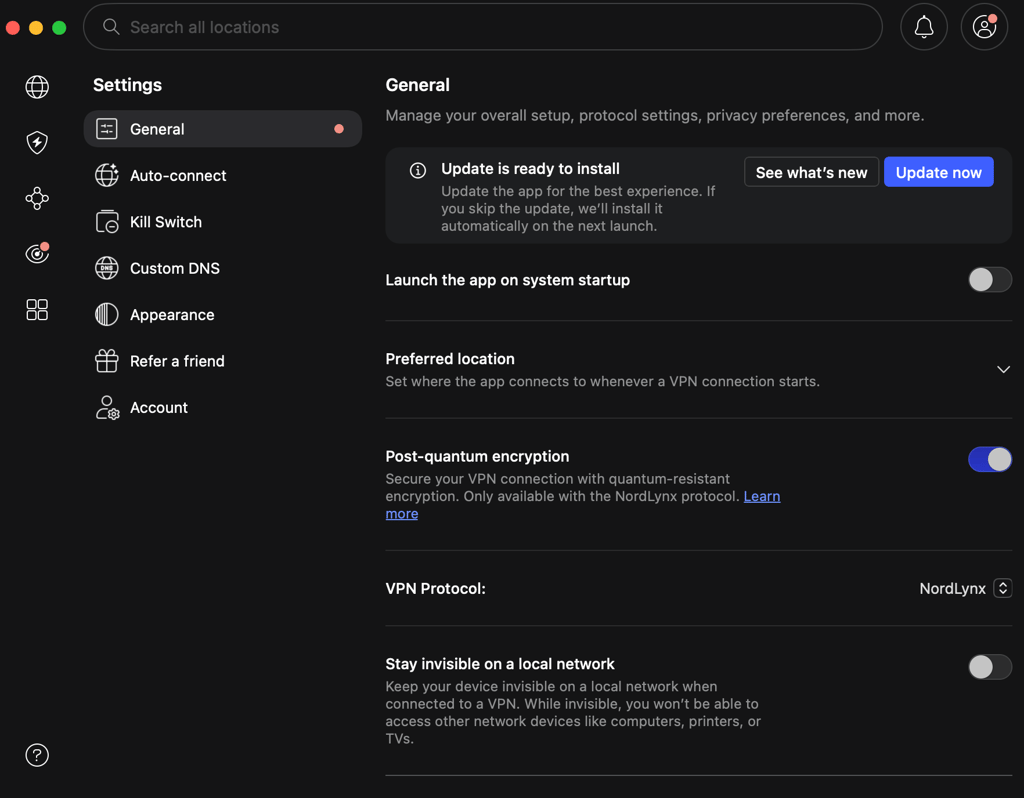
I also found it a nice touch that, when you toggle on post-quantum encryption, NordVPN shows a pop-up explaining how it works and its current limitations.
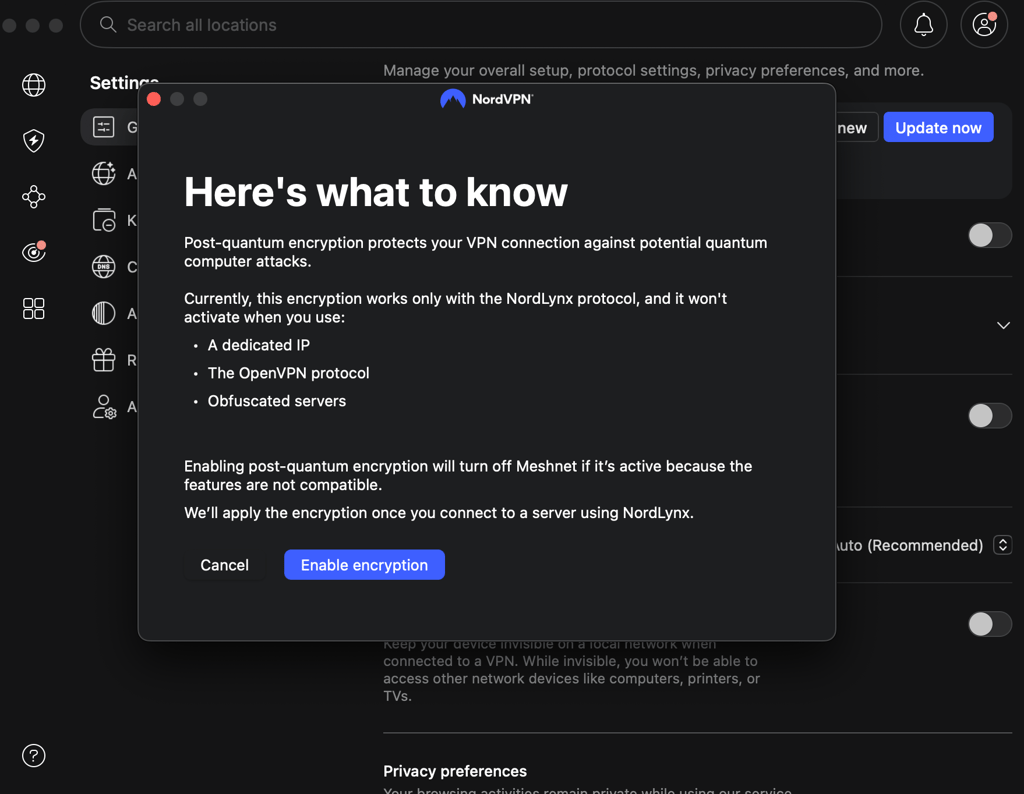
Meanwhile, NordWhisper is an entirely different feature. In a nutshell, it’s a VPN tunneling protocol that disguises the fact that you are using a VPN at all. In turn, it makes it much easier to connect on restrictive networks that would otherwise block all VPN traffic. And while Canada itself doesn't censor internet access, I can easily see this feature being useful if you're traveling abroad and want to access Canadian banking, streaming services, or work accounts more securely.
Dedicated IP for smoother remote work and secure access
NordVPN’s Dedicated IP is an optional add-on you can get with any subscription. Unlike regular VPN servers, where the same IP address is shared by many users, a dedicated IP is assigned only to you. In practice, this can mean fewer CAPTCHA checks, smoother access to work networks, and a lower chance of websites flagging your connection as suspicious. If you want a Canadian one, NordVPN currently offers Dedicated IPs in Toronto, Montreal, and Vancouver.
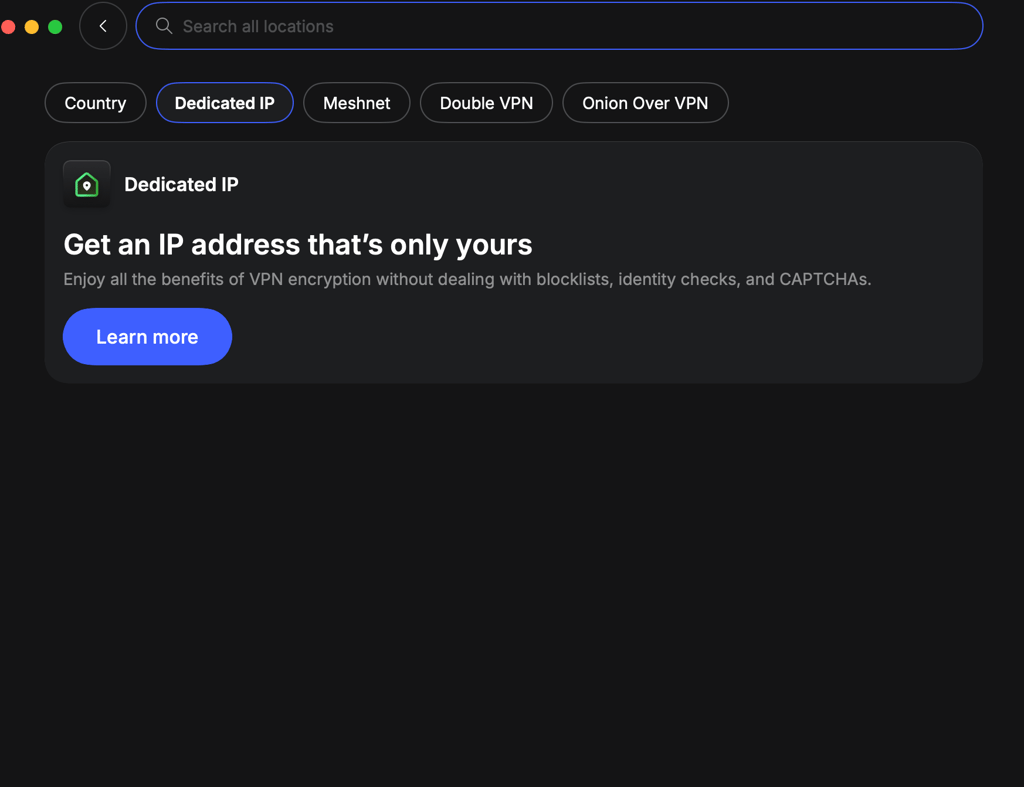
For Canadians who work remotely or travel often, I think this is one of NordVPN’s more practical extras. A consistent IP address can make it easier for banking platforms, company systems, and other security-sensitive services to recognize your connection. At the same time, you still get the encryption and privacy protection of a regular VPN connection.
Specialized servers for different use cases
Besides its regular server, NordVPN also has quite a few specialized ones that are designed for more specific use cases:
- P2P servers are optimized for torrenting and other peer-to-peer traffic. Although you can download torrents on any NordVPN server, I found that the specialized ones offer a smoother experience and let me download my files a bit faster.
- Double VPN servers route your traffic through two VPN servers instead of one. This double routing adds an extra layer of encryption, making it harder to trace your activity back to your real IP address. However, when using Double VPN servers, I noticed slower speeds, so bear in mind they may be most useful only when higher privacy is your priority.
- Onion over VPN servers combine NordVPN with the Tor network, allowing you to access .onion websites without launching the Tor Browser separately. It’s definitely a niche feature, but one that’s nice to have if you frequently use Tor.
- Obfuscated servers, meanwhile, disguise VPN traffic as regular HTTP traffic. I found them especially useful with restrictive networks or in countries where VPN use is heavily monitored.
In my opinion, most Canadian users will probably end up using NordVPN's regular servers the most, but that’s perfectly fine. Be as it may, I still like that the specialized options are there if ever I should need them. Overall, they make NordVPN feel more like a service with a tool for almost every situation, rather than a one-size-fits-all approach.
NordVPN security and privacy
Security is one of the main reasons to use a VPN, so I wanted to make sure NordVPN got not only the advanced features but also the basics right. The first thing I did was check for IP, DNS, IPv6, and WebRTC leaks across several Canadian and international servers. Every test came back clean, showing only the VPN-assigned IP address and DNS servers.
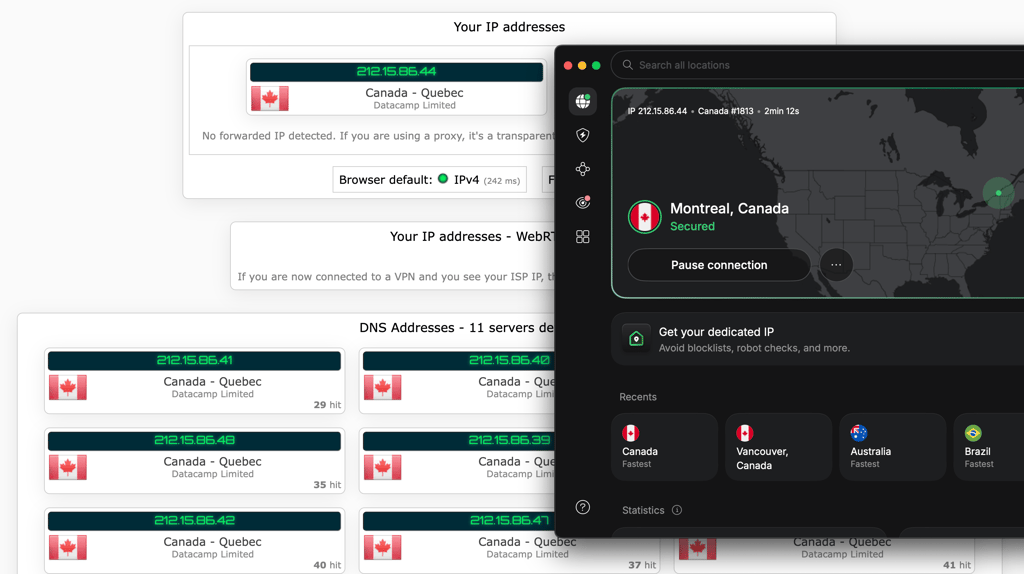
Then I looked into encryption. NordVPN uses AES-256 encryption with OpenVPN and ChaCha20 encryption with NordLynx, both of which are considered industry standards. You can now also use post-quantum encryption with NordLynx, but you’ll have to toggle it on in Settings. Combined with the leak protection I saw during testing, I had no concerns about the security of my connection.
I also liked that NordVPN doesn't expect users to simply trust its privacy claims. Its no-logs policy underwent its sixth independent audit in 2025 (report published in 2026). Meanwhile, its RAM-only servers are designed not to retain data permanently, clearing all data whenever they are restarted. While most people will hopefully never need to think about either of those things, they do add another layer of confidence that the service is built with privacy in mind.
Protect your online activities in Canada with NordVPN
NordVPN streaming for Canada
Besides security, streaming is one of the most common reasons people use a VPN, and it is just as relevant in Canada. Although my previous testing had already shown NordVPN to be one of the more reliable services for accessing regional streaming platforms, I ran a separate set of Canada-focused tests to make sure.
Half of my testing involved connecting to Canadian servers and checking whether local streaming services worked properly. For the other half, I connected to servers abroad to see whether NordVPN could access platforms such as BBC iPlayer and DAZN US from Canada
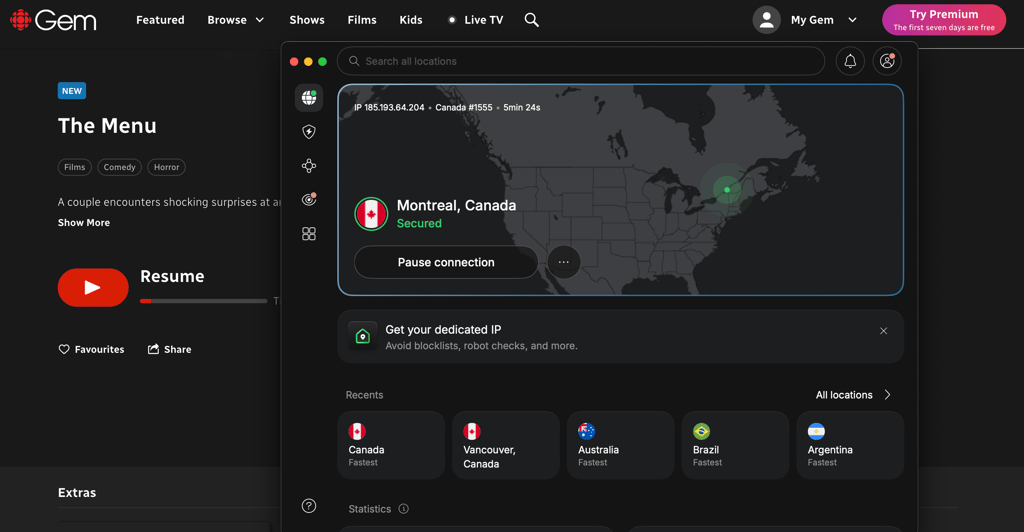
Overall, I was pleased with the results. NordVPN worked on all the platforms I tested it with on the first try, the fast connection speeds let me stream without interruptions, and my VPN usage was not detected even by stricter sites.
Here are the platforms I tried with NordVPN:
| Streaming platform | Did it work with NordVPN? |
| Netflix Canada | ✅Yes |
| Netflix US | ✅Yes |
| Crave | ✅Yes |
| CBC Gem | ✅Yes |
| Disney+ | ✅Yes |
| Prime Video | ✅Yes |
| TSN | ✅Yes |
| DAZN US | ✅Yes |
| BBC iPlayer | ✅Yes |
| Sportsnet | ✅Yes |
For Canadians, one of the biggest advantages is being able to access local streaming services while traveling. Platforms like Crave, CBC Gem, TSN, and Sportsnet often restrict access outside Canada, but connecting to one of NordVPN's Canadian servers restored access without any issues during my testing. Since the VPN also maintained excellent speeds on nearby Canadian servers, streams loaded quickly and played smoothly.
I found NordVPN just as useful in the opposite situation. By connecting to servers in other countries, like the US or the UK, I was also able to access other Netflix libraries or country-specific platforms like BBC iPlayer. I also liked that I almost never had to switch servers once I got into the sites, unlike with less-powerful VPNs.
There is one thing worth noting, though. While NordVPN can help you access geo-restricted streaming sites, some platforms may still require you to create an account or purchase a subscription before you can watch anything.
Stream without restrictions with NordVPN for Canada
Is NordVPN worth using in Canada?
After testing NordVPN on its Canadian servers and evaluating its security features, streaming performance, and overall usability, I still think it is one of the best VPNs for Canada. It performed very consistently during my testing and handled everything I asked of it without any noticeable shortfalls.
Here’s why I’d recommend NordVPN in Canada:
- Large Canadian server network with 300+ servers in Toronto, Montreal, Vancouver, and Calgary.
- Excellent speeds, maintaining over 90% of my original connection during testing
- Reliable access to Canadian and international streaming services, including Crave, CBC Gem, Netflix, TSN, Sportsnet, and BBC iPlayer
- Strong privacy protections, including a no-logs policy, RAM-only servers, and independent audits
- Advanced security features such as Threat Protection Pro, NordWhisper, Dedicated IP, Double VPN, and post-quantum encryption
- Beginner-friendly apps across major desktop, mobile, smart TV, and browser platforms
Probably the only more serious drawback I found is that NordVPN is not the cheapest VPN around, especially if you choose short-term subscriptions. That said, if you are okay with long-term commitments, the price balances out, and you get good value given its performance, privacy features, and reliability.
Get NordVPN in Canada for privacy and protection
NordVPN alternatives in Canada
Although NordVPN has earned its spot as one of the best VPNs for Canada, you may still want to compare it with other premium VPNs before you subscribe. My other top choice for Canada VPNs is Surfshark and Proton VPN, and here’s what they offer:
| NordVPN alternatives for Canada | Based in | No-logs policy | Servers in Canada | Unique features | Customer support channels | Free trial and money-back guarantee | Starting price |
| Surfshark | The Netherlands | ✅ Yes, 5 third-party audits, the latest published in 2025 | 170+ servers in 3 locations | CleanWeb, NoBorders and Camouflage modes, Dausos protocol | Live chat, email tickets, knowledge base | ✅ Yes, 7-day free trial and 30-day | CA$3.39/month |
| Proton VPN | Switzerland | ✅ Yes, 5 third-party audits, latest published in 2026 | 500+ servers in 3 locations | Secure Core servers, open-source apps, VPN accelerator, NetShield | Live chat, email tickets, knowledge base | ✅ Yes, free version and 30-day | CA$3.74/month |
Although Surfshark may not always outperform NordVPN in streaming or overall reliability, you may prefer its more affordable pricing or its unlimited device connections.
Meanwhile, Proton VPN stands in a niche of its own, putting privacy first. Based in Switzerland and with yearly no-logs policy audits, this provider, while not the fastest, is also an excellent Canada VPN choice.
Summary
After testing NordVPN for Canada, I became convinced that the service easily lives up to its reputation. To start with, it offers servers in 4 Canadian locations, which isn’t something I often see. Additionally, those servers deliver consistently fast speeds, suitable for browsing, streaming, and gaming. Lastly, I found its roster of security and privacy features very well-rounded, yet still packaged in beginner-friendly apps.
While NordVPN may not be the cheapest VPN around, I think the full package quickly justifies the price once you start using it. Overall, I think it’s one of the best VPNs for Canada on the market, adding a solid extra layer of privacy to all your online activities.

![Surfshark weekly deals logo [IN USE]](https://media.vpnpro.com/surfshark-weekly-deals.svg)
![Proton VPN winner logo [IN USE]](https://media.vpnpro.com/2025/05/protonvpn-winner.png)
FAQ
Is NordVPN good for Canada?
Yes, NordVPN is one of the best VPNs you can currently find for Canada. Thanks to its fast speeds, servers in 4 Canadian locations, and robust privacy and security features, it’s an excellent choice for any scenario.
Does NordVPN unblock streaming platforms in Canada?
Yes, NordVPN can help you access Canadian and international streaming services. During my testing, I easily accessed platforms such as CBC Gem, Crave, US Netflix, and BBC iPlayer with NordVPN and streamed without interruptions thanks to the consistently high connection speeds.
How much does NordVPN cost in Canada?
NordVPN Canada prices start at CA$4.39/month for the Basic plan with a 2-year subscription. You can also choose the more feature-rich Complete and Ultra plans, priced at CA$5.69/month and CA$8.29/month, respectively, with 2-year subscriptions. Every NordVPN plan comes with a 3-day free trial for Android devices and a 30-day money-back guarantee for risk-free purchases.
Is NordVPN fast enough for gaming in Canada?
Yes, NordVPN is fast enough for gaming in Canada. During my tests, NordVPN retained up to 93% of my initial connection speed with Canadian servers, which is perfect for gaming. The fast speeds are powered by the modern NordLynx protocol, which not only ensures smooth connections but can also provide a solid shield against DDoS attacks while you play.


- NordVPN Canada quick overview
- NordVPN pricing and plans in Canada
- NordVPN Canada servers
- NordVPN Canada speed test results
- NordVPN user experience and interface
- NordVPN features for Canada
- NordVPN security and privacy
- NordVPN streaming for Canada
- Is NordVPN worth using in Canada?
- NordVPN alternatives in Canada
- Summary
- FAQ