Surfshark VPN in Canada review: Price, servers, and streaming testing

Short summary:
- A VPN is an essential tool for enhancing your online privacy in Canada, protecting your activities, and accessing worldwide content without restrictions.
- Surfshark stands as a strong contender for the best VPN for Canada, thanks to its global server fleet, reliable connections, and affordable pricing.
🏷️ LIMITED OFFER: Surfshark VPN Deal! Now up to 88% OFF Surfshark + 3 months FREE 🏷️
A VPN is an undeniably useful tool for securing your browsing in Canada and keeping your activities private. It can also be very helpful if you want to access geo-blocked content or keep using your usual Canadian websites and services when traveling abroad.
However, not every VPN is suitable for Canada. First and foremost, a Canadian VPN should have plenty of local servers to access Canadian content and to keep the connection fast and seamless. It should also offer robust security features, such as modern encryption to mask your activity and a kill switch to prevent your real IP address from being exposed. Lastly, it should also offer a good price-to-features ratio.
Based on my tests, Surfshark is one of the best Canada VPNs. It offers plenty of servers in Canada, the latest security features, fast connection speeds, and even unlimited device connections, all wrapped up in a user-friendly, affordable package. In this guide, I’ll share my experience of using Surfshark VPN in Canada, reviewing its prices, effectiveness, and streaming compatibility.
![Surfshark responsive banner logo [IN USE]](https://media.vpnpro.com/images/160x40/surfshark-vpn.png)
Surfshark VPN Canada: quick overview
Surfshark is one of the best VPN providers overall and is well-suited for Canada. During my testing and Surfshark reviewing period, it stood out as a top Canada VPN for several reasons:
- Fast and reliable connections: Surfshark is one of the fastest VPNs, with reliable domestic connections that can retain up to 85% of initial connection speeds. Simply put, you are likely not even to notice that you are using a VPN.
- Good Canadian server selection: more than 170 servers in 3 Canadian cities – Toronto, Vancouver, Montreal – for easy access to local content.
- Affordable subscriptions: despite being powerful and effective, Surfshark offers affordable subscriptions starting at only CA$3.39/month. Every subscription includes unlimited device connections, which means you can protect all your devices with just one account.
- Great streaming compatibility: thanks to fast connection speeds and a strong server selection, Surfshark is perfect for streaming on Canadian platforms such as CB Gem and Crave, as well as global services like Hulu, HBO Max, and Amazon Prime Video.
- Advanced security and privacy features: in addition to strong essentials such as AES-256 encryption and IP/DNS/WebRTC leak protection, Surfshark offers a built-in CleanWeb ad & tracker blocker, Rotating IP, NoBorders mode, and Camouflage obfuscation for added stealth and privacy.
Surfshark price and plans in Canada
Surfshark offers three plan tiers in Canada: Surfshark Starter, Surfshark One, and Surfshark One+. You can also choose from different plan durations, such as 1-month, 12-month, and 24-month. From what I’ve seen, the longer the subscription you choose, the better the savings you’ll get.
Below, you’ll find more detailed information on Surfshark Canada plans, prices, features, and durations:
| Surfshark Canada plans | 1-month price | 12-month price price | 24-month price | Features |
| Starter | CA$22.39/month | CA$4.39/month | CA$3.39/month | Secure VPN, unlimited device connections, ad blocker, cookie pop-up blocker, Bypasser, Rotating IP, Dynamic MultiHop, Alternative ID |
| One | CA$25.79/month | CA$4.89/month | CA$3.79/month | All in the Starter plan + antivirus, email scam checker, data leak alerts, web content blocker, secure search |
| One+ | CA$29.69/month | CA$9.39/month | CA$6.09/month | All in the One plan + identity theft coverage, Incogni data removal |
If you only need a reliable VPN, the Surfshark Starter plan could be more than enough. It’s also the cheapest Surfshark Canada plan, starting at CA$3.39/month with the 24-month subscription.
If you are looking for a more well-rounded cybersecurity solution for Canada, you may want to consider the Surfshark One plan, which includes an antivirus suite and a VPN. It’s a bit pricier than the Starter plan, but it is still very much budget-friendly, with subscriptions priced at CA$3.79/month with the 24-month plan.
The top-tier plan, called Surfshark One+, is the most comprehensive for Canada and includes a secure VPN, antivirus, identity theft insurance, and Incogni data removal services. This plan is significantly pricier, starting at CA$6.09/month with the 24-month plan.
I also appreciated that all Surfshark plans come with a 7-day free trial for iOS, macOS, and Android devices, as well as a 30-day money-back guarantee for all subscriptions.
Surfshark Canada deals
I found that Surfshark often offers exclusive deals for Canada, with the latest knocking subscription prices down by up to 88%. Here’s what the current Surfshark Canada deals look like:
- Surfshark Starter 12-month subscription is now 80% off with 3 extra months for free. This brings down the total price from CA$335.85 for the first 15 months to only CA$65.85, or CA$4.39/month.
- Surfshark One 12-month subscription is currently discounted 81% with 3 extra months, knocking the plan price from CA$386.85 for the first 15 months to CA$73.35 or CA$4.89/month.
- Surfshark One+ 12-month subscription is now 68% off with 3 extra months. This means that instead of paying CA$445.35 for the first 15 months, you’ll spend only CA$140.85, or CA$9.39/month.
- The Surfshark Starter 24-month subscription is currently 85% off, with 3 extra months free. Now, instead of the original CA$604.53 for the first 27 months, you’ll only be paying CA$91.53 or CA$3.39/month.
- Surfshark One 24-month subscription is also 85% off with 3 extra months. This deal brings the price down from CA$696.33 for the first 27 months to CA$102.33, or CA$3.79/month.
- The Surfshark One+ 24-month subscription is currently discounted by 79% with 3 extra months, bringing the price down from CA$801.63 for the first 27 months to CA$164.43, or CA$6.09/month.
Surfshark VPN Canada servers
When I last checked, Surfshark had more than 170 servers across three Canadian cities: Montreal, Vancouver, and Toronto. All three locations support Dynamic MultiHop, while Montreal and Vancouver also offer P2P-friendly servers. Toronto is the only Canadian location with a Dedicated IP option. Here’s what the Surfshark specialty servers do:
- Dynamic MultiHop routes your connection through two VPN servers instead of one and lets you choose both locations for added privacy. Since your traffic is routed through two servers at a time, it becomes much harder for someone to trace back your original IP address.
- P2P servers are designed for peer-to-peer file sharing, such as torrenting. Surfshark does not allow such traffic on all of its servers, so if you want to torrent, look for P2P servers in Montreal and Vancouver.
- Dedicated IP gives you a unique IP address that only you use, reducing the likelihood you'll encounter CAPTCHA or login verification prompts. However, Surfshark’s Dedicated IP is an add-on that costs around CA$3.75/month on top of any standard subscription.
Although Surfshark offers several specialty server types, it doesn't have dedicated streaming servers. In practice, though, I never found it a drawback. I could simply connect to a regular server and start streaming without having to hunt for a specific location.
Similarly, Surfshark doesn't offer dedicated obfuscated servers. Instead, it uses its Camouflage and NoBorders modes to disguise VPN traffic on regular servers. I actually preferred this approach because it meant I could connect to almost any server and enable the feature whenever I needed to get around stricter VPN detection.
Surfshark Canada speed test results
One of the most important things I look for in a VPN for Canada is fast and reliable local server performance. After all, connecting to a nearby server should give you the best possible speeds for streaming, gaming, torrenting, or browsing. It's also worth remembering that when you're traveling abroad, you'll be relying on Canadian servers to access services like online banking securely, so consistent performance really matters.
My baseline connection measured 700 Mbps download and 700 Mbps upload. To get a realistic picture of Surfshark's performance, I tested servers in all three Canadian locations at different times of day, including peak-use evening hours. I also checked how well they held up during streaming, gaming, and torrenting.
Surfshark VPN Toronto server speed test results
I started my testing with Surfshark’s Toronto servers. My baseline connection speed was 700Mbps, and Surfshark averaged 505Mbps with a 123ms ping, resulting in a 77% initial speed retention rate.
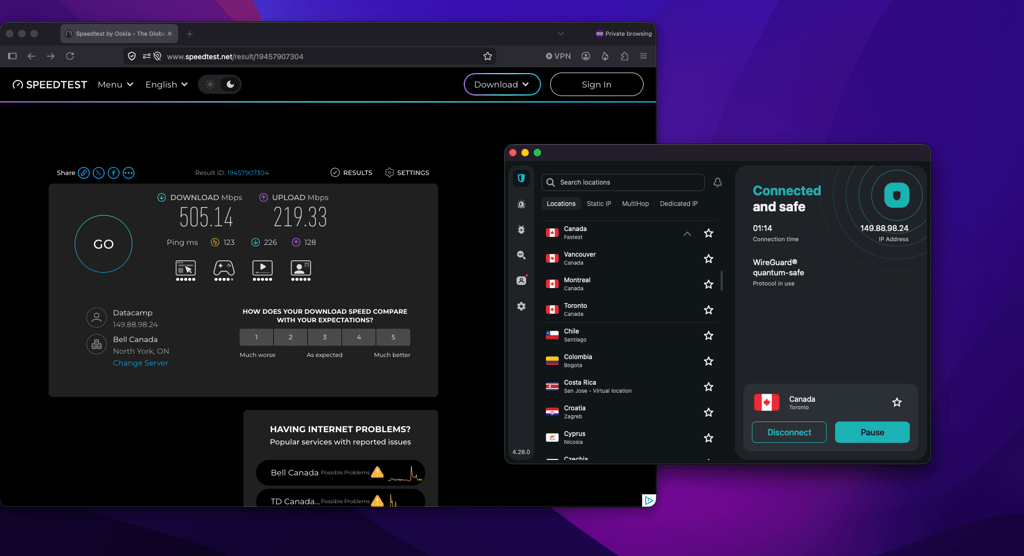
Overall, Surfshark’s Toronto server was the slowest when I did my tests. However, it was also the farthest server from my physical location. If you are physically close to Toronto, your connection speed is very likely to be much faster than mine.
That said, even with my initial speed dropping by 23%, I didn’t notice any tangible interruptions to my browsing or streaming.
Surfshark VPN Vancouver server speed test results
Next, I connected to Vancouver. Before connecting, my baseline speed was 700Mbps, and after the connection was established, I got 578Mbps with a 174ms ping, translating to an 83% initial speed retention rate.
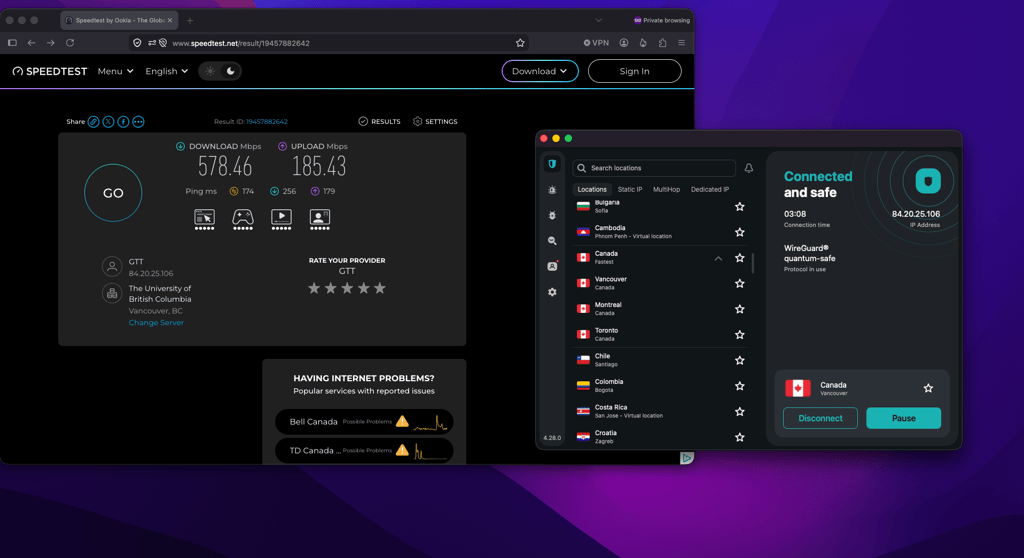
Surfshark’s Vancouver server was by far the fastest, and with a speed drop of only 17%, I could easily stream movies in full HD quality. However, while fast in connection speed, this server showed the slowest ping – 174ms – which made online gaming a little on the laggy side. Again, your own speeds using the Vancouver server may differ from mine, especially if you’re physically much closer to Vancouver than I was.
Surfshark VPN Montreal server speed test results
To finish off, I connected to Surfshark’s Montreal server. Again, I started with a 700Mbps baseline download speed and got 577Mbps with a 115ms ping, which translated to 82% initial speed retention rate when connected.
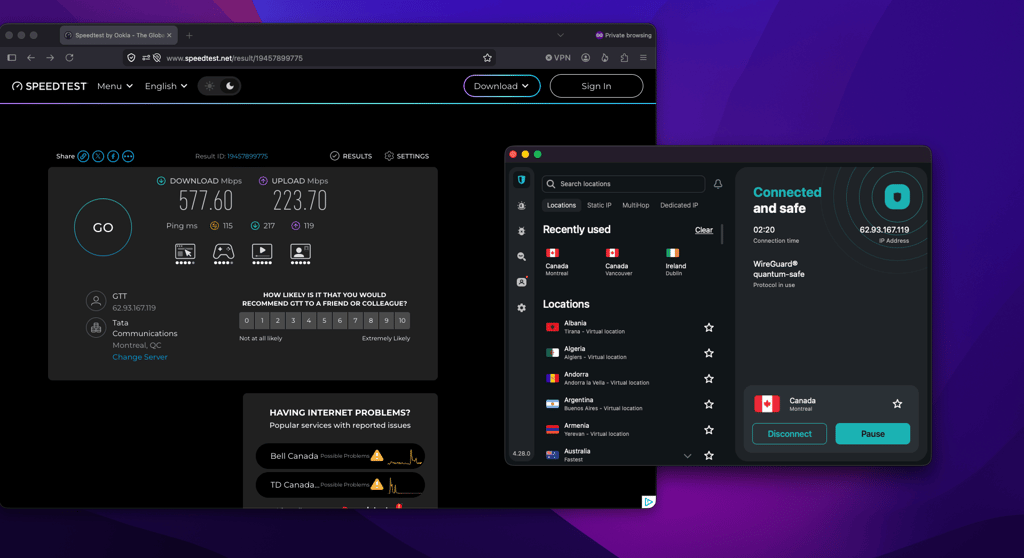
For me, Surfshark’s Montreal server struck the golden middle, as I got both a very fast connection speed with only an 18% drop of my original speed and 115ms ping. With this server, browsing, gaming, and streaming were the smoothest for me, and I also used this location for torrenting tests.
Overall, I was very impressed with the Surfshark Canada servers’ speed test results. In my experience, it is rare to find such consistency across city-level servers, and Surfshark did not disappoint in any respect.
Surfshark VPN user experience
Surfshark has long positioned itself as a one-stop-shop cybersecurity solution, with its One and One+ plans adding antivirus and identity protection alongside the VPN. Since many first-time Canadian users are likely to subscribe primarily for the VPN, I wanted to see how the apps would feel if I'd never used a VPN before.
After using the Surfshark desktop and mobile apps for a while, I appreciated their sleek, intuitive design, which made them easy to use from the get-go. If I were to nitpick, I still prefer VPN apps with an interactive server map because they're quicker to navigate. That said, maps are disappearing across the industry, and Surfshark's search bar has proven fast over time. Connecting to my chosen servers or switching between them was usually very quick, lasting no longer than a few seconds. I also liked that the Surfshark apps remember my most recently used servers, which made reconnecting after switching off much quicker.
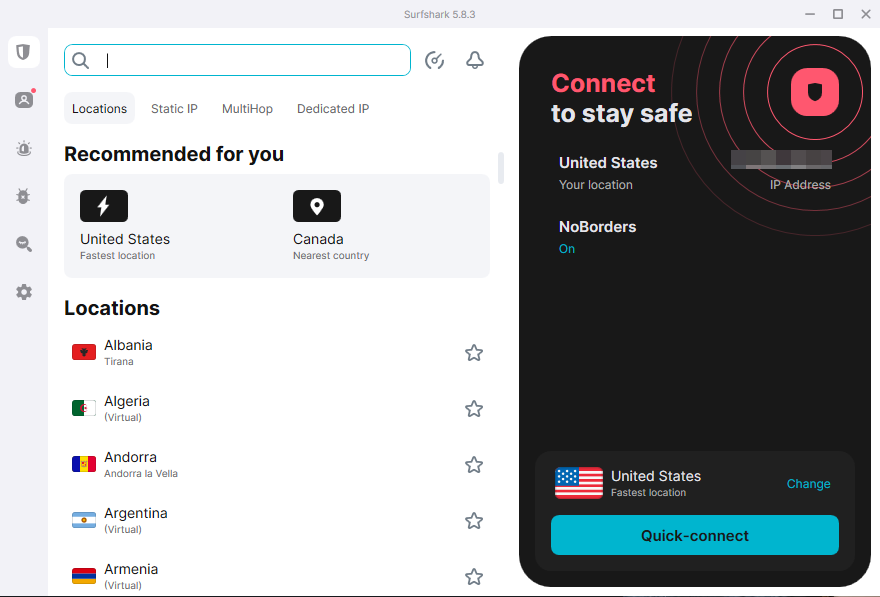
For selecting features, I used the sidebar to navigate to options such as tunneling protocol selection, kill switch settings, and modes like NoBorders. Additionally, I also found all antivirus features on the same sidebar. However, remember, those are only available with One and One+ subscriptions. All in all, it is very convenient that everything Surfshark offers fits into a single app.
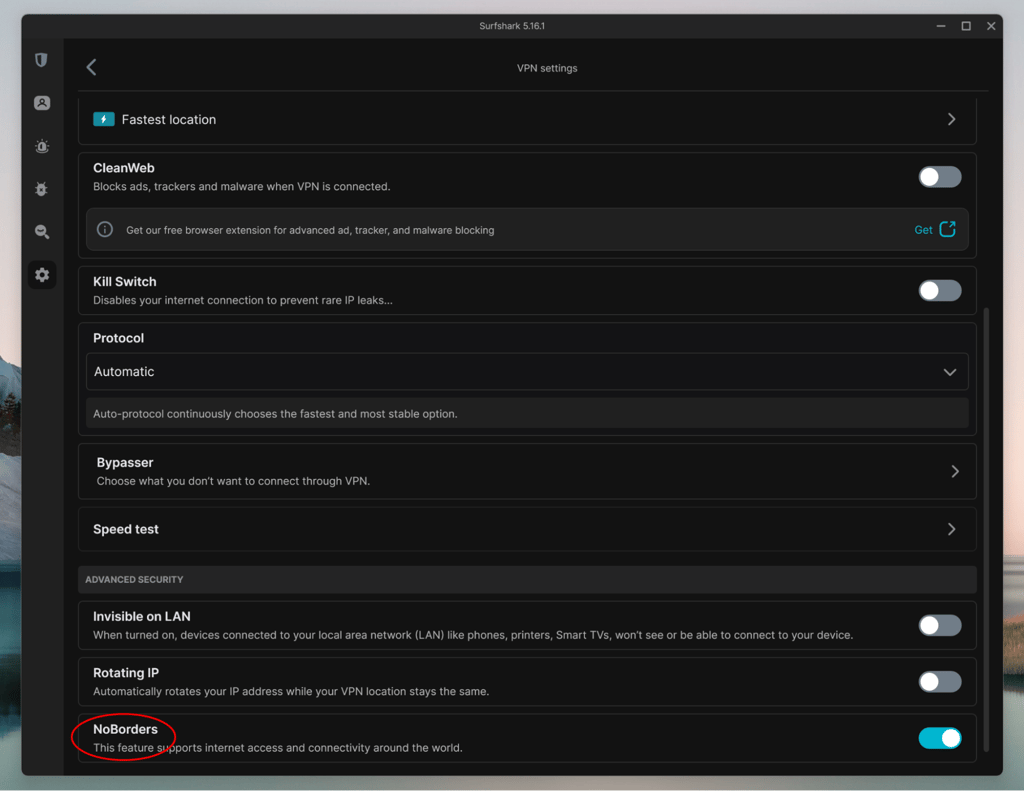
One newer addition I noticed was Surfshark's Dausos tunneling protocol. While traditional VPN protocols share the same underlying connection infrastructure between users, Dausos is designed to give each user a more isolated, encrypted connection, which can improve speed, stability, and privacy. While most people will probably stick with the default settings and won’t look for Dausos hidden away in settings, I thought it was nice to see Surfshark introducing newer technology without making the app any harder to use.
To sum it up, Surfshark manages to balance beginner-friendly design with advanced features quite well. On one hand, you can simply install it, connect to a Canadian server, and forget about it, or spend some time exploring its more advanced features if that's your thing.
Surfshark device compatibility
Device compatibility is one area where Surfshark leaves very little to complain about. It supports virtually every major operating system and device, so you won't need to change how you use your tech or where you stream CBC Gem just to get VPN protection. Surfshark works with almost all popular devices and OSs, including Windows, macOS, Linux, Android, iOS, smart TVs, routers, and gaming consoles. However, that’s the short, condensed list, and if you’re here for the specifics, I also have the full Surfshark compatible devices, OSs, and browsers list:
- Windows
- macOS
- Linux
- Android
- iPhone (iOS)
- iPad (iPadOS)
- Chromebook (ChromeOS)
- Apple TV (tvOS)
- Android TV
- Amazon Fire TV & Fire TV Stick
- Browsers: Chrome, Firefox, Microsoft Edge (also works on Chromium-based browsers like Brave and Opera via the Chrome extension)
- VPN-compatible routers (including Asus, GL.iNet, DD-WRT, OpenWrt, Tomato, Merlin, and other routers supporting OpenVPN or WireGuard)
- Game consoles (PlayStation, Xbox, Nintendo Switch) via router setup or connection sharing
- Smart TVs without native VPN support (such as Samsung Tizen and LG webOS) via a VPN router or connection sharing
For most Canadians, this means you can protect everything from your home computer and smartphone to your streaming device without needing multiple VPN subscriptions. While Surfshark supports almost every device you might want to use, I still encountered a few limitations. The biggest one is Linux support. Although Surfshark offers a native Linux app, it's not as polished or feature-rich as its Windows and macOS counterparts. If Linux is your primary operating system, NordVPN currently offers one of the strongest Linux options on the market. I also found the router setup less beginner-friendly, as it still requires manual configuration and takes longer than simply installing the desktop or mobile app.
Finally, it's worth noting that Surfshark's browser extensions aren't full VPNs but encrypted proxies. They're great if you're browsing on public Wi-Fi at a coffee shop or airport, but only your browser traffic is protected. If you want to secure banking apps, messaging apps, or other software on your device, you'll need the full desktop app instead.
Customer support experience for Surfshark Canada
Surfshark offers three main ways to get help if you run into any issues or simply have a question. The fastest option is the 24/7 live chat, available on the desktop and mobile apps as well as the official website. I also liked that you don't need to be a subscriber to use it, unlike with Proton VPN. If your issue isn't urgent, you can submit an email ticket through the Help Center on Surfshark's website. Finally, there's a well-rounded Knowledge Base full of searchable articles, setup guides, and tutorial videos, making it a good option if you want to find an answer yourself.
Whenever I test a VPN's customer support, I usually start with the live chat. As expected, I was first greeted by a chatbot. Still, after it identified my connectivity issue as something more complex, I was connected to a support representative within a few minutes. The conversation was polite, straight to the point, and my issue was resolved quickly.
Submitting an email ticket usually takes only a couple of minutes, but getting a reply can sometimes take several hours. With Surfshark, I received a response within an hour, even though I submitted my request during business hours. If you ever need immediate help, I recommend using the live chat, as it's likely the fastest option.
The only thing I missed was phone support. Although it’s a rare thing even with premium providers these days, some users may still prefer speaking to someone directly rather than using live chat or email.
Surfshark VPN features in Canada
Surfshark is a premium VPN, no matter which country you use it in. During my testing, however, I found several features that may be particularly useful for streaming, browsing, and other online activities in Canada.
Before digging deeper into those, Surfshark covers all the security essentials I'd expect from a trustworthy VPN. It uses AES-256 encryption, protects against IP, DNS, WebRTC, and IPv4 leaks, and supports modern VPN protocols to keep your connection secure.
With the basics out of the way, let's take a closer look at the Surfshark features I found most useful in Canada and how they can improve your everyday VPN experience.
Block ads and trackers with CleanWeb
CleanWeb is Surfshark's built-in ad, tracker, and malicious website blocker. Like NordVPN's Threat Protection and Proton VPN's NetShield, it can enhance the browsing experience. That said, Surfshark's version is a bit more polished and included in the cheapest Starter package, with no additional fees.
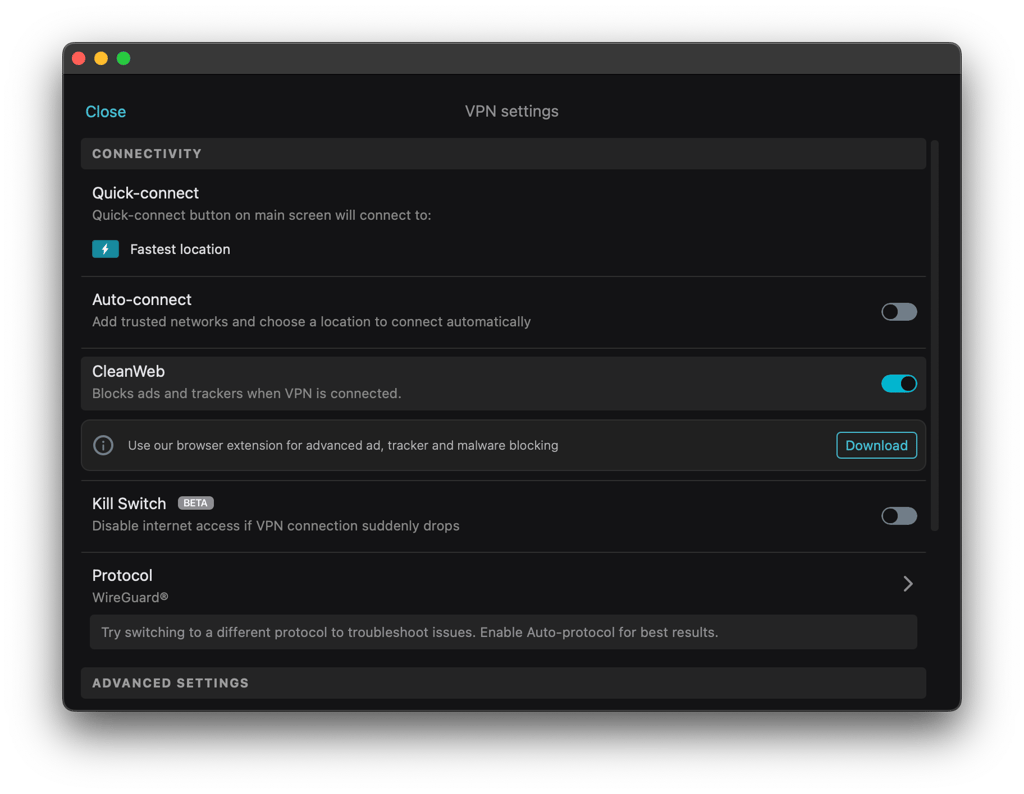
Besides blocking ads and trackers, CleanWeb 2.0 can also hide cookie consent banners and prompts to open pages in apps. It may sound like a small improvement, but I noticed the difference almost immediately while browsing Canadian news sites and online stores, where cookie pop-ups announce themselves on every other page.
The feature also blocks third-party trackers, preventing advertising scripts, cookies, and tracking pixels from collecting data about your browsing habits. All in all, no matter what your usual online activities look like, CleanWeb can make them cleaner and more private.
Stay protected with a kill switch
A kill switch is an essential VPN security feature that cuts your internet connection altogether if the VPN unexpectedly disconnects. This prevents your real IP address and traffic from becoming exposed. While a kill switch is a standard VPN feature, it’s especially useful when using public Wi-Fi in airports, hotels, cafés, and other places across Canada.
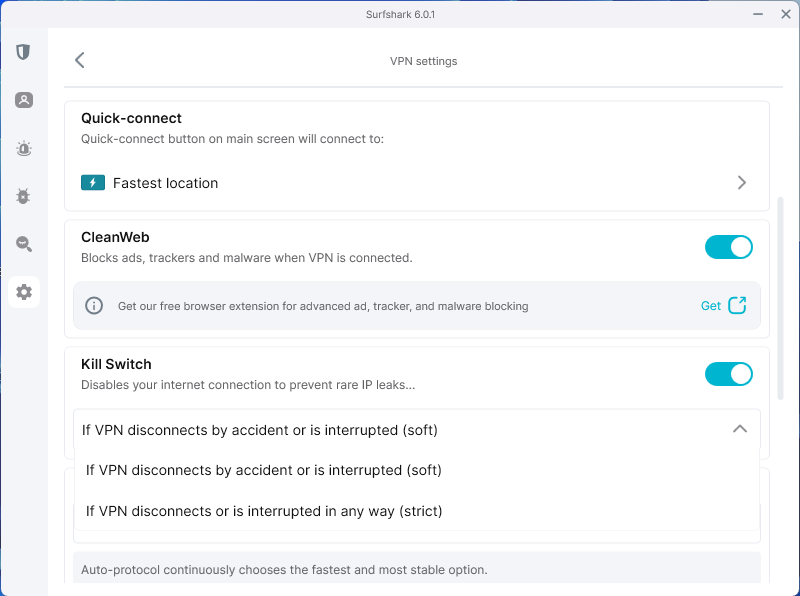
Surfshark’s kill switch, however, isn’t quite that simple, as you can choose between two modes: soft and strict. The soft setting only activates when the VPN connection drops, while strict mode blocks all network traffic until you connect to a VPN. You can toggle the feature on or off and select either mode in the VPN Settings section of any Surfshark app. Personally, I’d keep it enabled at all times for the added layer of security.
I also tested Surfshark’s kill switch by manually terminating my VPN connection and checking how quickly it responded. It worked immediately every time, blocking my connection before any traffic could leak.
Control which apps use the VPN with Bypasser
Bypasser is Surfshark's split tunneling feature. Typically, split tunneling lets you choose which apps, websites, and IP addresses use the VPN connection and which connect directly to the internet. However, Surfshark’s version goes a step further. Besides excluding selected apps and websites from the VPN (VPN Bypasser), it also lets you do the opposite with Route via VPN, sending only selected traffic through the VPN. At the same time, everything else uses your regular internet connection.
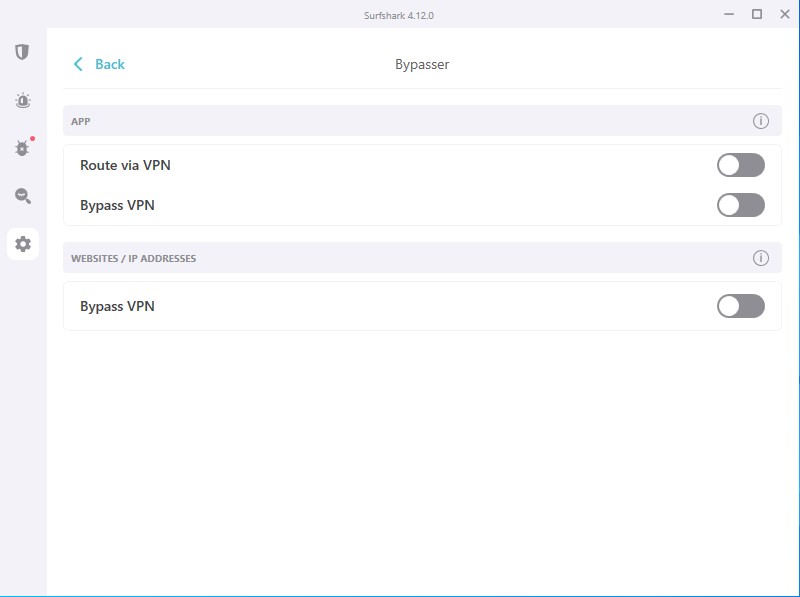
This feature is particularly useful in Canada, where some banking, government, and other local services may not always work properly with a VPN. Instead of switching the VPN on and off, you can simply exclude those services while keeping the rest of your traffic protected.
When I tested Bypasser, the first thing I noticed was how easy it was to set up. I simply enabled either VPN Bypasser or Route via VPN in Settings, then selected the apps and websites I wanted to include or exclude. I was also pleased to see that Surfshark offers split tunneling on all major platforms, including Android and iOS, which is still fairly uncommon even among premium VPNs. Finally, I found it handy for bandwidth-heavy activities like gaming and streaming. Letting those apps bypass VPN encryption gave me a small but noticeable speed boost and even saved a bit of battery life on my phone.
Add another layer of privacy with Dynamic MultiHop and IP Rotator
Surfshark’s Dynamic MultiHop is a double VPN feature that routes your traffic through two VPN servers instead of one. IP Rotator works together with it by changing your VPN IP address every 5 to 10 minutes without disconnecting your session. Although neither feature is essential for casual everyday browsing, both add an extra layer of privacy by making it much harder to trace your online activity to your actual IP address.
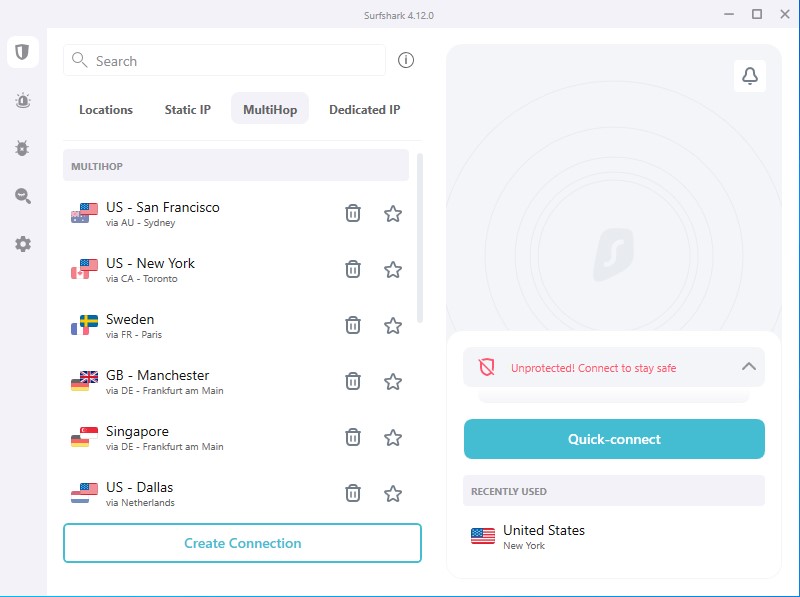
These features may be of interest to privacy-conscious users in Canada for one simple reason. Canada is a member of the Five Eyes intelligence-sharing alliance, cooperating with the US, UK, Australia, and New Zealand on intelligence matters. Although that doesn’t necessarily mean your browsing activity is constantly monitored, using a VPN can still reduce how much of your online activities are visible to your internet service provider, the government, or any other third parties. And that’s exactly the scenario where Surfshark’s Dynamic MultiHop and IP Rotator can give you a bit more control over your privacy than a standard VPN connection.
During my testing, I liked that Dynamic MultiHop wasn't limited to a handful of preset routes. Instead, Surfshark lets you choose your own entry and exit server locations, including Canadian servers, making the feature much more flexible than what many competing VPNs offer. Since IP Rotator works automatically in the background, I simply enabled it once and didn't have to think about it again.
Browse more privately with Alternative ID
Alternative ID is a unique Surfshark feature. It lets you create a new online identity, including a name, email address, and other personal details, to use instead of your real ones. It was particularly useful for situations such as creating an account just to access content or to post an advertisement on platforms like Kijiji or Craigslist. Using an Alternative ID instead, I could be surer that my own personal details wouldn't end up in some random person's lap.
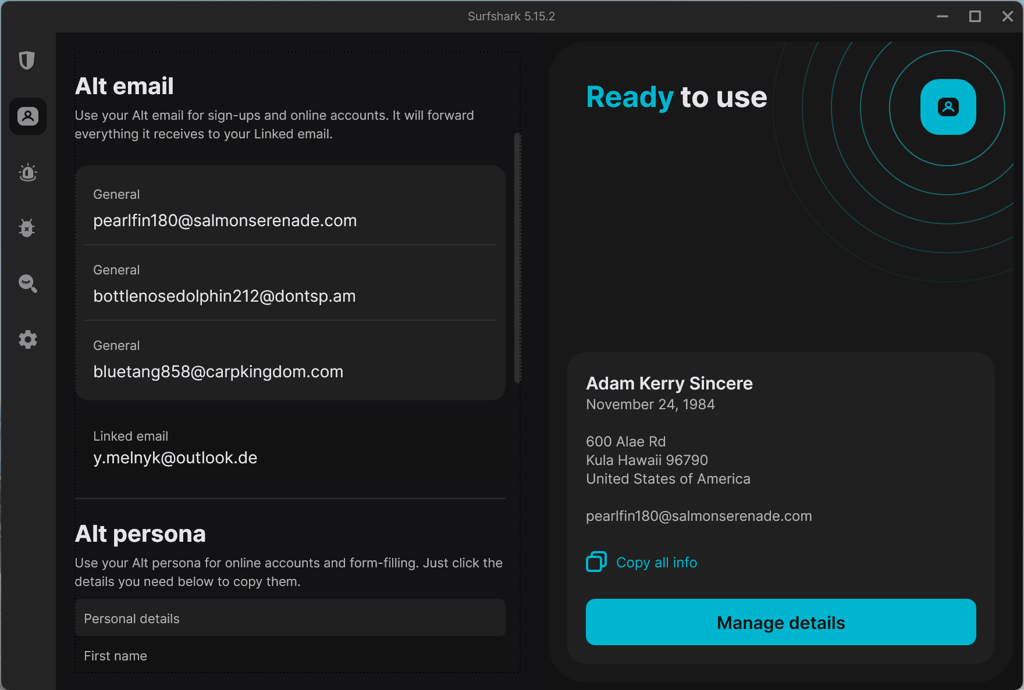
Using Alternative ID is straightforward and takes only a minute or so. I set everything up directly in the Surfshark app, and found it neat that the feature isn't locked behind any additional fees or top-tier subscriptions. Although it's not something I'd use every day, it's definitely a feature I'd keep around for one-off registrations and websites I don't fully trust.
Try Surfshark's new Dausos protocol
Dausos is Surfshark's newest proprietary VPN protocol, designed to improve connection speed, stability, and privacy. It also incorporates newer security technologies, including post-quantum cryptography. While post-quantum protection isn't unique to Surfshark, Dausos is the company's first protocol built around these newer technologies. You certainly don't need to understand the technical details to benefit from it, but it's still nice to see Surfshark investing in more future-proof security.
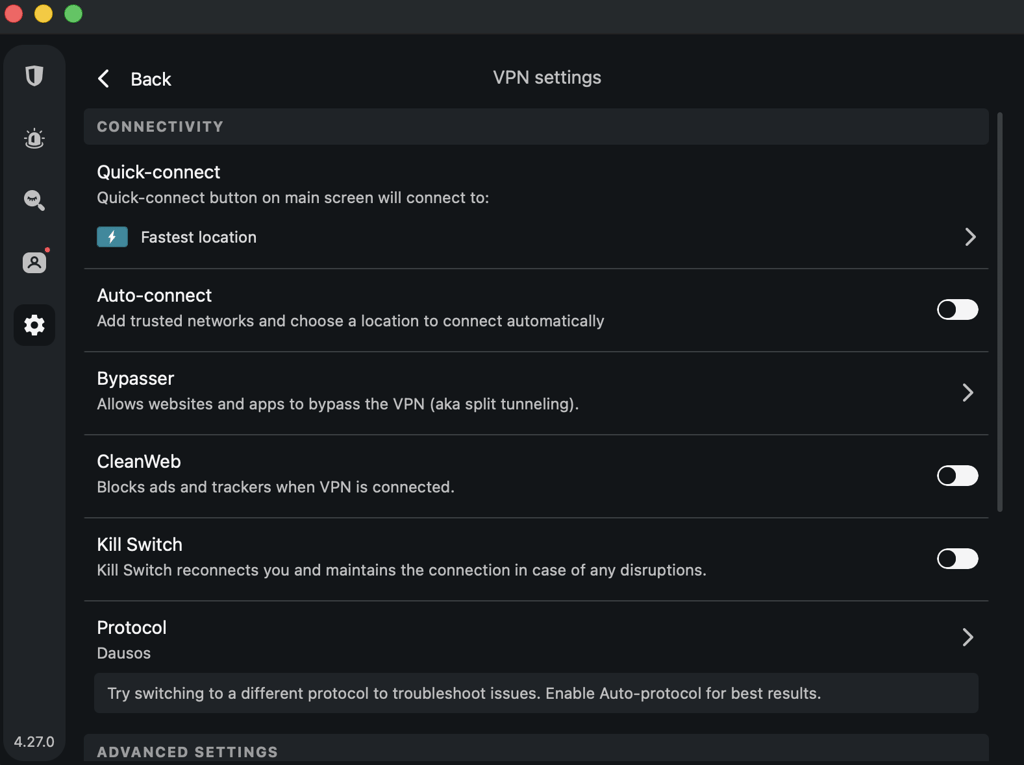
Using Dausos was pretty straightforward. All I had to do was select it from the list of available tunneling protocols in the settings, and it was ready to go. Naturally, I was curious to see how it compared with OpenVPN and WireGuard, so I ran my usual speed and performance tests. Unfortunately, Dausos didn't outperform WireGuard just yet, although it was consistently faster than the older, but still reliable, OpenVPN. In the end, I switched back to WireGuard for the remainder of my testing simply because it remains the faster option. That said, I like having Dausos available for anyone who wants to try Surfshark's newest networking technology.
If you're curious about the name, dausos is actually a Lithuanian word meaning the heavens. While Surfshark's Dausos still has some way to go before becoming heavenly, it's a nice nod to the company's Lithuanian roots.
Connect every device without limits
Surfshark offers unlimited simultaneous connections, even with its most affordable Starter plan. This means you can install and use the VPN on as many devices as you want with just one subscription. While unlimited connections aren't unique to Surfshark, many of its biggest competitors, including NordVPN and Proton VPN, limit the number of devices you can connect at once.
Unlimited connections can be especially useful for larger Canadian households or for anyone with a growing collection of gadgets. An average home can easily have 10 or more internet-connected devices among family members, such as phones, laptops, tablets, and smart TVs. With Surfshark, you don't have to decide which devices get VPN protection and which don't.
Testing Surfshark made me realize yet again just how many devices I actually own and want to protect with a VPN. While I initially expected the unlimited simultaneous connections to be just a minor perk, the option turned out to be much more than a mere convenience. After using VPNs with device limits, it was refreshing not having to disconnect the VPN on one device just to use it on another.
Surfshark streaming in Canada
Streaming is often a major reason people buy a VPN. Because of this, I wanted to see how well Surfshark actually performs with Canadian and international streaming platforms. A good streaming VPN needs three things: enough server locations to access different content libraries, fast enough speeds for buffer-free playback, and the ability to get past VPN detection.
Surfshark checks the first box without much effort. It has more than 4,500 servers across around 100 countries, including over 170 servers in Toronto, Montreal, and Vancouver. For Canadians, that means you can continue watching services like CBC Gem or Crave while traveling abroad, or access streaming libraries from countries like the US, Japan, or the UK without much hassle.

Of course, server locations only matter if the connection is fast enough to stream. Although Surfshark advertises 10Gbps servers, real-world performance is naturally lower. During my testing, however, the Canadian servers still delivered 578Mbps, which was more than enough for smooth HD and 4K streaming with no buffering. As expected, connecting to more distant locations resulted in slightly slower speeds, but not enough to make streaming frustrating.
The last thing I wanted to test was how well Surfshark handled geo-restrictions. Most streaming platforms actively detect VPN traffic due to regional licensing agreements, but Surfshark had no trouble accessing the services I tested. On the few occasions when I ran into stricter VPN detection, switching to Camouflage Mode or enabling NoBorders was enough to get things working again.
Overall, my streaming experience with Surfshark was very straightforward. I simply connected to a server in the country I needed, opened the streaming service, signed in, and started watching.
Is Surfshark safe to use in Canada?
When it comes to VPNs, another thing to consider is whether you can actually trust the service to handle your data and protect your privacy. Because no matter the length of the feature list, if your data is mishandled, using such a VPN renders it almost useless. To round out this Surfshark for Canada review, I also looked into its privacy practices.
Surfshark is based in the Netherlands, which is a member of the Nine Eyes Alliance, similar to Canada. This may initially raise concerns, but in practice, it is not a deal-breaker. Dutch law does not require VPN providers to log any user activity. On top of that, Surfshark operates under a strict no-logs policy, which Deloitte has independently verified in 2023 and 2025. Lastly, every single server on Surfshark’s fleet is RAM-only, which means that any information stored on this kind of server is automatically wiped whenever it’s restarted. In Surfshark’s case, that’s almost daily.
I also found that Surfshark has recently shifted from Warrant Canary, the usual practice for VPN services, to more detailed quarterly transparency reporting. These transparency reports detail all government requests it receives. For example, I found one case in the latest report where Surfshark received a legally binding court order in the Netherlands. Surfshark could only provide basic account and payment information because it didn't have the browsing logs to hand over.
Surfshark is a trustworthy VPN provider and is undoubtedly safe to use in Canada. And while no VPN can promise absolute anonymity, Surfshark’s strict no-logs policy, RAM-only servers, and transparency reports make the company’s privacy claims more than just marketing talk.
Surfshark VPN alternatives for Canada
Although Surfshark is one of the best VPNs for Canada, you might still like to compare it with other premium VPNs before you commit. My other recommendations for Canada VPN are NordVPN and Proton VPN, so let’s see how they compare with Surfshark:
| Surfshark VPN alternatives for Canada | Based in | No-logs policy | Servers in Canada | Unique features | Customer support channels | Free trial and money-back guarantee | Starting price |
| NordVPN | Panama | ✅ Yes, 6 third-party audits, the latest published in 2026 | 300+ servers in 4 locations | Threat Protection Pro, NordWhisper tunneling protocol, integrated next-gen antivirus | Live chat, email tickets, knowledge base | ✅ Yes, 3-day free trial for Android devices and 30-day | CA$4.39/month |
| Proton VPN | Switzerland | ✅ Yes, 5 third-party audits, latest published in 2026 | 500+ servers in 3 locations | Secure Core servers, open-source apps, VPN accelerator, NetShield | Live chat, email tickets, knowledge base | ✅ Yes, free version and 30-day | CA$3.74/month |
NordVPN slightly outperforms Surfshark in speed and sheer number of servers. Additionally, NordVPN is currently the more expensive option with subscriptions starting at CA$4.39/month. However, as it is a larger brand, I expect new features to roll out more often, so NordVPN might appeal to more tech-savvy users or those who need an extremely high-performance VPN.
Meanwhile, Proton VPN is most well-known for its strong emphasis on user privacy. Even the simple fact that it’s based in Switzerland, known for very strict privacy laws, says a lot. Plus, it undergoes year-long no-logs policy audits, which isn’t something many VPNs can brag about. However, Surfshark outperforms Proton VPN in terms of speed and ease of use.
Summary
Surfshark is one of the top premium VPNs for Canada, combining a large server fleet, fast connection speeds, the latest security tech, and even affordable subscription prices. Based on my experience, it works unnoticeably for casual browsing, but just as smoothly for gaming, streaming, and torrenting. So, whether your goal is simply to add an extra layer of privacy to your browsing or to access Canada-only content from abroad, Surfshark will do it all.
After testing Surfshark across different devices and use cases, I had very few complaints. Sure, it’s not perfect, and its Linux app and the newer Dausos protocol still need some upgrading, but no VPN is. That said, Surfshark is one of those VPNs that simply gets out of your way, letting you browse, stream, and game securely without requiring constant attention.

![Surfshark weekly deals logo [IN USE]](https://media.vpnpro.com/surfshark-weekly-deals.svg)
![Proton VPN winner logo [IN USE]](https://media.vpnpro.com/2025/05/protonvpn-winner.png)
You may also like to read:
NordVPN in Canada review: Price, deals, server testing
FAQ
Is Surfshark legal to use in Canada?
Yes, Surfshark is legal to use in Canada, just like any other VPN. In fact, it’s an indispensable cybersecurity tool that can add a layer of privacy and security to your browsing by encrypting your traffic and masking your IP address.
Can Surfshark unblock Netflix Canada when I travel?
Yes, Surfshark can help you access Netflix Canada while traveling abroad. All you need to do is sto select a server in Canada, connect to it, head to Netflix, sign in to your account, and start streaming as if you were home.
Can my Canadian ISP see what I am doing online?
Yes, if you are not using a VPN to encrypt your traffic. However, if you are using a VPN, your ISP can only see that you are using one, not what you are doing online. That’s because a VPN encrypts your traffic, making it impossible for your ISP to read. If you’d rather your ISP didn’t know you are using a VPN, you can switch on Surfshark’s Camouflage mode, which makes VPN traffic look like standard web browsing.
Will Surfshark slow down my internet speeds?
No, Surfshark will not significantly slow down your internet speeds. That said, every VPN slows down your connections to some degree, but thanks to Surfshark’s fast servers and stable connections, the change is so small that it’s barely noticeable.
Can I try Surfshark for free?
Yes, you can try Surfshark for free. The provider offers a 7-day free trial for Android, iOS, and macOS devices, available via mobile app stores. Additionally, Surfshark offers a 30-day money-back guarantee, allowing you to test the service completely risk-free.


- Surfshark VPN Canada: quick overview
- Surfshark price and plans in Canada
- Surfshark VPN Canada servers
- Surfshark Canada speed test results
- Surfshark VPN user experience
- Surfshark VPN features in Canada
- Surfshark streaming in Canada
- Is Surfshark safe to use in Canada?
- Surfshark VPN alternatives for Canada
- Summary
- FAQ