Best VPN for MLB TV in 2026



Key takeaways:
- MLB.TV blocks live games that are subject to local or national broadcast rights in your current location. If you live in a team’s home television territory or the game airs on a nationally exclusive network, you cannot watch it live on MLB.TV.
- To bypass MLB.TV regional blackouts, use a reliable VPN to mask your IP address and appear to be in a location where the game is not subject to a blackout.
- Based on my tests, NordVPN stood out as the best VPN for MLB.TV, with fast US servers that work across PCs, mobiles, consoles, and smart TVs to bypass MLB.TV blackouts.
🏷️ LIMITED OFFER: NordVPN deal! Get 78% OFF NordVPN + 3 months FREE 🏷️
Many MLB fans know that MLB.TV uses blackout restrictions that can prevent you from watching games in your local area. For example, Yankees fans in New York may be unable to watch certain Yankees games on MLB.TV because of regional blackout rules. Fortunately, there are ways to access MLB games that are unavailable in your location.
A reliable VPN can change your virtual location by connecting you to a server in another US location, which may help you bypass regional MLB.TV blackouts and other geo-restrictions. This lets you access games that aren’t available through your usual connection.
I tested and researched 18 reputable VPNs and found NordVPN to be the best VPN for MLB TV. Surfshark and Proton VPN closely follow it. All three delivered strong streaming performance and a wide selection of US locations, making them our top choices for watching MLB.TV.
Our recommended MLB.TV VPNs
| MLB TV VPN Provider | Rating | Bypasses MLB.TV blackouts? | Best for: | US servers | Price |
| 1. NordVPN | 9.8 ⭐⭐⭐⭐⭐ | ✅Yes | Overall best VPN for MLB.TV | 2,996+ servers across 55 US locations | $3.49/month |
| 2. Surfshark | 9.5 ⭐⭐⭐⭐⭐ | ✅Yes | Affordable VPN to watch MLB.TV anywhere | 600+ servers in 24 US cities | $2.49/month |
| 3. Proton VPN | 8.6 ⭐⭐⭐⭐ | ✅Yes | Privacy-focused MLB.TV VPN | 6,010+ servers in 22 US cities | $2.99/month |
| 4. TotalVPN | 8.2 ⭐⭐⭐⭐ | ✅Yes | Easy-to-use VPN to avoid MLB.TV blackouts | Undisclosed number of servers in 24 US cities | $1.59/month |
| 5. Norton VPN | 7.3 ⭐⭐⭐⭐ | ✅Yes | Secure VPN for MLB.TV with great speeds | Undisclosed number of servers across 62 US locations | $3.33/month |


Since 2018, VPNpro has delivered unbiased, expert-backed insights through in-house research and thorough VPN testing. Our team ensures every review is fact-checked and reliable. Learn how we maintain these high standards in our testing methods.
Why do I need a VPN to watch MLB.TV?
MLB.TV imposes blackout rules on local games. For example, if you’re in Colorado, you won’t see any Colorado Rockies games. It’s even worse in other states. For example, people from Iowa can’t see the Cubs, Cardinals, White Sox, Royals, Twins, or Brewers play.
Luckily, there is a reliable MLB.TV blackout workaround. By using a reliable streaming VPN you can change your IP address and access MLB games that are usually unavailable in your state. Fans can make it look like they are watching from a different state or country to bypass blackouts. Plus, a VPN service grants top-of-the-line encryption, an essential component of online privacy, and unlocks geo-restricted content. Good VPNs usually require a monthly subscription, but it’s cheaper than buying a cable TV.

How to get around MLB.TV local blackout with a VPN
Many sports fans find MLB blackout restrictions frustrating when trying to stream local games. However, with a trustworthy VPN, you can bypass MLB.TV blackouts and watch the games from anywhere.
- Subscribe to the VPN that works with MLB TV. I chose NordVPN, now 78% off!
- Download and install the app on the device of your choice.
- Connect to a US server where your desired game isn’t blacked out.
- Open MLB.TV and stream any game without restrictions!
Best VPNs for MLB.TV
-
Overall best MLB.TV VPN for uninterrupted streaming
-
Affordable MLB.TV VPN with unlimited connections
-
Effective VPN for MLB.TV with a great server network
-
The cheapest VPN for MLB.TV to enjoy every match
-
Reliable MLB.TV VPN to bypass restrictions
![NordVPN mobile logo [IN USE]](https://media.vpnpro.com/Nord-VPN-review.jpg)
![Surfshark mobile logo [IN USE]](https://media.vpnpro.com/surfshark-60x60-1.jpg)
![Proton VPN mobile logo [IN USE]](https://media.vpnpro.com/ProtonVPN-small.jpg)
![TotalVPN mobile logo [IN USE]](https://media.vpnpro.com/totalvpn-mobile.png)

I tested 20 of the most popular providers and their services. Only 5 of them are the best at bypassing geo-blocks, avoiding geo-restrictions, and giving access to blackout MLB games.
My tests reveal that NordVPN is the best VPN for MLB.TV. It can access most US cities, ensuring you find a blackout-free connection. Its 10 simultaneous connections are perfect for watching all MLB.TV games on any device. Alternatively, Surfshark emerged as one of the most affordable MLB TV VPNs, offering unlimited simultaneous connections to bypass MLB.TV blackouts on all your devices. Lastly, Proton VPN is pricier than the top VPNs, but its excellent technical features and foolproof unblocking performance are worth the price.
Top 1. NordVPN – best VPN for MLB.TV overall
![NordVPN mobile logo [IN USE]](https://media.vpnpro.com/images/170x89/2025/08/nord-rreview.jpg)


137

9300

24/7, email
-
Exceptionally fast MLB streaming
-
Compatible with various devices
-
Independently audited and secure
-
Only 10 simultaneous connections
NordVPN is our top pick for MLB.TV. I’ve personally used NordVPN to bypass geo-restrictions for the past three years, and it has consistently delivered reliable access. With thousands of servers across 224+ locations, including almost 3,000 US servers, it’s easy to connect to a location where your favorite MLB team’s game isn’t blacked out.
For the most reliable MLB.TV experience, I recommend using NordVPN’s dedicated IP, especially if you watch games frequently and want a consistent US connection. It gives you a stable US location for streaming MLB.TV and reduces the hassle of switching between shared VPN servers.
NordVPN is also an excellent choice for 4K MLB streaming. Its proprietary NordLynx protocol delivered impressive speeds in our testing, retaining around 94% of the original connection speed. That means smoother streams, less buffering, and enough bandwidth for high-resolution games.
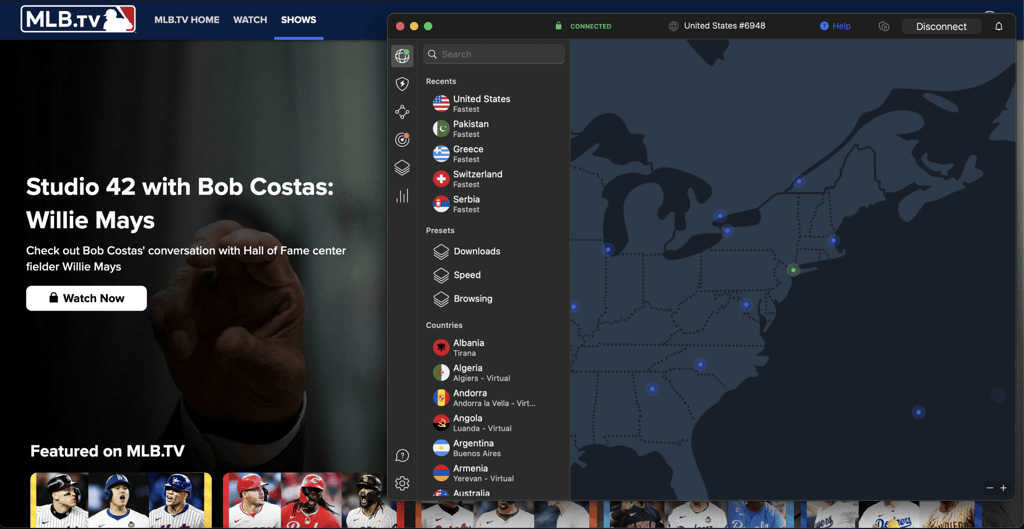
NordVPN also includes strong privacy features, including AES-256 encryption, a kill switch, and a no-logs policy. In my testing, the kill switch was particularly useful for MLB.TV, as it helps prevent your real IP address from being exposed if the VPN connection drops, which could otherwise reveal your actual location and trigger a blackout restriction.
Another perk is excellent compatibility. NordVPN has apps for all major platforms. Plus, you can use it on streaming devices like Apple TV, FireStick, or Android TV. If you own a console or a smart TV that doesn’t support VPNs, you can take advantage of the SmartPlay feature. If you want to know about other wonderful features, I suggest reading the NordVPN review.
NordVPN is the best MLB TV VPN, starting at $3.49/month, with a 3-day free trial and a 30-day money-back guarantee. Based on my testing, it’s the strongest overall choice for MLB.TV, delivering fast, reliable streaming, plenty of US locations to choose from, and a stable connection for dealing with MLB.TV blackout restrictions.
For a deeper investigation of NordVPN, read our NordVPN review.
Top 2. Surfshark VPN – budget-friendly VPN for MLB.TV
![Surfshark mobile logo [IN USE]](https://media.vpnpro.com/images/170x89/surfshark-review-logo-2.jpg)
100
4500
24/7, FAQ
-
Unlimited simultaneous connections
-
Great performance at an affordable price
-
Smart DNS for easy MLB unblocking
-
Bonus features cost extra
Surfshark is among the best MLB.TV VPNs thanks to its excellent geo-blocking capabilities, fast speeds, and built-in GPS spoofing feature. Its Override GPS location setting is particularly useful on Android, as it matches your GPS coordinates to the VPN server’s IP location, helping prevent MLB.TV from detecting a location mismatch.
In addition, with 4,500+ servers in 100+ countries and 20+ US locations, Surfshark gives you plenty of options for connecting through different parts of the US when dealing with MLB.TV blackouts. This is particularly useful if a game is unavailable in your current location, as you can switch to another US server and test a different IP location. Surfshark also offers a dedicated IP, which gives you a fixed US IP address instead of sharing one that changes between users, making it a more consistent option for regular MLB.TV streaming.
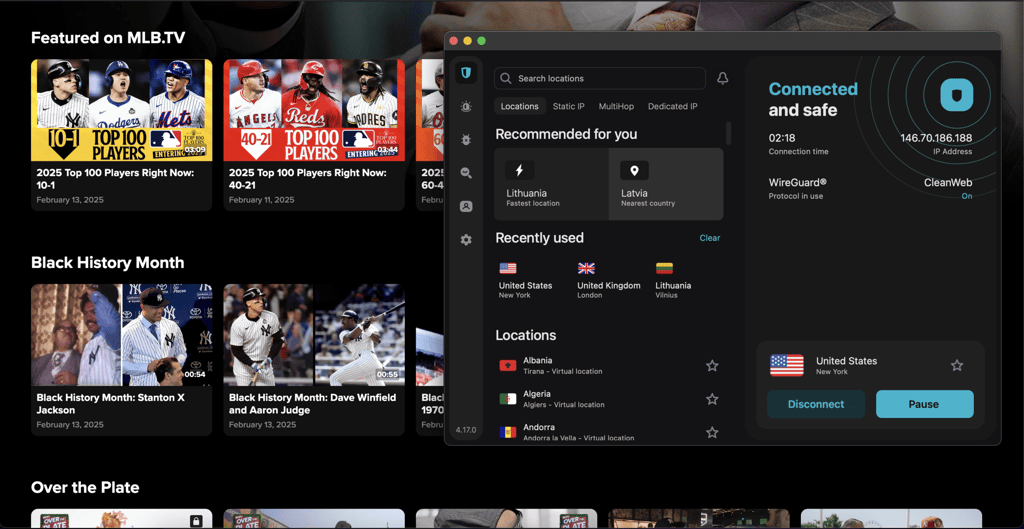
Compatibility-wise, Surfshark worked perfectly with any device I tested. Smart TV and console users can utilize Smart DNS to avoid tedious router setup. Because of the WireGuard tunneling protocol, I experienced high speeds and 4K video quality. As for overall browsing, I eliminated ads with one of the top-performing ad-blocking features—CleanWeb. You can read more about it in the Surfshark VPN review.
Surfshark is one of the best MLB.TV VPNs, starting at $2.49/month, with a 7-day free trial and a 30-day money-back guarantee. Based on my testing, it stands out for its built-in GPS spoofing, strong geo-block bypassing, and wide range of US locations, making it an especially good option for watching MLB.TV and dealing with location-based blackout restrictions.
For a deeper investigation of Surfshark VPN, read our Surfshark VPN review.
Top 3. Proton VPN – fast and secure MLB.TV VPN
![Proton VPN mobile logo [IN USE]](https://media.vpnpro.com/images/170x89/proton-vpn-review-logo-2.jpg)
148
20660
-
Great speeds
-
6000+ servers in the USA
-
Solid free version
-
Few P2P servers
Proton VPN is another great option if you want to bypass MLB TV restrictions. Its well-rounded free version includes servers in the USA. However, it only allows one connection, and the servers can be too overcrowded.
If you want more advanced performance, the premium plan offers 20,660+ servers in 148+ countries, including 6000+ servers in the US. I easily unblocked local games and other streaming platforms like Netflix, HBO Max, and others. Also, the performance was great because Proton VPN utilizes WireGuard tunneling and the Stealth protocol.
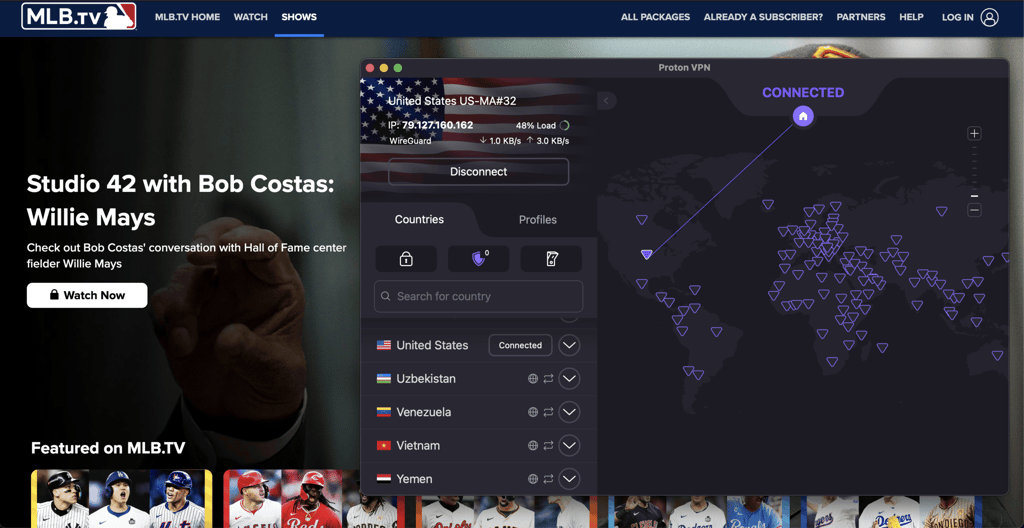
Proton VPN has some great security and privacy features in its pocket. It’s based in Switzerland, so it strictly follows the no-logs policy. Industry-standard AES-256 encryption, a kill-switch, and steadfast DNS leak protection ensure your data is hidden from prying eyes and your internet traffic is as private as it gets.
This service can be yours for $2.99/month. You can try a free version before committing full-time, but a 30-day money-back guarantee also has your back. I also recommend checking out Proton VPN deals.
Here’s what we found during our hands-on testing of Proton VPN.
Top 4. TotalVPN – cheapest VPN for MLB.TV
![TotalVPN mobile logo [IN USE]](https://media.vpnpro.com/images/170x89/totalvpn.jpg)
90
1800
24/7, email
-
Good speeds
-
Easily unblocks content
-
Secure and affordable
-
Smaller server selection
TotalVPN is a cheaper option to bypass MLB TV blackouts. It has only 1,800+ servers across 90+ countries, but there were enough servers in the US to connect and watch local MLB games. Thanks to the OpenVPN tunneling protocol, its speeds are great for browsing or even streaming.
The service provider works with Windows, macOS, Android, and iOS systems, making it easy to watch your favorite games on any device. I tested it on the computer and was satisfied with the results. Total VPN’s robust security toolkit ensured me easy access to MLB blackout games and the utmost privacy. It utilizes Stealth mode, which practically makes it undetectable. Plus, it employs AES-256 encryption, a kill switch, and IP & DNS leak protections. With them, you can rest assured that your actual location won’t be exposed and that your data stays secure.
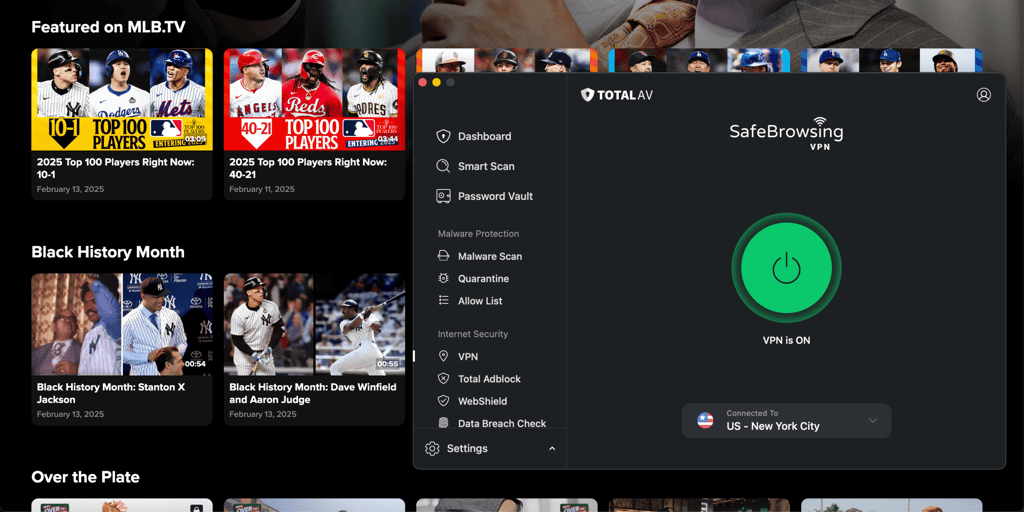
TotalVPN price starts at $1.59/month, but I advise you to check out coupons for a better deal. Additionally, you can take advantage of a 7-day free trial or 30-day money-back guarantee if you’re not satisfied with a service.
For a deeper investigation of TotalVPN, read our TotalVPN review.
Top 5. Norton VPN – flexible and secure MLB.TV VPN

65
2000
24/7 live chat
-
Unblocks MLB.TV streams
-
Strong security suite
-
Affordable and easy to use
-
Inconsistent speeds
Norton VPN is a good choice if you want to have a workaround for MLB TV blackouts. It provides great performance, solid security features, and compatibility with many devices, so you can watch MLB games from anywhere.
It has 2,000+ servers in 65+ countries, so I easily found nearby servers in the States where I could stream the games. Even though Norton VPN uses OpenVPN tunneling protocol, which is slightly weaker than competitors, during my tests, it retained around 80% of the original speed. However, I noticed that the speed was inconsistent when I connected to farther servers.
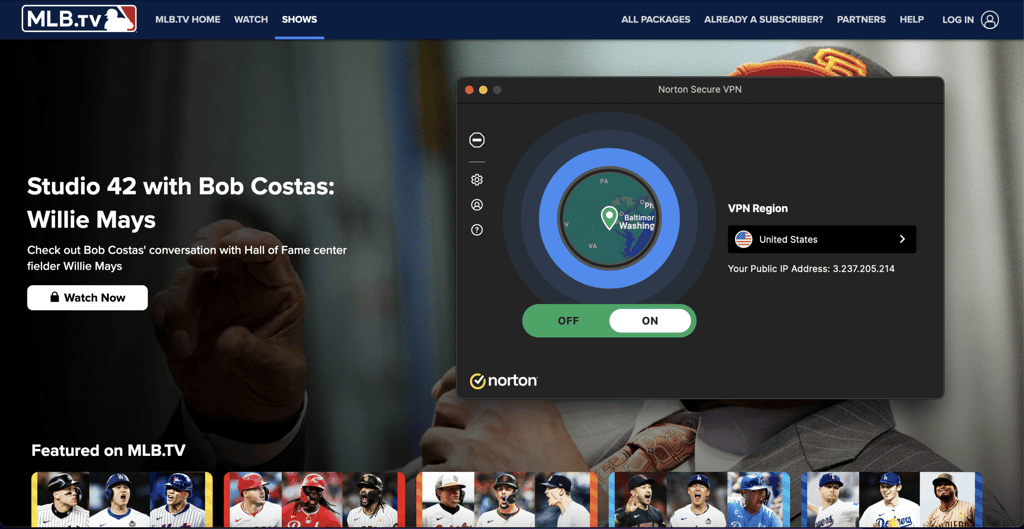
Norton VPN is very compatible with many devices and software, so streaming games was so much easier. The security package includes all the essentials, such as a reliable kill switch, top-grade AES-256 encryption, and split tunneling. Not only do they help me to bypass geo-fences, but they also secure my internet browsing every day.
Norton VPN is one of the affordable options, starting at $3.33/month. While it doesn’t offer a free trial, there’s a lengthy 60-day money-back guarantee for annual subscriptions. Test it yourself, and see if it meets your needs.
For a deeper investigation of Norton VPN, read our Norton VPN review.
Other VPNs I tested
Besides my top 5 VPNs for MLB.TV choices, I tested other VPNs, too. However, they did not make it to the final list for various reasons. Some of my tested VPNs weren’t capable of securely bypassing MLB.TV blackout restrictions, others did not offer stable connection speeds, and some did not meet my high-security standards. Yet, I found a couple of VPNs that also worked quite well at bypassing MLB.TV restrictions:
- ExpressVPN. This service can also bypass blackout restrictions, making ExpressVPN an MLB.TV-compatible choice. Additionally, this VPN offers a strict no-logs policy, excellent connection speeds, modern tunneling protocols, and a 30-day money-back guarantee for risk-free testing.
- IPVanish. While IPVanish offers excellent security features and good connection speeds, it wasn’t always able to bypass MLB.TV blackout restrictions. But, if you do not mind switching around the servers and trying different tunneling protocols, IPVanish can also be a good choice for MLB.TV.
So, if you’re one of the sports fans asking MLB.TV why blackouts happen; remember, you can bypass them and enjoy your games without restrictions using a reliable MLB.TV VPN.
How I tested best MLB.TV VPNs
I tested 20 of the most popular VPNs to see if they worked with MLB.TV and if they could bypass local blackouts. Here are the main things I looked at when analyzing the services:
- Servers in the USA (40%). Having more is always better, and a wide selection of servers and US IP addresses will help you shun those pesky MLB.TV blackouts. Also, it’s always a neat bonus if your VPN catalogs the servers by the cities.
- High speed (30%). I tested VPN speeds to pick those that ensure the least possible speed loss, no matter where you live. My tests show minimal speed loss can only be achieved if a VPN employs modern and efficient tunneling protocols like WireGuard or NordLynx.
- Price (10%). Even the best VPNs on the market shouldn’t cost a fortune. Luckily, the top VPN market contenders offer astonishing deals left and right. One thing to look out for is a free trial or a money-back guarantee period to test a service before any commitment.
- Compatibility (10%). Most of the best MLB.TV VPNs these days are already fully compatible with PCs and smartphones. However, streaming-specialized devices are becoming more popular by the day. Thus, it’s wise to go for a multi-device VPN that offers Smart DNS and router compatibility.
- Privacy and security (10%). Leaking IP and browsing data is a serious threat to your privacy. The most trustworthy countermeasures are AES-256 encryption, DNS and IP leak protection, as well as a reliable kill switch.
Among the VPNs I tested, NordVPN stood out as the best VPN for MLB.TV. I was satisfied with blackout bypassing capabilities, as well as speeds and overall usability. Moreover, NordVPN provides apps for the most popular streaming devices, which makes it super easy to set up.
What do MLB blackouts mean?
MLB blackouts restrict you from viewing local games in your area. For instance, you can’t watch Rangers games on TV or streaming services in Texas. These limitations exist to protect local broadcasting rights, teams, and partners. However, because of this, loyal fans are left wondering how to watch blackout MLB games of their favorite team if they can’t watch them live due to financial reasons or distance.
Blackout rules are also quite confusing and depend on various factors, such as location, team affiliation, and broadcast agreements. However, there is a way to get around MLB TV blackouts. With a reliable VPN, you can change your IP address to the state where your favorite team’s games are accessible. Plus, a good VPN also secures your online presence, so you will be well protected while watching.
MLB TV blackout rules
MLB divides the US into 30 regional markets, one per team. Home games are typically blacked out in the team's local market on out-of-market streaming services. Blackout zones extend roughly 75 miles from the stadium, though exact boundaries vary by team and broadcaster.
REGIONAL TERRITORIES (2026):
- NORTHEAST: Yankees (NY), Mets (NY), Red Sox (Boston area), Blue Jays (Toronto)
- MID-ATLANTIC: Phillies (PA), Orioles (MD), Nationals (DC/VA), Pirates (Western PA)
- SOUTHEAST: Braves (GA), Marlins (Miami), Rays (Tampa Bay area)
- MIDWEST: Cubs, White Sox (Chicago area), Brewers (WI), Guardians (OH), Reds (OH), Tigers (MI), Twins (MN), Royals (KC), Cardinals (STL)
- SOUTHWEST: Rangers (Texas), Astros (Houston), Diamondbacks (AZ), Rockies (CO)
- WEST COAST: Dodgers, Angels (California), Padres (San Diego), Giants, Athletics (Bay Area), Mariners (Seattle)
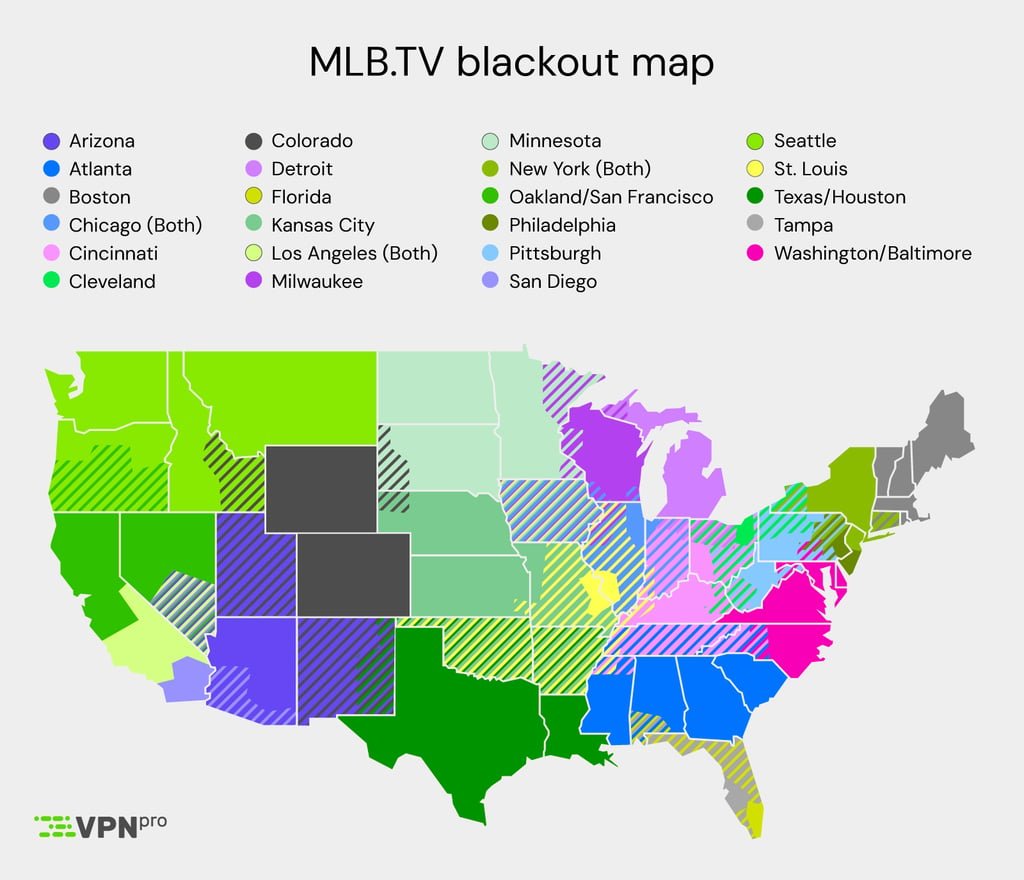
Home games in the local market on same-day national broadcasts (ESPN, FOX, MLB Network). Out-of-market games may have restrictions depending on broadcaster rights and streaming service policies.
- MLB.TV: Strictest enforcement - home games and some out-of-market games blacked out locally
- YouTube TV, Hulu Live: Enforce blackouts based on regional sports network availability
- ESPN+, Peacock: Limited blackouts, fewer restrictions than MLB.TV
- Regional Sports Networks (RSNs): No blackouts on primary broadcasts
- Cable/Satellite: Generally no blackouts on cable broadcasts
FINDING YOUR BLACKOUT ZONE. Visit MLB.com, enter your ZIP code, or contact your streaming service to determine if you're in a blackout area. Zones are defined by address, so location matters—even within the same city.
Which server location to choose to get around MLB TV local blackout
A VPN masks your actual IP address and location by routing your internet connection through a server in a different geographic location. When you connect to a VPN server in a specific city or state, websites and streaming services detect your location as that server's location, not your actual address. For example, connecting to a VPN server in Los Angeles would make MLB TV think you're in California, potentially bypassing a blackout in your actual location (such as New York).
Step 1. Identify your home market blackout zone
Determine which team's blackout zone you're in based on your ZIP code. This information is available on MLB.com.
Step 2. Choose a server outside your blackout zone
- If you're in the Yankees blackout zone (New York area), connect to a server in Boston, Philadelphia, or any market outside the Northeast region
- If you're in the Dodgers blackout zone (Southern California), connect to a server in San Francisco, Phoenix, or another non-overlapping market
- If you're in a multi-team overlap area (like the Chicago market with Cubs and White Sox), select a server in a completely different region like Texas or Florida
Step 3. Consider distance and server quality
Servers physically closer to your actual location typically provide better connection speeds and less latency, even if they're technically in a different market. However, they must still be outside your specific team's blackout zone.
MLB TV VPN not working: How to fix
If your VPN is not working with MLB.TV, the streaming service has likely blocked your current VPN server's IP address, or your device's GPS/location services are exposing your real location. MLB actively detects and blocks VPN usage to enforce blackout restrictions, making it increasingly difficult to bypass geolocation restrictions. Quick fixes to try:
- Switch VPN servers. Disconnect from your current VPN server and connect to a different server location or city/state. MLB continuously blacklists known VPN IP addresses, so rotating between servers is often the most effective immediate solution. Try servers in different regions until you find one that works.
- Turn off GPS/location services. On mobile phones or tablets, the MLB app uses built-in GPS hardware that overrides your IP address and exposes your actual location. Turn off location permissions for the MLB app in your device settings (iPhone: Settings > Privacy > Location Services; Android: Settings > Apps > Permissions > Location). This is a common reason why mobile VPN connections fail.
- Clear cache and cookies. Clear your browser or app data, then restart your device completely. Cached location data or session information can prevent your VPN from working properly. Remove all MLB.TV app data and reinstall if necessary.
- Change VPN protocols. Switch your VPN protocol settings to a different option, such as changing to OpenVPN or specialized stealth/obfuscated protocols if your provider offers them. Obfuscated protocols can sometimes mask VPN usage more effectively against detection systems.
- Switch devices. Mobile apps and smart TVs (like Apple TV or Fire TV) leak location data easily due to hardware-level location sensors. Streaming via a desktop computer browser through a wired connection is often more reliable and harder for MLB to detect location spoofing.
For a more detailed guide on VPN issues and comprehensive troubleshooting steps, follow our informational article about MLB TV not working with a VPN.
MLB schedule 2026
The MLB 2026 season looks very promising and is expected to deliver another competitive year, with new contenders and well-known teams battling for postseason spots. The league’s core rules remain in place, while MLB continues refining pace-of-play and competitive balance. Here are the key 2026 MLB season dates to know:
| MLB event | Date |
| Spring training start | February 20, 2026 |
| MLB Opening Day – the start of the regular season | March 25, 2026 |
| MLB All-Star game | July 14, 2026 |
| Roberto Clemente Day | September 15, 2026 |
| End of the regular season | September 27, 2026 |
Does MLB.TV blackout workaround works with free VPN
Using the best VPN for MLB.TV is the best way to avoid frustrating blackouts and enjoy baseball matches without interruption. A reliable VPN successfully changes your IP address and bypasses geo-restrictions so you can enjoy games from anywhere. Plus, you will get extra security features that retain your online privacy.
I recommend NordVPN, as it has passed every MLB.TV blackout test I threw at it. It is closely followed by Surfshark and TotalVPN, which also performed exceptionally well. All three VPN services are excellent for unblocking geo-restricted content, offering smooth connections and impressive speeds.
Conclusion on best MLB.TV VPNs
Using the best VPN for MLB.TV is the only way to avoid frustrating blackouts and enjoy baseball matches without interruption. A great VPN will change your online location, allowing you to stream your favorite games from anywhere. In addition, VPN comes with many security and privacy features, such as traffic encryption, a kill switch, and protection from malware, so you will benefit much more.
Enjoy every MLB.TV match with a reliable VPN and bypass any restriction. My personal recommendation is NordVPN, as it has passed every MLB.TV blackout test I tried it with. NordVPN is a truly great service that not only unlocks geo-blocked content and ensures smooth connections, but also effectively secures your online privacy.

![Surfshark weekly deals logo [IN USE]](https://media.vpnpro.com/surfshark-weekly-deals.svg)
![Proton VPN winner logo [IN USE]](https://media.vpnpro.com/2025/05/protonvpn-winner.png)
You may also like to read:
Where to watch the 2026 World Cup
How to stream UFC live from anywhere
How to watch NBA games online
How to watch Fox Sports anywhere
How to watch Champions League online
FAQ
How can I watch MLB games that are blacked out?
A VPN can help you bypass MLB.TV blackouts, even if they occur in the away team’s market. With a VPN, you can change your IP address to a state where the blackout games are available, giving you access to local restricted games. Remember to choose a reliable MLB.TV VPNs, such as NordVPN, will allow you to avoid any issues catching your favorite team’s games.
Does MLB TV block VPN?
Yes, MLB.TV actively blocks VPN connections. It uses your IP address to determine your location and enforce blackout restrictions, and if it detects unusually high numbers of users connecting from the same IP address, that address can be blocked. This means VPNs with overcrowded or frequently flagged servers may stop working with MLB.TV, so choosing a provider that regularly rotates its IP addresses and offers multiple US server locations is important.
Can I use a VPN for MLB TV?
Yes, you can use a reliable VPN with MLB TV to avoid blackouts. However, not every VPN service can effectively change your virtual location and ensure a frustration-free MLB streaming experience. That’s why I recommend choosing NordVPN as our most trusted MLB.TV VPN.
How to watch MLB TV with a VPN?
Watching MLB.TV with a VPN is straightforward. Subscribe to a VPN that works with MLB.TV, install the app on your streaming device, and connect to a server in a location where the game isn’t blacked out. Then open MLB.TV and stream the game as usual. For blackout games, NordVPN is our top recommendation thanks to its fast speeds and extensive US server network, which gives you plenty of locations to choose from.
Will VPN allow me to watch blackout games?
Yes, a trustworthy VPN allows you to watch blackout MLB games. All you need is to choose a service, my recommendation is NordVPN, install it on a streaming device, and select a state where your team’s games are not restricted.
Does NordVPN work with MLB.TV?
Yes, NordVPN works with MLB.TV. In fact, it’s one of the best VPNs for MLB.TV to workaround blackouts and stream any game in any location. It easily unblocks geo-restricted content, has a huge network of servers, and allows you to stream games without lag.
How to trick MLB.TV location?
You can use a VPN to change your location on MLB.TV and unblock local blackout games. Let’s say you’re in southern California and want to watch the San Francisco Giants. All Giant games are blacked out in your area, but you can connect to a server in New York as a workaround.
Does MLB.TV use my IP address?
MLB.TV uses your IP address to define your location and blocks you from enjoying local games in your area. It can also use other methods like an address you put while registering. Enter your ZIP code on MLB TV's website to check what blackouts apply to your location.
How to watch out-of-network MLB games?
You can watch out-of-network MLB games with a reliable VPN. Just choose a streaming-focused VPN, select a server in a state where your team’s games are available, and enjoy every match.
Why is MLB.TV not letting me watch games?
MLB.TV has to follow regional broadcast rights. This means that games in your location can only be broadcast by local networks that have exclusive rights to air them. You can watch the games with a VPN, such as NordVPN, which is capable of bypassing blackouts.


- Does a VPN work with MLB.TV?
- How to get around MLB.TV local blackout
- Best VPNs for MLB.TV
- 🥇NordVPN
- 🥈Surfshark
- 🥉Proton VPN
- Other VPNs I tested
- How I tested VPNs
- MLB TV blackout map
- Which VPN server location to choose
- MLB.TV VPN not working
- MLB schedule 2026
- Does MLB.TV blackout workaround works with free VPN
- Conclusion
- FAQ