Best 1Password alternatives after price increase in 2026

With 1Password increasing prices in March 2026, the best 1Password alternatives are NordPass (best overall for usability and security), RoboForm (most affordable option), and Keeper (best for advanced security features and business tools). These alternatives to 1Password offer robust, secure, and frequently more affordable ways to manage passwords on all your devices, including features like password generators, encrypted vaults, breach monitoring, and cross-platform sync.
🏷️ LIMITED OFFER: 56% OFF NordPass + 2 months free + 3 free months of NordVPN 🏷️ 🏷️
On March 27, 2026, 1Password pricing increased by around 33%, raising the cost of yearly Individual plans from $2.99 to $3.99/month. The cost of yearly Families plans also increases from $4.99/month to $5.99/month. While this is one reason why many users are now looking for 1Password alternatives, other reasons include a lack of a free plan, higher pricing than competitors, and no money-back guarantee.
After testing over 10 different, premium password managers, NordPass, Roboform, Keeper, Proton Pass, and Norton Password Manager stood out as the best 1Password alternatives in 2026. These alternatives include password managers with a free version, small business support, cheaper pricing, and money-back guarantees and free trials.
Our recommended alternatives to 1Password
-
best 1Password alternative with robust security features
-
most affordable 1Password alternative
-
intuitive alternative with password generator
-
privacy-focused 1Password alternative with a generous free plan
-
best free alternative to 1Password with a premium version


1Password price increase: is it worth it for users?
In late February 2026, 1Password issued an announcement about its first major price hike in almost a decade, increasing the cost of Individual plans by 33% and family plans by 20%.
| Plan type | Old price | New price | Increase |
| Individual | $35.88 ($2.99/month) | $47.88 ($3.99/month) | +$12/year (33%) |
| Families (up to 5 users) | $59.88 ($4.99/month) | $71.99 ($5.99/month) | +$12/year (20%) |
1Password claims that the increase in prices is due to a need to fund continued operational costs and innovation, mentioning features like AI-powered labeling, enhanced phishing protection, and improved Watchtower alerts. However, some users are concerned about the focus on AI-driven features and stated their preference for simple security tools over AI integrations in their password management software.
If you use multiple operating systems, such as a Windows PC and an iOS mobile device, or if you need advanced vault sharing and security tools, 1Password remains the best choice. However, if you stick to one platform, such as all Apple or all Google products, and you only have basic password management needs, the price hike may be a good motivator to switch to a free integrated manager.
Best 1Password alternatives in October 2026
To find the best 1Password alternatives in October 2026, I looked for features like unlimited password storage, storage for notes and credit card data, secure password generation, cross-platform sync, and multi-factor authentication. I also considered added extras, such as Dark Web Monitoring and phishing protection tools, and password managers with a free version and affordable pricing.
After testing over 10 providers, NordPass, Roboform, Keeper, Proton Pass, and Norton Password Manager were my best 1Password alternatives thanks to a combination of these features, resulting in this top-5 list to suit all users.
Top 1. NordPass: Best 1Password alternative
| Pros | Cons |
| Modern XChaCha20 encryption | Less advanced vault organization tools |
| Cheaper 1Password alternative | Some features locked to premium plans |
| Free plan available |
NordPass is the overall best alternative to 1Password for users who want strong security with a simpler interface and lower pricing. In my tests, NordPass felt noticeably easier to set up and navigate than 1Password. This was especially true for importing passwords or enabling autofill across devices. While 1Password is a good fit for advanced users, I recommend NordPass to people who want password management without complexity.
Security: NordPass uses XChaCha20 encryption, a newer encryption standard than the AES-256 used by 1Password. Both providers have a zero-knowledge architecture, so neither can access your vault data. However, unlike 1Password, NordPass does not need a separate secret key, which made account setup slightly simpler during my tests. The service has also been through independent security audits, backing up its reliability as a secure service.
Pricing & value: NordPass is more affordable than 1Password, at $1.29/month rather than $3.99/month, and this is prior to the 1Password price hike.There’s also a free plan available with NordPass, whereas 1Password only has a 14-day free trial. Overall, NordPass is a better-value-for-money provider.
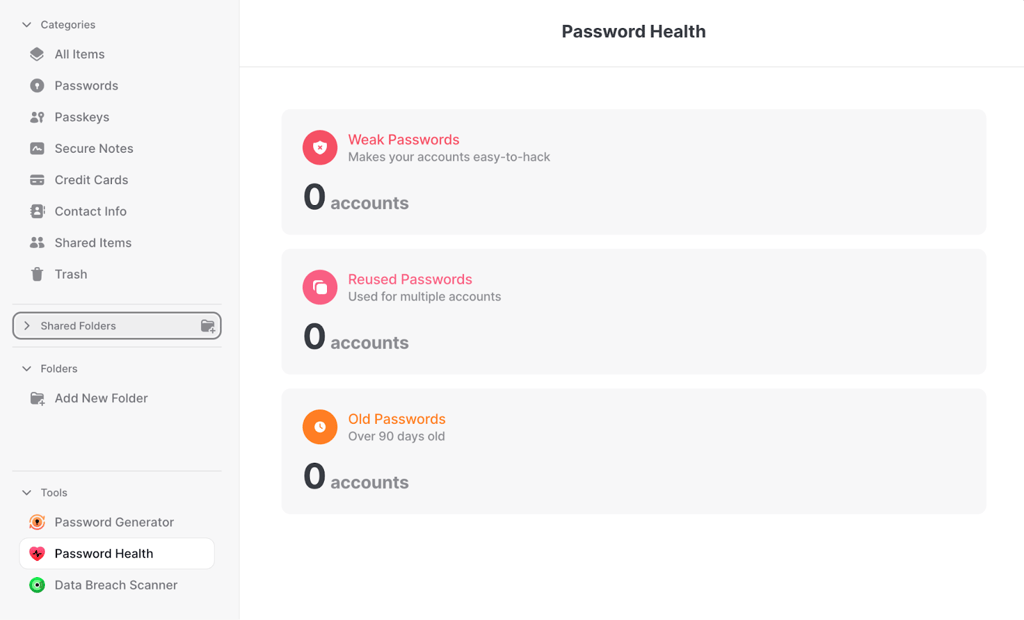
Core feature comparison: NordPass matches 1Password in most of the essential features users need from a password manager. Both services have secure password storage, autofill, password generation, passkey support, secure notes, and cross-platform apps for Windows, macOS, Linux, iOS, Android. Where NordPass slightly improves on usability is its simpler vault structure and faster autofill, and while 1Password still has advanced vault management options, NordPass provides a more straightforward experience without sacrificing core functionality most users want.
Unique features: NordPass offers data breach monitoring and password health tools that make it easy to identify weak or reused passwords. It also integrates with the Nord Security ecosystem, which can appeal to users already using NordVPN or NordLocker.
For a more detailed look at this 1Password alternative, read our NordPass review.
Top 2. RoboForm: Affordable 1Password competitor
| Pros | Cons |
| Cheapest of the 1Password alternatives | Interface feels outdated |
| Excellent form-filling tools | Fewer modern security tools |
| Accurate autofill performance |
RoboForm is one of the most affordable alternatives to 1Password while still having reliable password management features. In my tests, RoboForm’s autofill worked very well, especially for populating long web forms, which is an area in which many password managers struggle.
Security: RoboForm uses AES-256 encryption with a zero-knowledge architecture, similar to 1Password. All vault data is encrypted locally before being synced to RoboForm servers, which means your passwords remain private. While I noticed that RoboForm does not use a secret key like 1Password, it still features strong security thanks to two-factor authentication and independent security audits.
Pricing & value: Where RoboForm stands out is price. From just $0.99/month, its premium plans are significantly cheaper than 1Password. Based on my comparisons, it is the most budget-friendly password manager available. There’s also a free version, although it limits syncing across devices.
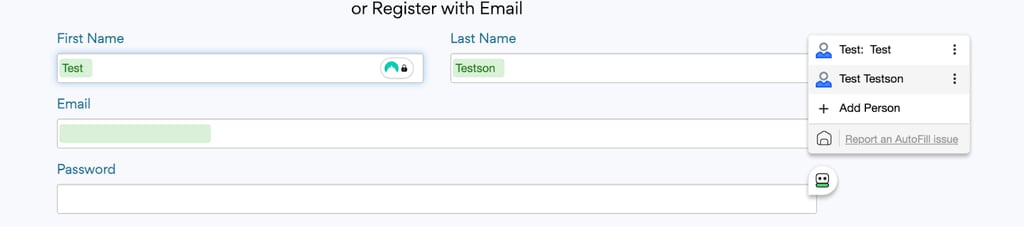
Core feature comparison: RoboForm matches 1Password in most core areas. Both services have secure password storage, autofill, secure notes, password generation, and cross-platform apps for Windows, macOS, iOS, Android, and major browsers. RoboForm also supports password sharing and emergency access, which lets your trusted contacts recover access to your vault. During my tests, RoboForm’s autofill system was particularly reliable when handling complicated login forms and long signup processes.
Unique features: RoboForm’s biggest advantage is its industry-leading form-filling tools, which automatically populate complex forms including addresses, payment details, and account registrations faster than other password managers.
For a more detailed look at this 1Password alternative, read our RoboForm review.
Top 3. Keeper: Secure alternative to 1Password
| Pros | Cons |
| BreachWatch dark web monitoring | Premium features require add-ons |
| Encrypted file storage | Interface can be quite complex |
| Strong business tools |
Keeper is a strong alternative to 1Password for users who prioritize advanced security tools and business features. In my testing, Keeper felt more security-focused than many other password managers, with some additional tools designed for individuals and teams.
Security: Keeper uses AES-256 encryption and a zero-knowledge architecture, ensuring only you can access your encrypted vault data. All encryption and decryption take place locally on your device before any information is synced to Keeper’s servers, meaning the company itself cannot view the contents of your vault. Like 1Password, Keeper has undergone independent security audits and supports multi-factor authentication and biometric login, adding additional protection layers.
Pricing & value: Keeper’s pricing is competitive with 1Password, starting from $1.67/month. However, some advanced features, such as dark web monitoring, are offered as paid add-ons. Still, Keeper provides good value for users who want enhanced security capabilities, and it is still around half the cost of 1Password.
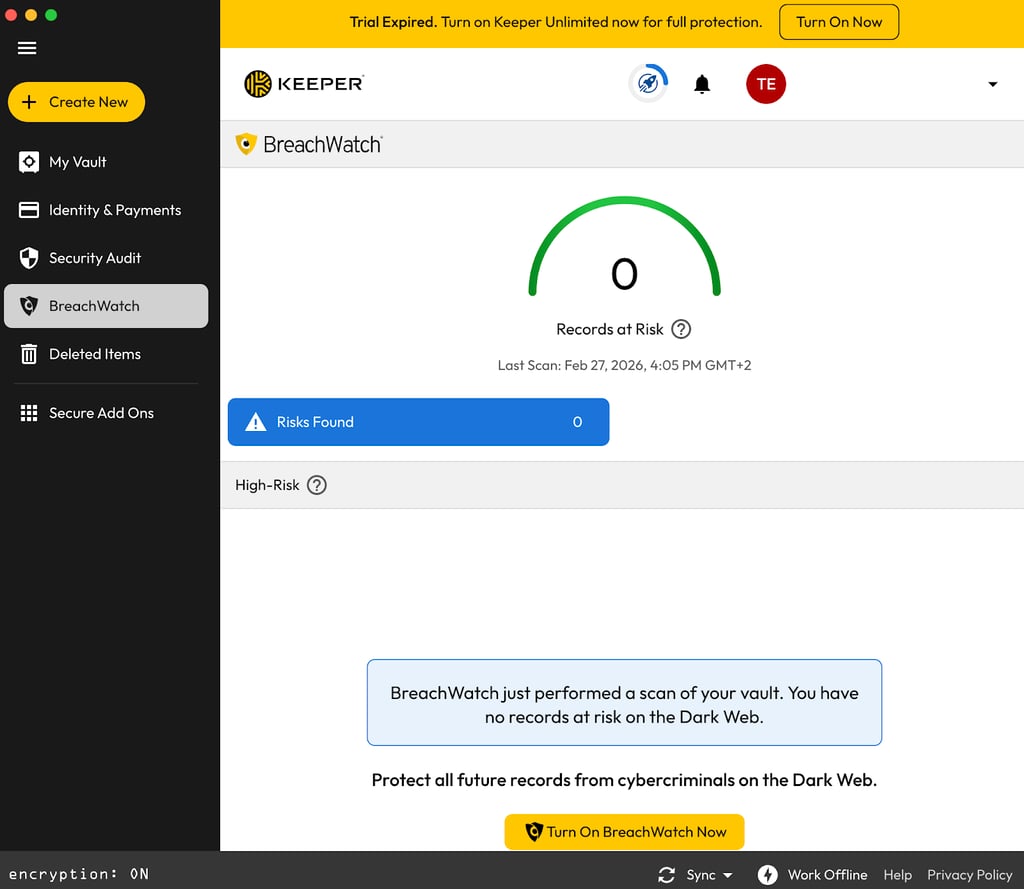
Core feature comparison: Keeper delivers nearly all of the core functionality offered by 1Password. It supports password storage, secure notes, password sharing, encrypted file storage, passkey support, and cross-platform apps across all major devices. In my tests, I noticed that Keeper lacks some features found in 1Password, such as built-in item categories and Travel Mode. However, I found that Keeper excelled above 1Password in offering encrypted file storage, dark web monitoring, and advanced business control tools for admins.
Unique features: Keeper’s BreachWatch dark web monitoring alerts you if your credentials appear in data breaches. It also has encrypted file storage and secure messaging tools, features that go beyond the typical password management feature set.
For a more detailed look at this 1Password alternative, read our Keeper review.
Top 4. Proton Pass: Privacy-focused 1Password alternative
| Pros | Cons |
| Open-source security model | Newer product with fewer features |
| Built-in email aliasing | Smaller ecosystem than some competitors |
| Free tier available |
Proton Pass is one of the best alternatives to 1Password for users who prioritize transparency and privacy. Developed by the same company behind Proton Mail and Proton VPN, it integrates into the company’s ecosystem, making it appealing to privacy-conscious users already using another Proton service.
Security: Proton Pass uses end-to-end encryption and a zero-knowledge architecture, ensuring that vault data is encrypted before leaving your device. Unlike 1Password, Proton Pass is fully open-source, allowing independent researchers to inspect its code for security vulnerabilities. This transparency can provide additional reassurance for users who want verifiable security practices.
Pricing & value: Proton Pass has a free plan, which immediately sets it apart from 1Password. Paid tiers unlock additional features that include advanced email aliasing and integration with Proton’s other services, but even the free version provides solid password management capabilities. Paid plans are available from $1.99/month, which makes this the most expensive 1Password alternative I’ve reviewed.
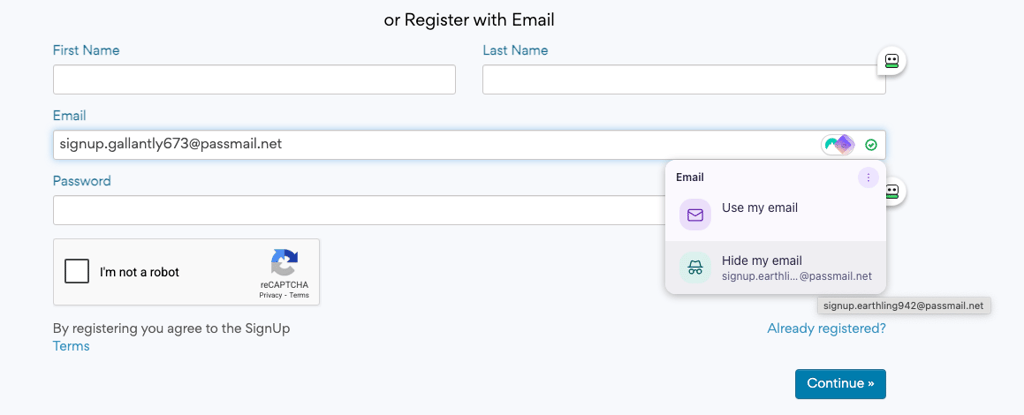
Core feature comparison: Like 1Password, Proton Pass supports secure password storage, autofill, password generation, passkey support, secure notes, and cross-platform browser extensions. In my tests, the browser extension worked well on Chrome and Firefox, reliably detecting forms and filling in my credentials. Proton Pass also includes breach alerts and password health tools, helping users monitor account security.
Unique features: Proton Pass’s standout feature is its built-in email aliasing, allowing users to generate unique email addresses when signing up for websites. This helps prevent spam and protects your real email identity. However, Proton Pass also scores points for offering a respectable free version.
Top 5. Norton Password Manager - Free 1Password alternative
| Pros | Cons |
| Completely free to use | Limited advanced features |
| Simple browser integration | No premium tier upgrade |
| Easy setup and syncing |
Norton Password Manager is one of few completely free alternatives to 1Password. While it doesn’t offer the same range of features as premium password managers, it offers a simple and cost-free way to securely store and autofill passwords on multiple devices.
Security: Norton Password Manager uses AES-256 encryption and a zero-knowledge architecture, ensuring that all vault data is encrypted locally before syncing with Norton’s servers. The service also supports biometric login and two-factor authentication, helping add additional security layers to user accounts.
Pricing & value: The biggest advantage here is that Norton Password Manager is entirely free, whereas 1Password requires a paid subscription after its 14-day trial period. While Norton PM is included in paid versions of Norton 360, an antivirus suite, it’s no different to the free password manager.
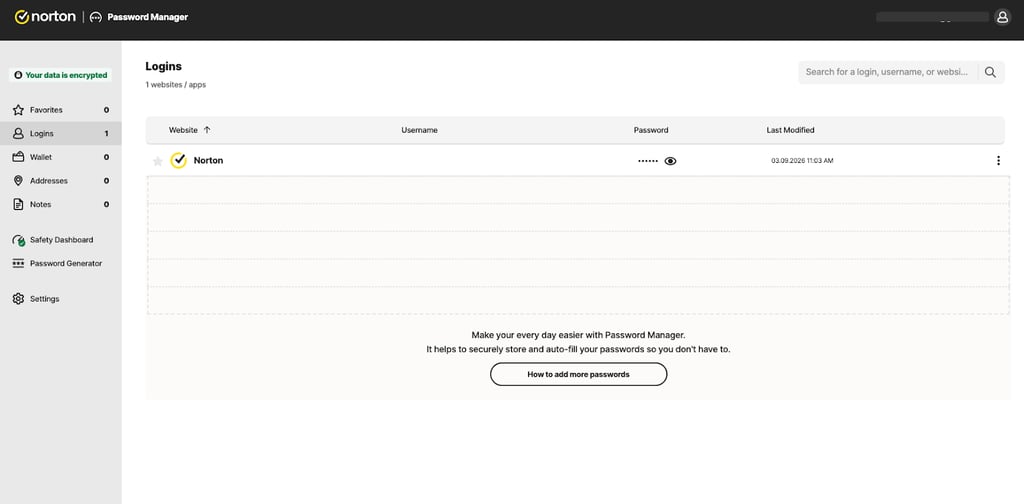
Core feature comparison: Norton Password Manager provides many of the same basic features found in 1Password, including password storage, autofill, password generation, and syncing across desktop and mobile devices. The browser extension worked reliably in my tests, detecting login fields and filling in my credentials. However, it lacks advanced features available in 1Password, such as encrypted document storage, password sharing controls, and detailed password health reports.
Unique features: Norton Password Manager integrates with the broader Norton cybersecurity ecosystem, making it convenient for users who already rely on Norton security tools. Best of all, it’s free to use if you’re on a budget.
For a more detailed look at this 1Password alternative, read our Norton PM review.
Compare top 5 1Password alternatives
| Password manager | Rating | Starting price | Free tier | Key differentiator |
| 1. NordPass | 9.7 ⭐⭐⭐⭐⭐ | From $1.29/month | ❌ No | Strong usability with fast autofill and XChaCha20 encryption |
| 2. Roboform | 9.3 ⭐⭐⭐⭐⭐ | From $0.99/month | ✅ Yes | Extremely affordable premium plans with good autofill features |
| 3. Keeper | 9.2 ⭐⭐⭐⭐ | From $1.67/month | ❌ No | Advanced security tools like BreachWatch and encrypted file storage |
| 4. Proton Pass | 9.1 ⭐⭐⭐⭐ | From $1.99/month | ✅ Yes | Privacy-focused and open-source password manager with built-in email aliasing |
| 5. Norton PM | 8.9 ⭐⭐⭐⭐ | Free | ✅ Yes | Completely free password manager integrated with the Norton security ecosystem |
Note that Norton’s password manager is a standalone free password manager, which can be installed as a browser extension or downloaded for iOS and Android. Paid Norton 360 antivirus plans include the password manager by default, too.
How we tested 1Password alternatives
To find the best 1Password alternatives, I looked at more than 10 popular password managers and focused on criteria that matter most for everyday password security. I investigated how each service performed in real-world scenarios, including security architecture, password autofill accuracy, pricing, and cross-device compatibility. Here are the criteria I focused on in more detail:
- Security architecture (30%). Encryption and privacy protections were the first things I checked, followed by industry-standard encryption (AES-256 or XChaCha20), zero-knowledge architecture, and independent security audits. Each provider needed to have robust encryption and a transparent approach to protecting your data.
- Interface and ease of use (20%). Password managers should simplify account security, so I tested how intuitive each app and browser extension was, including setup, password imports, vault organization, and overall interface usability.
- Autofill and login (20%). Reliable autofill is essential for daily use. I tested each manager across different websites to see how accurately it detected login fields and filled in my passwords. The best providers detect and fill login forms without errors.
- Cross-platform security (10%). Since most users access accounts on several devices, I tested each service across desktop apps, mobile apps, and browser extensions. The best 1Password alternatives support all major operating systems and synchronize passwords smoothly across devices.
- Extra security features (10%). I evaluated additional tools like password health reports, breach monitoring, secure sharing, and encrypted storage. Password managers offering meaningful security features beyond basic storage scored higher.
- Pricing and value (10%). With 1Password raising prices in 2026, I compared each service’s pricing, free tiers, and overall value. Password managers that offered strong security and usability at a lower cost — or with a free plan — ranked more favorably.
After testing these criteria, I was able to identify the strongest alternatives to 1Password based on their security, usability, features, and overall value.
Are there any free 1Password alternatives?
While 1Password does not offer a free version and only has a 14-day free trial, Norton Password Manager is one of the best free alternatives to 1Password. With no need for a subscription, you can add the browser extension in Firefox, Edge, Chrome, and Safari, or you can download it on iOS and Android. It provides core features like password storage, autofill, and cross-device syncing, but it lacks advanced features like secure password sharing, encrypted file storage, and more detailed password health monitoring tools.
For these reasons, I instead recommend trying a premium password manager with a free trial. For example, you can get NordPass, our best alternative to 1Password, with a 30-day free trial and a 30-day money-back guarantee, giving you two whole months to try the service risk-free.
Get NordPass free for up to 60 days
What are 1Password disadvantages
While 1Password is one of the most secure and best password managers available in 2026, it still has some drawbacks compared to competing providers. Here are some of 1Password’s disadvantages, based on my extensive testing:
- Lacks a free tier: Unlike competitors like Proton Pass or Norton Password Manager, 1Password does not offer a free plan. Instead, you only get a 14-day free trial, after which a paid subscription is required to continue using the service.
- Cloud-only storage: 1Password no longer supports fully local vault storage. All data is stored on 1Password’s servers and synced in the cloud. While this improves convenience, I prefer services that support local-only vaults or self-hosted storage options to increase choice.
- Secret key requirement: 1Password requires you to store a 34-character Secret Key in addition to your master password. This adds an extra layer of security, but in my opinion it can make account recovery and adding new devices more complicated compared to providers that rely solely on standard 2FA (two-factor authentication).
- No live chat for Individual plans: Customer support for Individual and Families subscriptions is mostly handled with emails and support documentation. There’s no 24/7 live chat or phone support available for personal plans.
- Some features require third-party tools: Features like email masking and virtual payment cards are not built directly into 1Password. They rely on integrations from services like Fastmail or Privacy.com, which can require additional subscriptions.
These disadvantages are discussed in more detail in our 1Password review. While they don’t make 1Password a poor password manager, when combined with the 2026 price hike, they do mean that you may find better value in some of the 1Password alternatives highlighted in my guide.
Your best 1Password alternative: NordPass
NordPass is the top alternative to 1Password for those who want better value, a simpler interface, and newer encryption standards. While 1Password is a solid choice for niche power-user features, including Travel Mode, NordPass takes the lead in offering a completely free account and more affordable premium plans.
That said, other alternatives to 1Password may suit different users. RoboForm is one of the most affordable password managers and excels at form-filling, while Keeper has a wide range of security tools like breach monitoring and encrypted file storage. For most users looking to replace 1Password with a secure, user-friendly, and cost-effective solution, NordPass remains the best overall alternative.
FAQ
Is there anything better than 1Password?
Yes, based on our research, NordPass is better than 1Password and offers XChaCha20 encryption, a zero-knowledge architecture, password health monitoring, breach alerts, and cross-device sync. At just $1.29/month, it's also cheaper than 1Password and will be even more affordable in comparison following 1Password's price hike in March 2026.
What is the downside of 1Password?
The downsides of 1Password include a lack of any free tier, cloud-only storage, no live chat for individual plans, and a need for third-party tools in some cases. What's more, it's not the best-value password manager you can get, especially following the price increases in March 2026. At $1.29/month, NordPass is the best password manager with affordable pricing.
What is the best 1Password alternative?
The best 1Password alternative is NordPass, with strong security that uses modern XChaCha20 encryption and a zero-knowledge architecture, meaning not even 1Password can access your stored passwords. NordPass is also easy to use on both desktop and mobile devices, with password health checks, autofill, and breach monitoring. It’s also cheaper than 1Password, particularly following the 2026 price increases.
What is the best free alternative to 1Password?
The best free alternative to 1Password is Proton Pass, with a truly free plan that includes encrypted password storage, autofill, and syncing across devices. Proton Pass also offers strong privacy and open-source architecture, which enables independent vetting of its security. Alternatively, Norton Password Manager is a reliable free alternative to 1Password that can be installed in your browser, or on iOS and Android mobile devices.


