Best VPNs for Amazon Prime Video in 2026

Key takeaways:
- While Amazon Prime Video is available in quite a few countries, its content libraries differ from country to country, meaning that certain content will not be available in some regions.
- One way to access your favorite Amazon Prime Video content without restrictions is by using a VPN.
- Based on my in-house tests, NordVPN is the best Amazon Prime VPN that guarantees access to different libraries with fast speeds and total privacy. Surfshark is the best cheap alternative, while Proton VPN is a perfect choice for those looking for advanced security measures.
🏷️ LIMITED OFFER: NordVPN deal! Get 75% OFF NordVPN + 3 months FREE 🏷️
Amazon Prime Video is one of the most popular streaming services, but it offers different content in different regions due to geo-restrictions. Because of this, people who are traveling abroad or interested in region-exclusive content are looking for VPN services to access Amazon Prime without any restrictions. Besides, using a VPN for Amazon Prime Video might not only unlock your favorite content, but also help with slow speed issues as some Internet Service Providers (ISPs) tend to throttle speed when they detect that you’re streaming content.
However, to access your desired Amazon Prime library from anywhere, you must use a truly reliable VPN. To find the best options, we performed in-house tests on over 20 VPN providers. In this article, you can find our top 5 Amazon Prime Video VPNs and their benefits.
Our recommended Amazon Prime VPNs
| VPN for Amazon Prime Videos | Rating | Best for: | US server network | Speed retention | Price |
| 1. NordVPN | 9.8 ⭐⭐⭐⭐⭐ | Best overall Amazon Prime Video VPN | 3,022+ servers in all 50 states | 84% | From $3.49/month |
| 2. Surfshark | 9.5 ⭐⭐⭐⭐⭐ | Budget-friendly VPN for Amazon Prime | 600+ servers in 24 cities | 83% | From $2.49/month |
| 3. Proton VPN | 8.6 ⭐⭐⭐⭐⭐ | Privacy-focused Amazon Prime VPN | 6,015+ servers in 22 cities | 81% | From $2.99/month |
| 4. ExpressVPN | 8.4 ⭐⭐⭐⭐ | High-speed VPN for streaming Amazon Prime abroad | Undisclosed number of servers in all 50 states | 81% | From $2.99/month |
| 5. IPVanish | 8.4 ⭐⭐⭐⭐ | Beginner-friendly VPN that works with Amazon Prime | 1,020+ servers in 20+ cities | 74% | From $2.39/month |
❗Try before you buy: After testing numerous VPNs, NordVPN stood out as the best VPN for Amazon Prime Video. You can try it completely free for 3 days on Android or use its 30-day money-back guarantee on all plans and devices. With servers in 50 US states, it easily unblocked Amazon Prime from abroad, letting me access the local US library without any buffering.
How to watch Amazon Prime with a VPN
- Choose a reliable streaming VPN. We recommend NordVPN, now 75% off, as it has proven to work with Amazon Prime and deliver the fastest speeds.
- Download and install the VPN app. Most providers are compatible with Windows, macOS, Android, and iOS devices. You can download the app from the VPN provider’s official website, Google Play Store, or the Apple App Store.
- Connect to a VPN server. Depending on which country’s library you want to reach, connect to a VPN server in that location. For example, if you’re interested in American Amazon Prime Video, connect to a server in the US.
- Visit Amazon Prime Video and stream content without restrictions.
In case you’re still seeing the “This video is unavailable” error message, you should also try clearing your cache and cookies, as it might already track your real location. I would also recommend reconnecting to a different VPN server in the same country to get a new IP address, as the previous one might already be blocked by Amazon Prime.
How to choose the best Amazon Prime VPN?
A truly reliable Amazon Prime Video VPN should guarantee geo-block bypassing, fast speeds for buffer-free 4K streaming, and native apps for Fire TV, Android TV, and other streaming devices. During our tests, we paid close attention to these criteria, but there are a few key aspects that you should consider before choosing a VPN:
- Ability to bypass Amazon’s proxy detection (30%). Not all VPN providers work with Amazon Prime Video, as the service uses advanced detection systems and blocks IP addresses that are related to VPNs. However, during our tests, NordVPN achieved a 100% success rate unblocking Prime Video, Surfshark followed with 98%, and Proton VPN reached 95%. If you want to test these services yourself, you can take advantage of free trials, such as NordVPN’s 3-day free trial (Android only) and Surfshark’s 7-day free trial (Android and iOS).
- Server network (30%). Amazon Prime Video licenses content by country, meaning that some content is only available in specific regions. To access your desired library from anywhere, you will need a VPN that has servers worldwide. In this case, you could try using Proton VPN, which has an impressive 20,660 servers in 148 countries.
- Traffic obfuscation (15%). Amazon Prime is really good at detecting and blocking shabby virtual private networks. So, we recommend getting a VPN with obfuscated servers that can bypass even the strictest firewalls.
- Safety (15%). To ensure that you can enjoy watching Amazon Prime Video safely, it’s important to choose a VPN that offers the necessary security features. This includes a strict no-logs policy that guarantees that your activity is not monitored, DNS leak protection to ensure that your real IP address is not visible, and a kill switch, which is very useful to have in case your VPN connection accidentally drops.
- Speeds (10%). Using a slow VPN for Amazon Prime Video will lead to lower video resolution or failing to load content at all. To ensure a smooth streaming experience, Amazon Prime Video requires 1Mbps for standard definition. 5Mbps for HD, and at least 15Mbps for 4K Ultra HD streaming. During our tests, NordVPN proved to be the fastest Amazon Prime Video VPN with a retention rate of 84%, followed by Surfshark with an 83% retention rate. To check your speed, you can use reliable websites like speedtest.net.
Best VPNs for Amazon Prime Video
Essentially, not every VPN can bypass Amazon Prime Video geo-restrictions and VPN blocks. Therefore, we tested multiple services and selected the 5 best VPNs that can change your location and circumvent any obstacles. They all offer loads of servers globally, top-tier speeds, and excellent device compatibility. Moreover, they won’t cost you a fortune, and some even offer free versions.
1. NordVPN – fastest VPN for Amazon Prime Video
![NordVPN mobile logo [IN USE]](https://media.vpnpro.com/images/170x89/2025/08/nord-rreview.jpg)


9300

Yes (SmartPlay)

452 Mbps
-
Wicked fast
-
Obfuscated servers
-
SmartPlay feature
-
Only NordVPN simultaneousConnections simultaneous connections
NordVPN is the best Amazon Prime VPN, offering phenomenal speeds, obfuscated servers for private streaming, and a SmartPlay feature, allowing you to enjoy content on your smart TV. Not to mention, it has 9,300+ servers in 137+ countries, including over 3000 servers in all 50 US states. Our tests revealed that NordVPN has a 100% success rate in unblocking different Amazon Prime Video libraries with servers in the US, UK, and Canada.
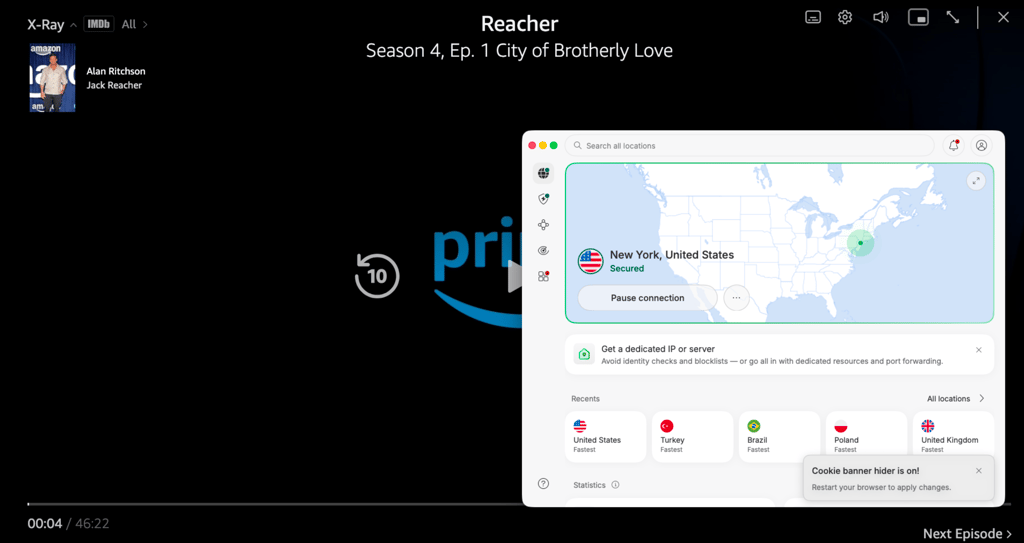
It should be noted that NordVPN only uses bare-metal servers. Together with the in-house NordLynx tunneling protocol, they allow for the industry’s best speeds and seamless 4K streaming. During our tests, NordVPN’s average download speed was around 790Mbps, retaining 84% of our baseline speed. Moreover, this VPN has apps for all major OS. And even if your PS5, Apple TV, or Roku device does not support VPNs. You can use the SmartPlay feature to avoid this obstacle and stream Amazon Prime Video on the big screen.
Moreover, avoiding the Amazon VPN block will be a piece of cake with obfuscated servers. And pesky ads, trackers, and viruses won’t be bothering you with Threat Protection. Additionally, while you only get 10 simultaneous connections, you can easily set up NordVPN on a router.
Overall, NordVPN is the top Amazon Prime Video VPN that you can get for $3.49/month, or try risk-free using the 3-day free trial on Android or the 30-day money-back guarantee. NordVPN proved to successfully unlock different Prime Video libraries with servers in the US, UK, and Canada and deliver the fastest speeds with its in-house NordLynx protocol, ensuring a buffer-free streaming experience.
For a deeper investigation of NordVPN, read our NordVPN review.
2. Surfshark – VPN that can easily change Prime Video country
![Surfshark mobile logo [IN USE]](https://media.vpnpro.com/images/170x89/surfshark-review-logo-2.jpg)
4500
Yes
405 Mbps
-
Infinite connections
-
Smart DNS for accessing geo-blocked content
-
Covers NordVPN countriesCount+ countries globally
-
Some features cost extra
Another top VPN for watching Amazon Prime outside your country is Surfshark. Even though it’s highly affordable, it offers top-tier features to enhance your streaming experience, such as CleanWeb, RAM-only servers, and SmartDNS. Plus, you’ll have loads of Amazon Prime libraries to explore with 4,500+ pieces of hardware in 100+ countries with 600+ servers in 24 US cities. When we tested Surfshark, it proved to have a 98% success rate in unlocking Amazon Prime, which is almost as good as NordVPN.
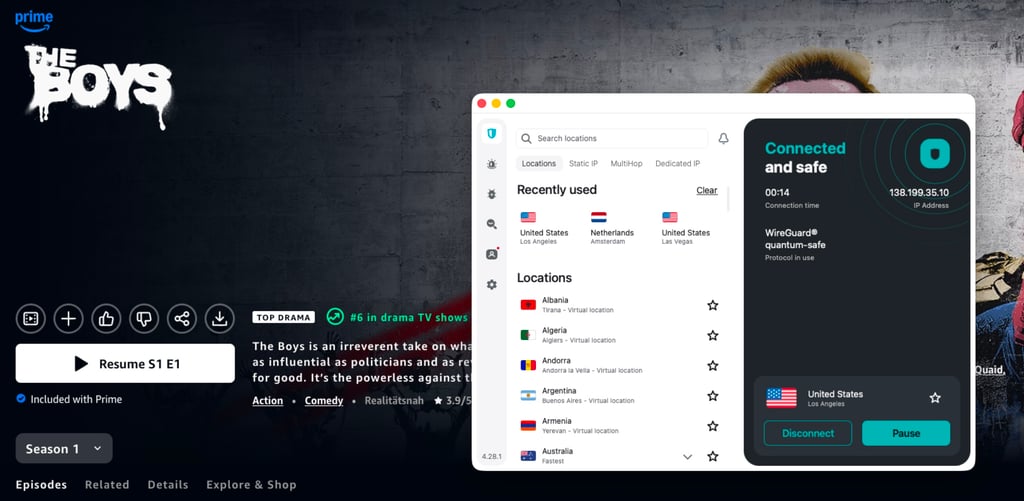
More so, you won’t notice a drop in speed even with a distant connection due to the next-gen WireGuard protocol and Nexus technology. The average download speed was 780Mbps with a retention rate of 83%, which makes us believe that Surfshark is almost as fast as NordVPN. Furthermore, thanks to its Smart DNS feature, you can watch your favorite Amazon Prime Video content even via devices that do not have a dedicated VPN app.
Apart from changing Amazon Prime country, Surfshark offers multiple features to ensure privacy. To avoid blocks, you can utilize the Camouflage mode that basically provides obfuscation. Not to mention, CleanWeb can help you escape malware and various ads, so they won’t interrupt your streaming experience. Besides, if you only need a VPN for streaming Amazon Prime Video, you can use Surfshark’s Bypasser, which will let you choose which traffic to route through the VPN tunnel. The cherry on top – Surfshark has no device limit. That means you can share your account with your close ones and friends and watch Amazon Prime together.
Surfshark is the best affordable VPN for Amazon Prime Video, currently costing only $2.49/month, and it also comes with a 7-day free trial and a 30-day money-back guarantee. If you’re looking for unlimited connections, solid speeds, and advanced features for a budget-friendly price, Surfshark for Amazon Prime Video might be just for you.
For a deeper investigation of Surfshark VPN, read our Surfshark VPN review.
3. Proton VPN - freemium VPN for Amazon Prime Video
![Proton VPN mobile logo [IN USE]](https://media.vpnpro.com/images/170x89/proton-vpn-review-logo-2.jpg)
20660
No
423 Mbps
-
Wide selection of servers worldwide
-
Stealth protocol
-
Unlocks different Amazon Prime Video libraries
-
Limited free version
Proton VPN is another excellent Amazon Prime Video VPN due to its wide selection of servers worldwide that will help you unlock different libraries and its advanced privacy features for total anonymity. The provider has over 20,660 servers in 148 countries, including over 6000+ servers in 22 locations. Besides, you won’t experience many issues bypassing Prime’s geo-restrictions, as our tests showed that Proton VPN has a 95% unblocking success rate with various servers in the US and UK.
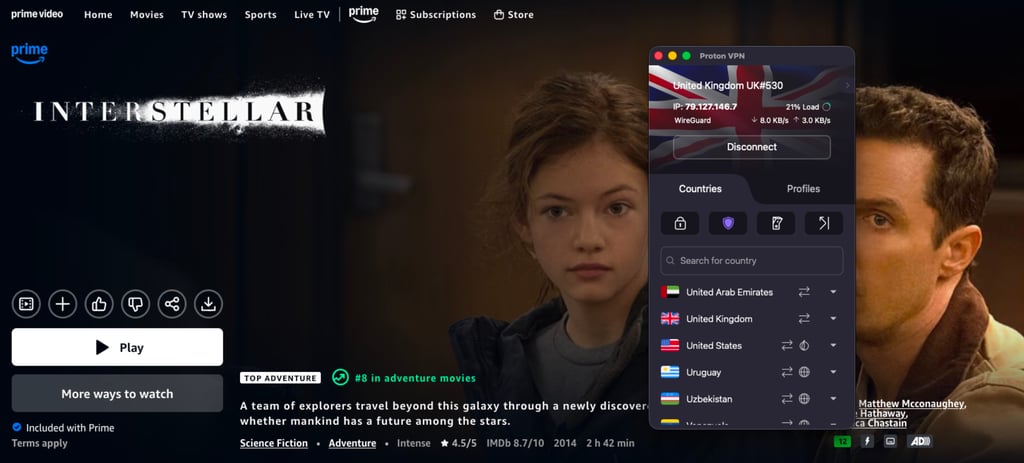
The provider also has the fast and stable WireGuard protocol, but the speed was a bit slower when compared to NordVPN and Surfshark. With Proton VPN, the average download speed was around 766Mbps, which retained around 81% of our original speed. If you’re interested in streaming Amazon Prime Video on a smart TV, Proton VPN offers native apps for Fire TV and Android TV. However, Smart DNS is not available as Proton VPN focuses highly on privacy.
If you don’t want the VPN to cover other traffic, you can use Proton VPN’s Split Tunneling and only use a VPN for Amazon Prime Video. You can also add an extra layer of security and avoid being detected by using the Stealth protocol, which will provide obfuscation. To avoid your real IP being exposed on Prime Video, be sure to enable Proton VPN’s Kill Switch, which will disconnect the internet in case your VPN connection drops.
Proton VPN is the best free Amazon Prime Video VPN, but if you want to use it without limits, you can get it for $2.99/month, which also comes with a 30-day money-back guarantee. Overall, Proton VPN is definitely a good choice for Amazon Prime Video, especially if you want access to a wide selection of servers and if you value your privacy while streaming.
For a deeper investigation of Proton VPN, read our Proton VPN review.
4. ExpressVPN – Amazon Prime VPN with great connectivity
![ExpressVPN mobile logo [IN USE]](https://media.vpnpro.com/images/170x89/expressvpn2.png)
3000
Yes (MediaStreamer)
440 Mbps
-
Lightway tunneling protocol
-
Excellent for bypassing geo-blocks
-
MediaStreamer feature
-
Only ExpressVPN simultaneousConnections simultaneous connections
ExpressVPN is one of the best VPN for Amazon Prime Video for beginners due to its user-friendly app. Our tests showed that it provides stable connections, so you shouldn’t experience many issues when watching Amazon Prime Video. In our case, we were able to access it with servers in the US and Canada, but it did require more time when connected to Germany. With ExpressVPN, you can find servers in 105+ countries, including all 50 US states.
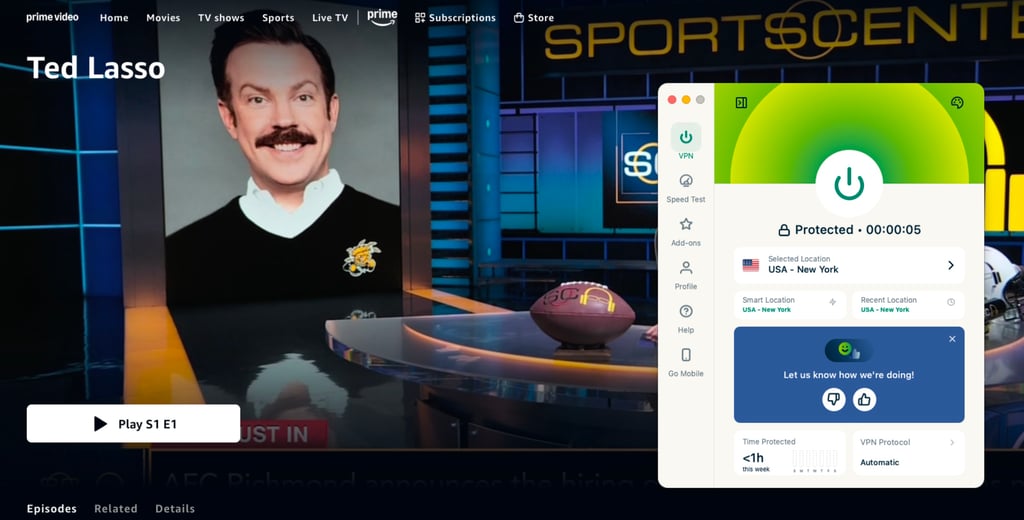
The ExpressVPN app is super easy to use, and you can set it up on almost any device. If your console or streaming device doesn’t support VPNs natively, you can use the MediaStreamer feature. It allows you to access geo-blocked Amazon Prime libraries on your big screen. Buffering and lagging won’t be an issue either, thanks to the speedy Lightway tunneling protocol. During our tests, the speed was very similar to Proton VPN. The average download speed stayed at 762Mbps, retaining 81% of our baseline speed.
The majority of the servers are obfuscated, so facing the Amazon VPN block is very unlikely. Additionally, with Threat Manager, you won’t have to worry about intrusive ads, annoying trackers, or scary viruses bothering you. And while ExpressVPN only offers 14 simultaneous connections, you can essentially get infinite connections if you set up the VPN on your router.
You can get ExpressVPN, a beginner-friendly Amazon Prime Video VPN, for $2.99/month, which comes with a 30-day money-back guarantee. We believe that it’s a perfect choice for anyone who is new to such services and is looking for reliable yet simple-to-use Amazon Prime Video VPNs.
5. IPVanish – VPN for Amazon Prime with specialized servers
![IPVanish mobile logo [IN USE]](https://media.vpnpro.com/images/170x89/IPVanish.jpg)
3200
No
270 Mbps
-
US servers in 20 locations
-
Provides obfuscation
-
User-friendly interface
-
Not many security features
Finally, IPVanish also made the list as the best VPN for Amazon Prime Video since it reliably unblocks different content libraries and offers unlimited connections, meaning that you can stream Prime Video on multiple devices at once. With IPVanish, you can connect to 3200+ servers in 113 countries, which also includes US servers in 20 locations. When we tested IPVanish for Amazon Prime Video, we had no issues accessing its US library, but we had to reconnect a few times to make it work with the UK.
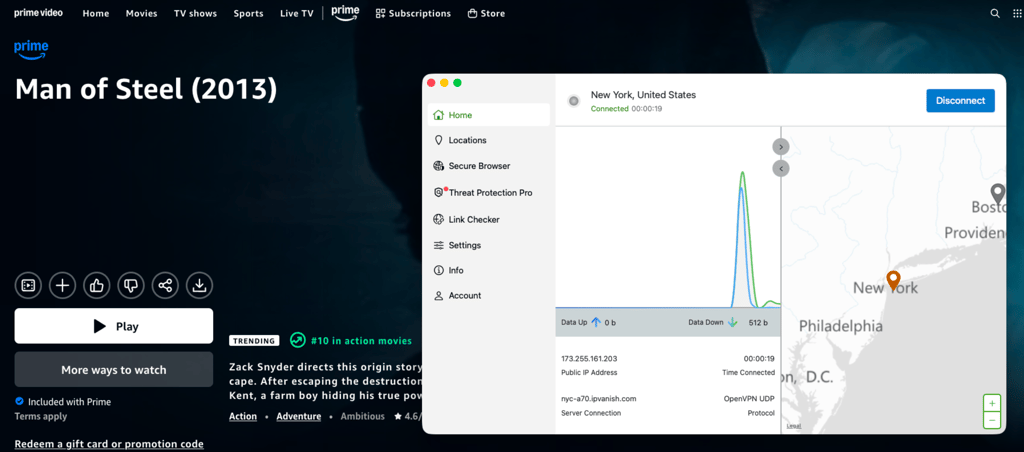
You will be able to stream Amazon Prime Video on various devices with IPVanish as it doesn’t limit simultaneous connections and is compatible with all major OS. This includes not only computers and phones, but also various smart TVs, consoles, and routers. However, it is important to note that even with the WireGuard protocol, IPVanish proved to be the slowest Amazon Prime VPN. The average download speed was 699Mbps, retaining 75% of our original speed.
Nonetheless, while IPVanish doesn’t offer too many additional features, you’ll still stay private while streaming Amazon Prime. Using the Threat Protection feature, you’ll be protected from any malicious ads and trackers online. There’s also a Kill Switch feature, which will secure your data in case you experience any VPN disruptions. Besides, IPVanish’s Scramble feature provides obfuscation, so it will be harder for Amazon Prime Video to track that you’re using a VPN.
IPVanish is a good VPN for Amazon Prime Video, which you can currently get for only $2.19/month, or use the 7-day free trial and the 30-day money-back guarantee. While it’s not as fast as other Prime Video VPNs, IPVanish is a reliable, simple-to-use, and unlimited devices option that you can get for a very low price.
Best free VPN for Amazon Prime
Based on my tests, completely free Amazon Prime VPNs are unsuitable for changing your location or bypassing the Prime Video VPN ban. That’s because these no-pay services have very few IP addresses, and most of them are already blacklisted.
Additionally, free VPNs are slow, unreliable, and even malicious in some cases.
Suppose you don’t want to pay, but crave some new content. In that case, a better alternative is utilizing a free trial VPN for Amazon Video. For a limited time, you won’t have to worry about bans, shoddy connectivity, or various threats. A free trial VPN will help you punch through geo-blocks and give you access to content you have always dreamed of.
How to watch Amazon Prime with a VPN: detailed guide
To access your favorite Amazon Prime Video library from anywhere, all you have to do is use a VPN service. Here are detailed steps on how you can watch Amazon Prime with a VPN:
Step 1. Subscribe to a reliable VPN provider
To watch Amazon Prime from anywhere, be sure to choose a reliable streaming VPN that has many servers worldwide. We recommend NordVPN, which has proven to be the best Amazon Prime Video VPN because of its reliable geo-restriction unblocking, fast speeds, and extra security features.
Step 2. Download and install the VPN app
Once you have a subscription, download and install the VPN app on your device. Most providers offer native apps for all major OS, including Windows, macOS, Android, iOS, Fire TV, and Android TV. You can download it from the official provider’s website, the Google Play Store, or the Apple App Store, depending on your device.
Step 3. Connect to a VPN server
To change your virtual location, you should now log in to your VPN account and connect to a server in a country whose Amazon Prime Video library you want to reach. For example, if you want to access American Amazon Prime while being outside of the country, you should connect to a server in the US.
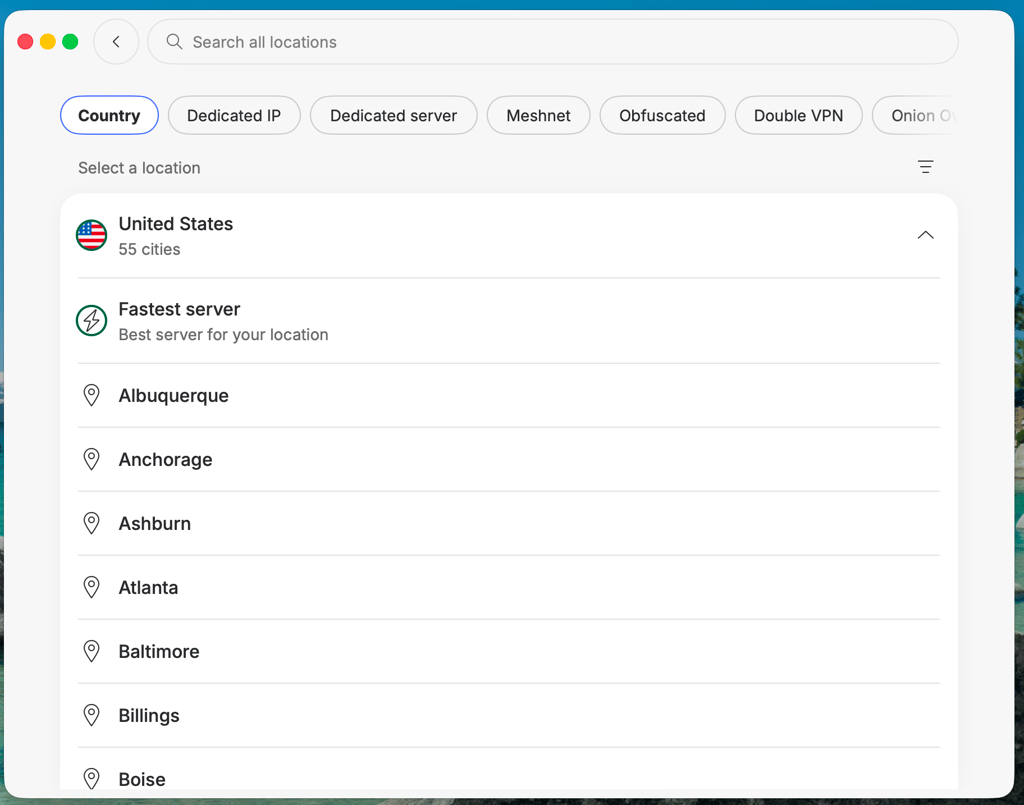
Step 4. Clear cache and cookies
Before streaming content, you should also clear your cache and cookies, as it is possible that your real location is already tracked. If you’re using a browser to stream Amazon Prime Video, you can clear your cache and cookies via the browser’s settings. If you’re using an app on your phone, you should go to your settings, then applications, select the Prime Video app, and clear its data.
Step 5. Watch Amazon Prime Video from anywhere
After you successfully connected to the VPN server in your desired location, you can now go to Amazon Prime Video, log in to your account, and stream content from anywhere without restrictions. However, be sure to visit the right domain address that matches your server location.
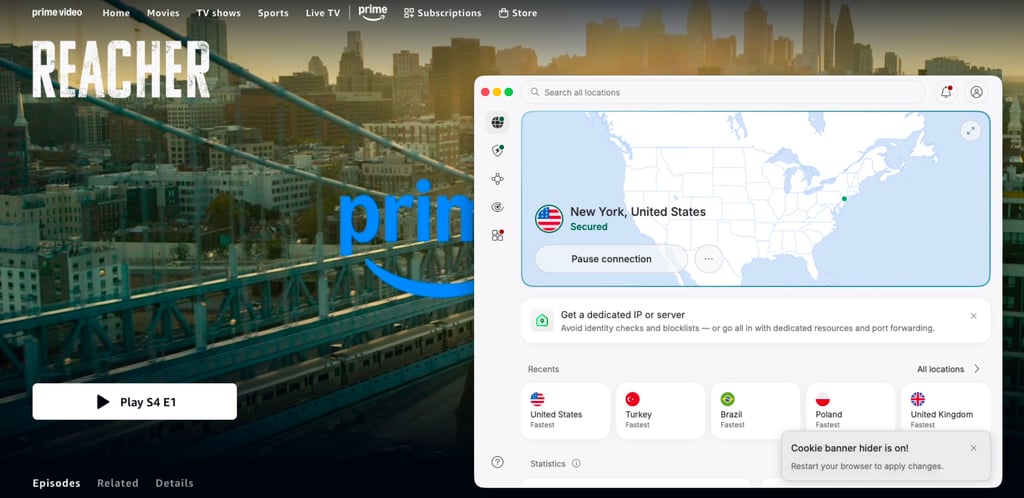
Amazon Prime blocking VPN: troubleshooting steps
Amazon Prime Video uses advanced detection systems, which help it to detect and block IP addresses related to VPN services. It’s also possible that your Amazon Prime VPN is not working due to connectivity issues, which might lead to you being unable to enjoy content. If that happens, here are a few easy fixes that you can try:
- Switch to a different VPN server. It is possible that the specific IP address that you’re connected to is already blocked by Amazon Prime. To solve this, simply reconnect to the same server or choose a server in a different city to get a new IP address.
- Clear cache and cookies. Amazon Prime Video might have already tracked your real location. To avoid this, be sure to clear your cache and cookies via your browser’s or device’s settings.
- Change the connection protocol. In case you’re experiencing slow speed or any connection issues with your VPN, it’s always smart to try using a different protocol. For the most stability and better speeds, try using WireGuard, if possible.
- Change Amazon Prime’s region settings. If a VPN alone cannot help you unlock your favorite Amazon Prime Video library, you should change your account’s region settings. To do so, go to Preferences, find country/region settings, and change it to the country you are trying to reach.
Why do you need a VPN for Amazon Prime Video?
You need a VPN for Amazon Prime Video to bypass geo-blocks. Amazon Video has to restrict access to content in certain countries. That is due to copyright laws and broadcasting agreements. Luckily, by changing your location, the best VPNs can quickly punch through these blocks. Thus, you’ll finally get to watch previously blocked movies and shows.

Furthermore, Prime Video VPN can prevent constant lagging and endless loading screens. Streaming requires a lot of data, so your Internet Service Provider (ISP) might throttle your bandwidth and slow you down. Thankfully, a streaming VPN can make it harder for the ISP to detect and throttle your connection, which can result in a smoother streaming experience.
What to watch on Amazon Prime Video in 2026
Amazon Prime Video has the biggest content database of all streaming websites. Therefore, it comes as no surprise that there are plenty of movies and TV shows worth your time.

Deciding what to watch, however, can be quite the mental exercise. Thus, here are some of the most coveted titles, including new series and classics to rewatch:
| Title | Seasons available on Prime Video |
| Reacher (2022 – present) | 4 season |
| Young Sherlock (2026) | 1 seasons |
| The Terminal List: Dark Wolf (2025 – present) | 1 seasons |
| Hazbin Hotel (2024 – present) | 2 season |
| Ballard (2025) | 1 seasons |
| Elle (2026) | 1 seasons |
Some of these shows might be unavailable in your area due to geo-blocks. Therefore, we highly recommend using a reputable VPN that works with Amazon Prime. Best of the bunch is NordVPN.
Final tips for streaming Amazon Prime with a VPN
While Amazon Prime Video is available in over 200 countries, it is geo-restricted, meaning that its content varies country by country. If you want to watch your favorite movies and series that are unavailable in your region, the only way to do that is by using a reliable streaming VPN.
After testing over 20 providers, we found that NordVPN is the best Amazon Prime Video VPN in 2026 as it successfully unlocked different content libraries and delivered the fastest speeds, ensuring a smooth streaming experience. Besides, it offers advanced security measures, such as obfuscation, DNS leak protection, and a no-logs policy, which means that your privacy will stay secure while watching Amazon Prime Video from anywhere.

![Surfshark weekly deals logo [IN USE]](https://media.vpnpro.com/surfshark-weekly-deals.svg)
![Proton VPN winner logo [IN USE]](https://media.vpnpro.com/2025/05/protonvpn-winner.png)
You may also like to read:
Best VPN for Hulu
Best VPN for Netflix
Best VPN for MLB.tv
Best VPN for Disney+
Best VPN for Spectrum
Best VPN for HBO Max
FAQ
Can a VPN change your Amazon Prime Video region?
Yes, a VPN can change your Amazon Prime Video region. By connecting to a VPN server, your IP address will be changed, meaning that it should allow you to access different Amazon Prime libraries that offer different content. If you’re interested in finding new series and movies, the best Amazon Prime Video VPN regions are the US, UK, Canada, and Japan.
Why is my Amazon Prime VPN not working?
Your Amazon Prime VPN might not be working, as it is possible that it’s already blocked. Amazon Prime Video uses detection systems that make it easy to block IP addresses that are tied to VPN services. To avoid this, try using a different VPN server and clearing your browser’s cache and cookies.
Does Amazon Prime block VPNs?
Yes, Amazon Prime blocks VPNs. Amazon Prime geo-restricts its content due to licensing agreements. To ensure that people are not bypassing these restrictions, it uses strict detection systems to block VPN connections. If you want to watch Amazon Prime Video from anywhere, you should choose a truly reliable VPN provider, such as NordVPN.
How do I fix Amazon Prime Video error 1042 with a VPN?
To fix Amazon Prime Video error 1042 with a VPN, you should try using a different IP address. The 1042 error means that Amazon Prime has detected your VPN. To solve it, connect to a different server, change your VPN protocol, and clear your browser’s cache and cookies.
How does Amazon Prime VPN detection work?
Amazon Prime VPN detection works by monitoring known data centers and blocking IP addresses that are linked to VPN services. It can also block the connection if your virtual location doesn’t match your Amazon Prime Video region settings. To avoid such issues, be sure to choose a VPN that has servers worldwide and offers obfuscation for extra privacy.
How to bypass Prime Video VPN block?
To bypass the Prime Video VPN block, connect to a different VPN server to get a new IP address, as the previous one might already be blocked. You should also clear your cache and cookies in case your true location was already tracked. If possible, you should also use obfuscated servers, as they will be harder for Amazon Prime Video to detect.
Does VPN still work with Amazon Prime Video in 2026?
Yes, VPN still work with Amazon Prime Video in 2026, but it’s important to choose a truly reliable provider, such as NordVPN. NordVPN has proven to work very well with Amazon Prime Video as it successfully bypasses geo-restrictions, delivers fast speeds, and offers a wide selection of servers worldwide. It also offers obfuscated servers, which will make it harder for Amazon Prime to detect the VPN connection.
What is the best VPN to watch Amazon Prime?
The best VPN to watch Amazon Prime is NordVPN. NordVPN has a 100% success rate in unblocking different Amazon Prime Video libraries. It’s also the fastest VPN for streaming, ensuring a smooth and uninterrupted experience. It will not only allow you to watch Amazon Prime Video from anywhere, but also do it privately with NordVPN’s advanced security features.
How do I fix ExpressVPN not working with Amazon Prime Video?
If you’re connected to an ExpressVPN server and Amazon Prime Video is still not working, you should first try connecting to a different server. If the previous IP address was already blocked, by connecting to a different server, you’ll get a new IP address. Before visiting Amazon Prime again, be sure to clear your browser’s cache and cookies.


